The following examples demonstrate running a StackQL query against a cloud or SaaS provider and returning the results as a pandas.DataFrame.
For brevity, the examples below assume that the appropriate imports have been specified and that an instance of the :class:`pystackql.StackQL` has been instantiated with the appropriate provider authentication.
For more information, see :ref:`auth-overview` and the StackQL provider docs.
Table of Contents
from pystackql import StackQL
import pandas as pd
stackql = StackQL()StackQL provider definitions are extensions of the provider's OpenAPI specification, which exposes all of the provider's services, resources, and operations - making them accessible using SQL grammar.
StackQL allows you to explore the provider's metadata using the SHOW and DESCRIBE commands as demonstrated here.
query = "SHOW SERVICES in aws"
df = pd.read_json(stackql.execute(query))
print(df)
query = "SHOW RESOURCES in azure.compute"
df = pd.read_json(stackql.execute(query))
print(df)query = "DESCRIBE EXTENDED google.compute.instances"
df = pd.read_json(stackql.execute(query))
print(df)StackQL can be used to collect, analyze, summarize, and report on cloud resource inventory data. The following example shows how to query the AWS EC2 inventory and return the number of instances by instance type.
regions = ["ap-southeast-2", "us-east-1"]
queries = [
    f"""
    SELECT '{region}' as region, instance_type, COUNT(*) as num_instances
    FROM aws.ec2.instances
    WHERE region = '{region}'
    GROUP BY instance_type
    """
    for region in regions
]

res = stackql.executeQueriesAsync(queries)
df = pd.read_json(json.dumps(res))
print(df):mod:`pystackql` can be used with pandas and matplotlib to create visualizations of the data returned by StackQL queries. Typically, this would be done in a Jupyter notebook. The following code can be used to generate a bar chart using :mod:`pystackql`, pandas and matplotlib:
org = "my-okta-org"
query = """
SELECT status, COUNT(*) as num
FROM okta.user.users
WHERE subdomain = '%s'
GROUP BY status
""" % (org)

res = stackql.execute(query)
df = pd.read_json(res)
df.plot(kind='bar', title='User Status', x='status', y='num')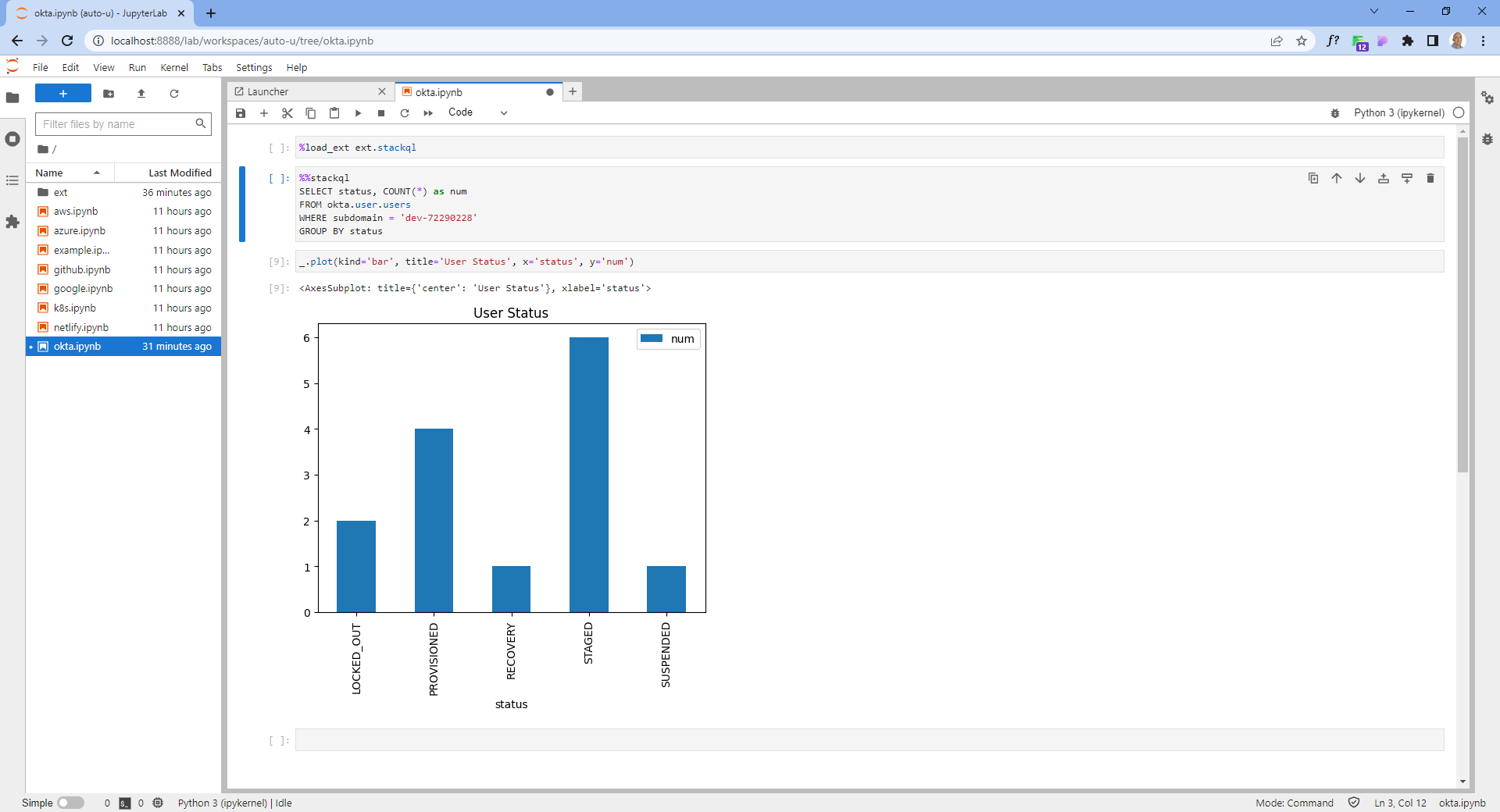
StackQL can perform point-in-time or interactive queries against cloud resources to determine if they comply with your organization's security policies. This is an example of a CSPM query to find buckets with public access enabled in a Google project.
project = "stackql-demo"
query = """
SELECT name,
JSON_EXTRACT(iamConfiguration, '$.publicAccessPrevention') as publicAccessPrevention
FROM  google.storage.buckets
WHERE project = '%s'
""" % (project)

res = stackql.execute(query)
df = pd.read_json(res)
print(df)StackQL can be used to run queries across multiple cloud providers, this can be useful for cross cloud reporting or analysis. StackQL supports standard SQL set-based operators, including UNION and JOIN. Here is an example of a UNION operation between AWS and GCP.
project = "stackql-demo"
gcp_zone = "australia-southeast1-a"
region = "ap-southeast-2"
google_query = f"""
    select
    'google' as vendor,
    name,
    split_part(split_part(type, '/', 11), '-', 2) as type,
    status,
    sizeGb as size
    from google.compute.disks
    where project = '{project}'
    and zone = '{gcp_zone}'
"""
aws_query = f"""
    select
    'aws' as vendor,
    volumeId as name,
    volumeType as type,
    status,
    size
    from aws.ec2.volumes
    where region = '{region}'
"""
res = stackql.executeQueriesAsync([google_query, aws_query])
df = pd.read_json(json.dumps(res))
print(df)StackQL can be used as an Infrastructure-as-Code solution to deploy cloud resources using the INSERT command. Here is an example of deploying a 10GB disk in GCP. Note that INSERT operations do not return a dataset, so the :meth:`pystackql.StackQL.executeStmt` is used in this case.
project = "stackql-demo"
gcp_zone = "australia-southeast1-a"
query = """
INSERT INTO google.compute.disks (project, zone, name, sizeGb)
SELECT '%s',
'%s',
'test10gbdisk', 10;
""" % (project, gcp_zone)

res = stackql.executeStmt(query)
print(res)
DELETE and UPDATE operations are also supported.
Note
By default StackQL provider mutation operations are asynchronous (non-blocking), you can make them synchronous by using the /*+ AWAIT */ query hint, for example:
INSERT /*+ AWAIT */ INTO google.compute.disks (project, zone, name, sizeGb)
SELECT 'stackql-demo',
'australia-southeast1-a',
'test10gbdisk', 10;
In addition to query, reporting, and analysis operations using SELECT and mutation operations using INSERT, UPDATE, and DELETE, StackQL can also be used to perform lifecycle operations on cloud resources using the EXEC command. An example of a lifecycle operation is to start a GCP instance.
project = "stackql-demo"
gcp_zone = "australia-southeast1-a"
query = """
EXEC compute.instances.start
@instance = 'demo-instance-1',
@project = '%s',
@zone = '%s';
""" % (project, gcp_zone)

res = stackql.executeStmt(query)
print(res)
To make the lifecycle operation synchronous (blocking), use the /*+ AWAIT */ query hint, for example:
project = "stackql-demo"
gcp_zone = "australia-southeast1-a"
query = """
EXEC /*+ AWAIT  */ compute.instances.start
@instance = 'demo-instance-1',
@project = '%s',
@zone = '%s';
""" % (project, gcp_zone)

res = stackql.executeStmt(query)
print(res)Using StackQL in a Jupyter Notebook provides a seamless way to execute and visualize your queries. You can make use of Jupyter's line and cell magics to run your StackQL commands directly within notebook cells.
To get started, you'd first load the StackQL magic extension:
%load_ext pystackql
Once loaded, you can run StackQL commands as either line or cell magics. Here are some of the previous examples rendered in a Jupyter-like style:
%%stackql
SHOW SERVICES in aws
%%stackql
SHOW RESOURCES in azure.compute
%%stackql
DESCRIBE EXTENDED google.compute.instances