Below we will describe the necessary tools and procedures to follow.
Before that, we'll remind you that at the moment we are an unofficial translation fan team, we do not ask for donations or expect any payment. In the event of you receive any donations or payment, it will be only through the developers of the mod/game.
Follow the Discord community rules and follow the order for translations, we make decisions together, full disclosure!
- Download and install OmegaT:
- Download and install Okapi Filters plugin for OmegaT:
https://okapiframework.org/binaries/omegat-plugin/
Download the most recent version and install the plugin by extracting the file and moving the .jar file to OmegaT's plugin folder, which should be in C:/Program Files/OmegaT/plugins if you didn't change anything.
This will allow OmegaT to read the .json files we'll be translating.
- Download and install TexTra plugin for OmegaT:
https://codeberg.org/miurahr/omegat-textra-plugin/releases
Same procedure as above, but this time you must sign up on this website:
https://mt-auto-minhon-mlt.ucri.jgn-x.jp/
And then look for this: Dialogue - NT (For Speech Translation Engine Only) 【English - Brazilian Portuguese】 and click the ( i ) button.
Then add the Textra Machine Translation API to OmegaT by following these steps or the guide:
-
Options > Preferences > Machine Translation
-
Click on "TexTra Powered by NICT" and then "Configure"
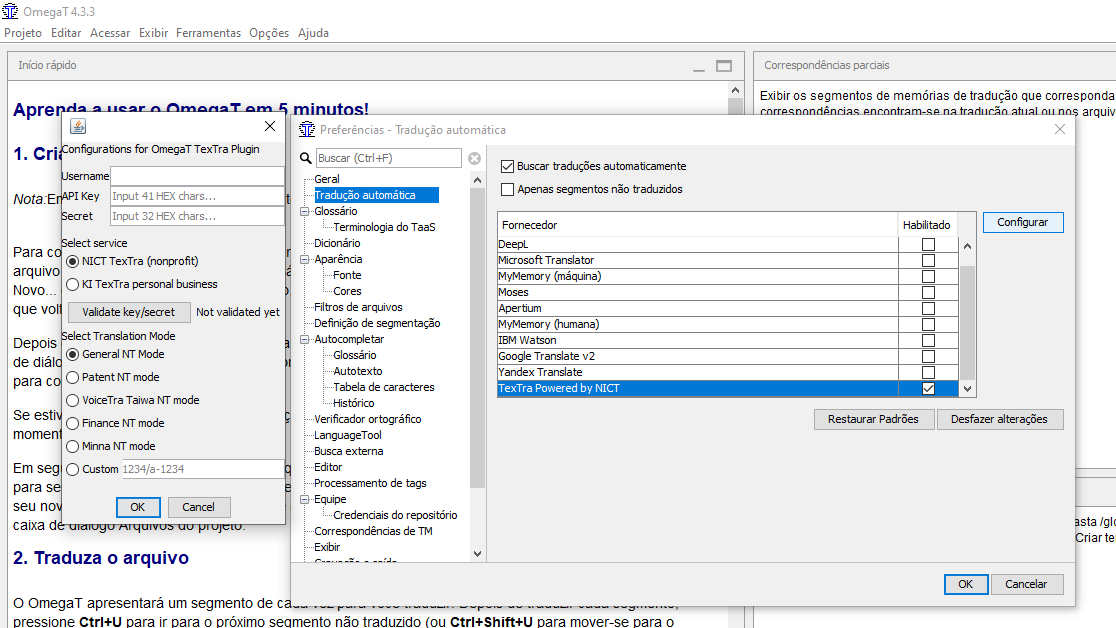
-
"Username" should be the username you used to sign up before (lowercase), and the API Key and Secret can be found after clicking the ( i ) button described above, then click "ok".
Guide:
https://github.com/miurahr/omegat-textra-plugin/wiki/Usage
This will allow OmegaT to automatically give you machine translated text for every segment in the file you're currently translating.
- Configure OmegaT to your liking, and read through the documentation:
https://omegat.sourceforge.io/manual-standard/en/index.html#__sethome
- Learn about Git and Github, specifically about commits, pushing, pulling and cloning repositories:
- Ask to be added to the Trello Board:
https://trello.com/b/52fRML9x/com-archolos-tradu%C3%A7%C3%A3o-pt-br
- Talk to other members if you have any questions!
Tips:
-
This is a neutral and serious translation, so please don't use expressions with cultural character like "HUEHUEHUHEUHE".
-
Don't waste time with details, focus on finishing, but remember to be careful. We have over 600k words to go through!
-
Try to write good commit messages, you might know what "change some things" means, but other people won't!
-
Remember to save your work constantly, just press ctrl + s!