Agent-driven · Persistent · Source-grounded







English · 简体中文 · 日本語 · Español · Português (Brasil) · Français · Русский
lwc is an agent-driven proactive memory CLI for AI agents. It lets Agents
autonomously recall, maintain, and evolve persistent, source-grounded knowledge
across sessions.
Works with Claude Code, Codex, Cursor, OpenCode, Gemini CLI, Kiro, Hermes, Antigravity, and pi.
LWC turns curated documents into a durable Wiki. Agents reason and synthesize;
lwc preserves sources, pages, citations, links, indexes, and history so
knowledge compounds instead of being rediscovered from raw chunks on every
query.
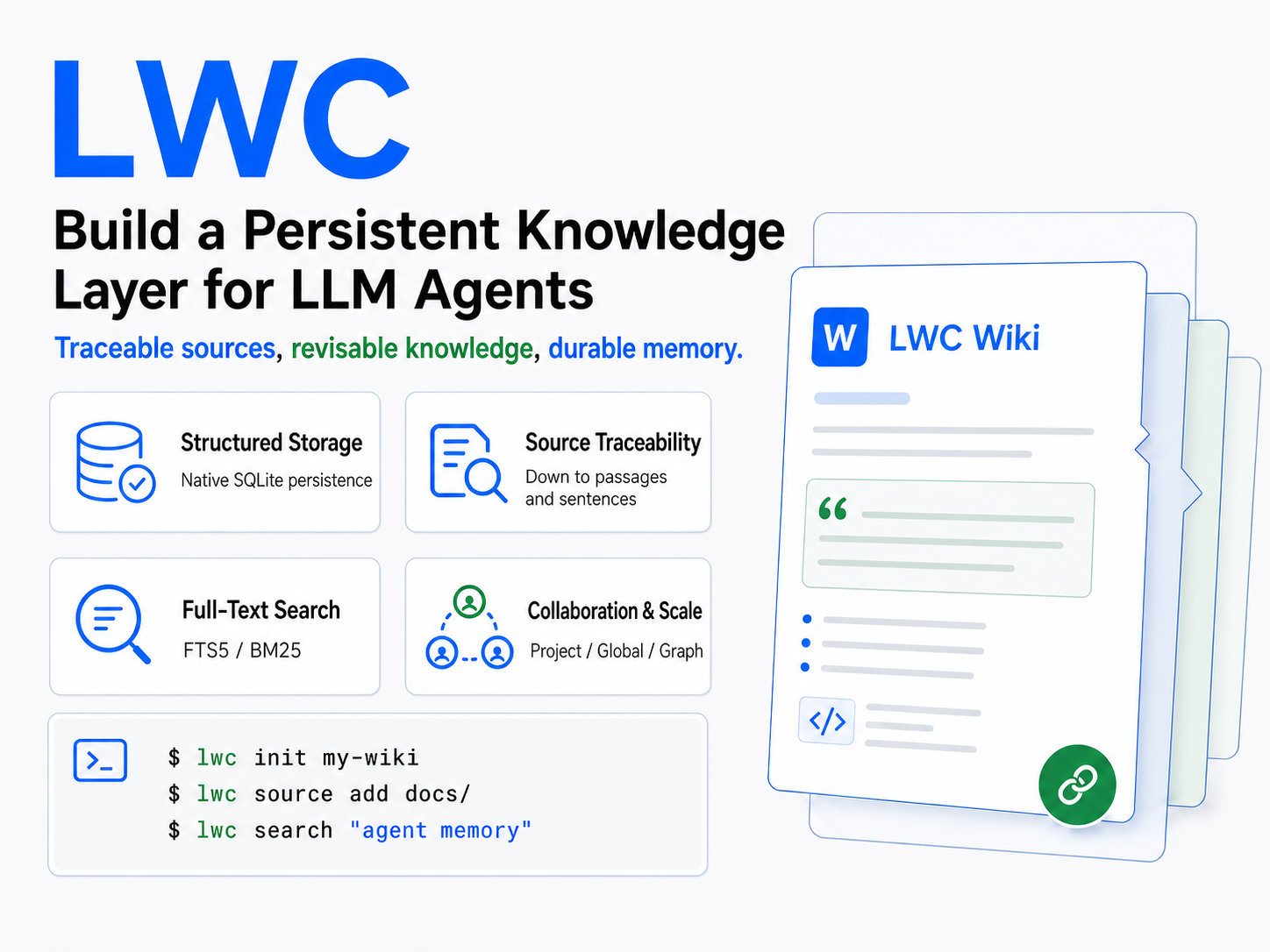
RAG and LWC can both help an LLM work with external documents, but they keep state in different places. A typical RAG request retrieves raw chunks and builds one answer at query time:
query -> retrieve chunks -> generate answer
LWC keeps the useful work between requests:
task -> recall maintained Wiki -> reason from sources and prior synthesis
     -> write durable improvements back
Retrieval is one operation inside LWC, not its organizing principle. The durable artifact is a source-grounded Wiki whose pages, citations, links, contradictions, and history are revised as knowledge changes. LWC therefore does not require embeddings or a vector database, and it does not discard each synthesis after answering. It can complement RAG, but it is not query-time RAG.
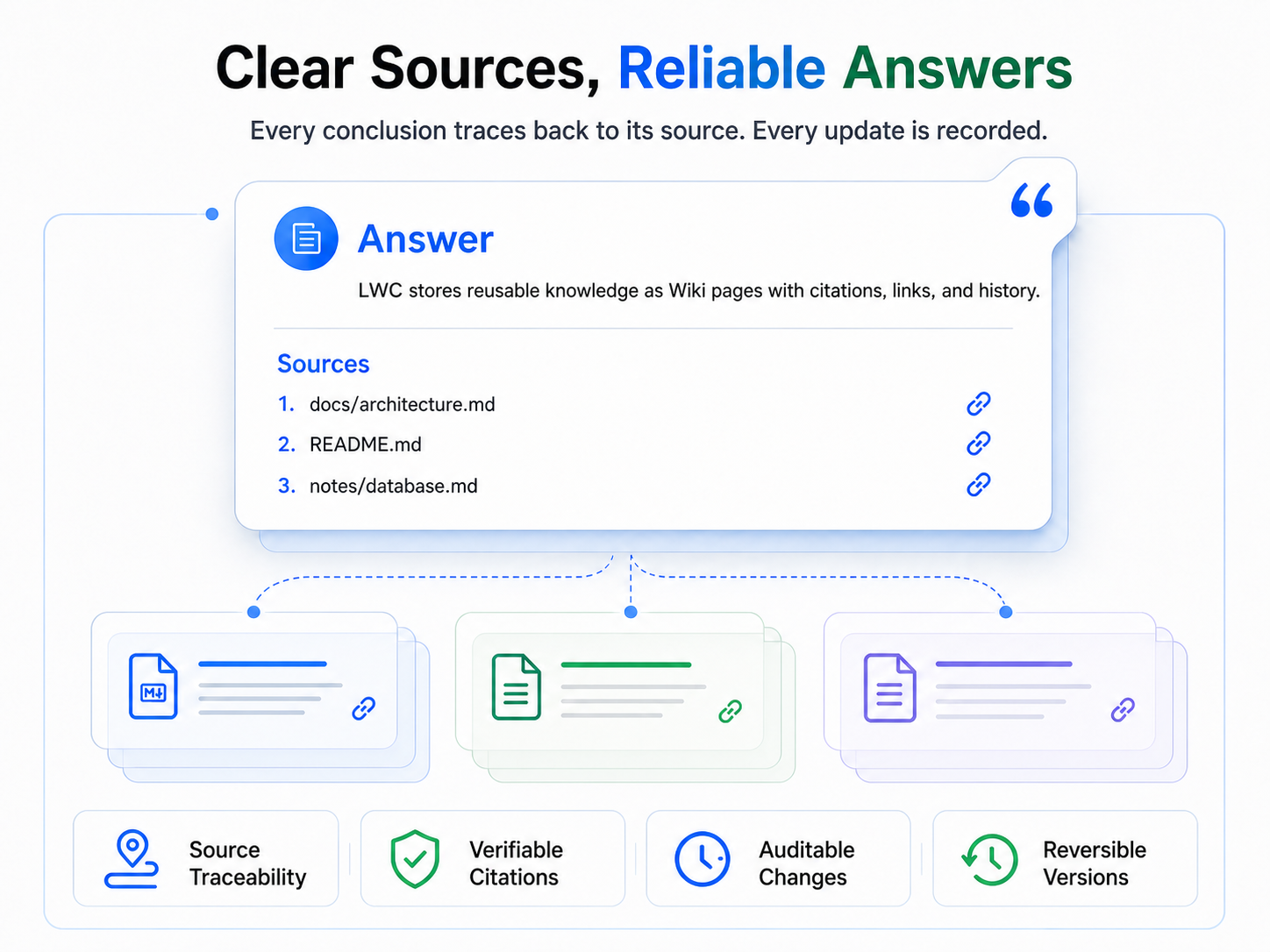
lwc is a machine interface for Agents, not a human-facing note-taking app. In
normal use, a human selects sources, states goals, asks questions, and reviews
answers or the projected Markdown. The Agent runs the CLI, manages scope,
integrates sources, maintains citations and links, and decides what is worth
recalling or writing back.
Do not manually drive the routine lwc workflow unless you are developing or
debugging the tool. Ask your Agent to activate the bundled canonical
using-lwc Skill instead—usually as $using-lwc.
Paste this prompt into the Agent you use. It installs the global CLI, delegates all supported host configuration to LWC's idempotent AgentTarget installer, and uses native self-configuration only for an unregistered Agent.
Copy the complete setup prompt
Configure LWC completely for this user. Perform and verify the work; do not
merely describe commands for me to run.

Source of truth:
- https://github.com/JanYork/llm-wiki-cli
- https://github.com/JanYork/llm-wiki-cli/tree/main/skills/using-lwc

Requirements:
1. Read this README, `SECURITY.md`, and `skills/using-lwc/SKILL.md`. Install the
   official checksum-verified release if `lwc` is not globally callable; never
   prefix routine commands with a private binary path or `LWC_PROJECT_ROOT`.
2. Run `lwc --version`, initialize global memory once with
   `lwc --scope global init` when missing, then run `lwc agent install --yes`.
   This command detects installed supported Agents and safely installs their
   MCP, Skill, Hook and Instructions using official locations. Do not recreate
   that logic manually or install a native package for the same Agent as well.
3. Inspect `lwc agent status --target all --location global`. Restart affected
   Agents and complete their normal Hook trust review where required. Do not
   initialize a project Wiki or either graph without explicit project consent.
4. If the current runtime is not one of LWC's registered AgentTargets, use its
   official user-level conventions to install the canonical `using-lwc` Skill,
   an additive instruction block, `lwc serve --mcp`, and a bounded session Hook
   only where those surfaces are officially supported. Preserve existing
   configuration, remain idempotent, and report unsupported surfaces instead of
   inventing paths or keys.

Finish with the LWC version, detected and configured Targets, status results,
files changed, unsupported surfaces, and any restart or trust action remaining.
lwc implements the LLM Wiki
pattern proposed by Andrej Karpathy: an LLM incrementally builds and maintains a
persistent, interlinked Wiki instead of reconstructing knowledge from raw
documents for every query. The CLI architecture and selected implementation
details also draw inspiration from
nashsu/llm_wiki.
This project adapts those ideas into an agent-first Rust CLI backed by SQLite.
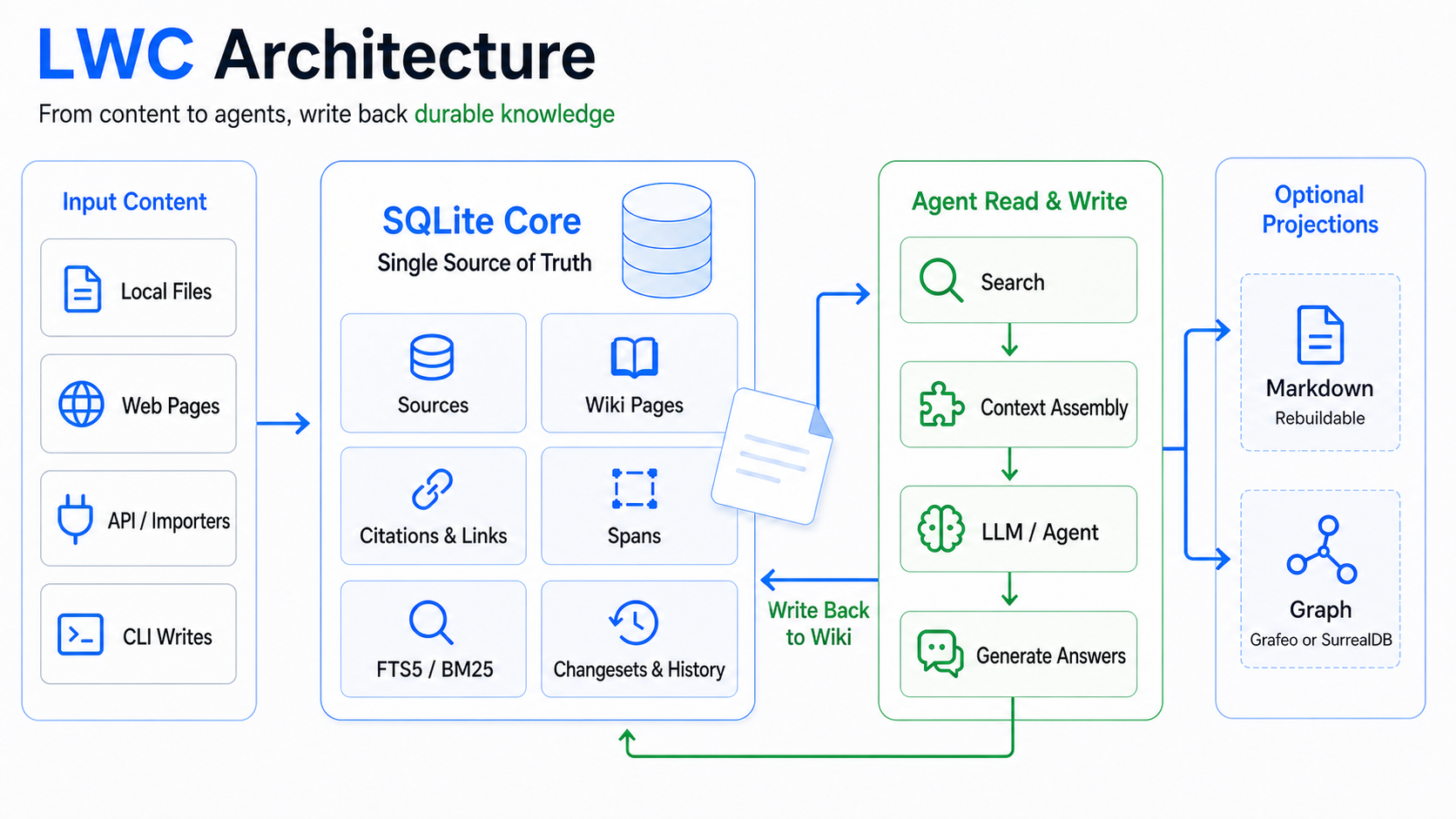
LWC keeps four distinct layers so durable knowledge stays traceable:
| Layer | Purpose |
|---|---|
| Raw sources | Immutable snapshots of curated evidence |
| Wiki | Agent-maintained pages, citations, links, and provenance |
| Temporal memory | Compact records of changes, decisions, outcomes, and unresolved work |
| Schema and purpose | Project-specific rules that guide future maintenance |
SQLite is canonical. Markdown, full-text indexes, and optional graph stores are rebuildable projections. Agents update knowledge through the CLI; successful operations return structured JSON that can be audited and resumed.
Read the architecture overview →
LWC indexes Sources and Wiki pages at document, passage, and sentence levels. Agents can start with a small answer-shaped context, expand the exact span only when necessary, and detect stale locators after content changes.
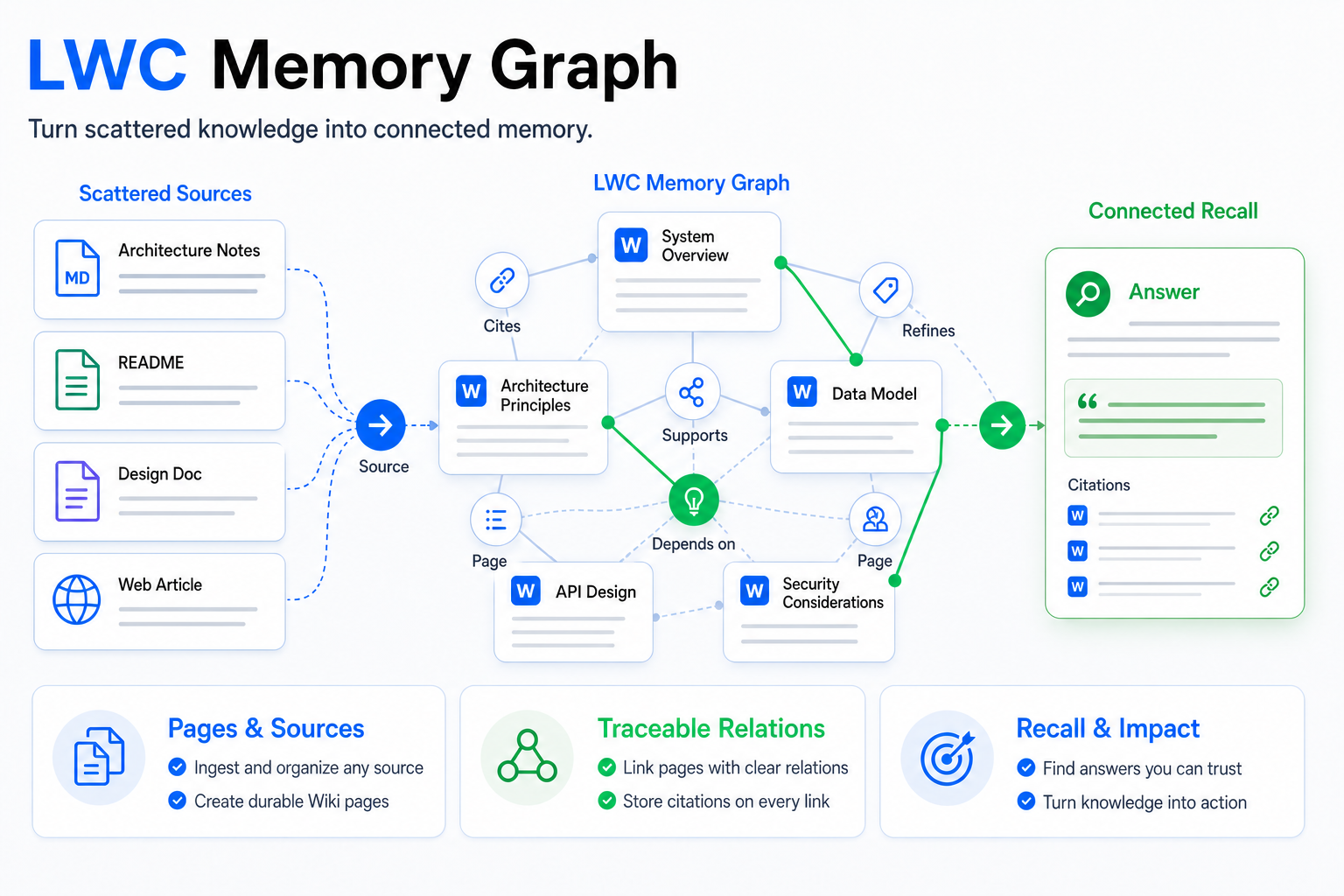
The optional document graph connects pages, sources, citations, links, and explicit semantic relations. SQLite remains authoritative, while Grafeo or SurrealDB provides a rebuildable traversal layer. Explicit relations keep their reason, provenance, confidence, and source evidence.
Optional Anydoc or MarkItDown adapters convert supported local files into reviewable Markdown before ingestion. OfficeCLI provides a separate, consent-based, read-only path for Word, Excel, and PowerPoint files. Neither capability is silently installed or enabled, and source Office files are never modified.
Explore retrieval and indexing → · Document graph → · Document conversion →
Tutor, Book, and Practice are independent first-party capabilities, disabled by default and backed by separate private stores:
- Tutor keeps teaching turns, learner evidence, goals, plans, and a private Soul/Wiki.
- Book imports supported books in verified source order for complete, grounded reading.
- Practice keeps versioned question banks, papers, attempts, grading, flashcards, and FSRS review state.
Each runtime is downloaded lazily, pinned to the LWC version, and verified by checksum. Disabling a capability preserves its canonical data. Agent Skills handle recovery and persistence without exposing routine bookkeeping to the learner.
Read the Learning Suite contracts →
Most users need only one package command:
npm install --global @i-xor/lwc
Homebrew, crates.io, checksum-verified GitHub releases, and local Cargo builds are also supported.
Installation and upgrade guide →
The bundled using-lwc Skill turns LWC into a proactive memory layer. It recalls bounded context, keeps project and global knowledge separate, integrates sources, preserves citations, and writes back only verified knowledge worth reusing.
Install it from skills.sh:
npx skills add JanYork/llm-wiki-cli --skill using-lwc -g
The canonical trigger is $using-lwc. The Skill is runtime-neutral
and includes focused guidance for memory, document graphs, Word Graph,
CodeGraph, strong tags, conversion, onboarding, recovery, and maintenance.
LWC detects supported Agents and installs their available MCP, Skill, Hook, and Instructions surfaces through idempotent AgentTarget adapters:
lwc agent install --yes
The unified read-only MCP exposes bounded Wiki memory and optional code context without widening the active workspace. Supported hosts include Claude Code, Codex, Cursor, OpenCode, Gemini CLI, Kiro, Hermes, Antigravity, and pi.
Graph capabilities remain consent-aware: document relationships require the physical graph, code-structure tasks require CodeGraph, and neither is enabled merely because its runtime exists. Office reading follows the same explicit consent boundary.
Humans normally describe the goal and review the result; the Agent operates the CLI. The complete walkthrough lives in the Quick Start Wiki page.
The Agent creates a project-local Wiki and defines its purpose and maintenance rules. Project state is excluded locally from Git unless versioning it was an explicit choice.
Curated files become immutable, deduplicated snapshots. LWC tracks their live paths and can report whether the current file is unchanged, modified, missing, or superseded.
The Agent reads the complete bounded source, writes a cited source summary, updates shared knowledge, and completes the ingest only after both layers are consistent.
Search is page-first and source-grounded. Agents retrieve maintained answers first, then open exact source evidence when a claim needs verification.
The normal loop is short:
- Recall relevant maintained knowledge.
- Inspect current sources or code when freshness matters.
- Make the smallest verified update.
- Validate retrieval, links, and applicable graph projections.
Broad revisions use an atomic changeset. See the full Agent workflow for trust boundaries, preconditions, recovery, and completion evidence.
Temporal memory records compact events about what changed, why a decision was made, what was tried, the outcome, and what remains unresolved. It complements the Wiki: temporal recall explains history; the Wiki represents current stable knowledge.
Retention is bounded and protects pinned, unresolved, and open contradiction records. Events are normalized rather than stored as raw chat transcripts, and similar events are never silently merged.
Sync reconciles project memory, global memory, or both over SSH while keeping semantic Wiki state separate from Git publication. Merge preserves unique objects from both sides; conflicts are returned as bounded packets for explicit resolution.
Sessions are durable and resumable. LWC never copies live SQLite database, WAL, or SHM files, never resets the working tree, and keeps canonical publication separate from rebuildable search and graph projections.
Sync workflow and safety contract →
Changesets keep a multi-step knowledge update invisible until it has been reviewed and validated. Commit publishes only touched canonical entities in one transaction; unrelated live work survives, and same-entity revision conflicts fail closed.
A successful commit records an exact inverse patch for supported operations, enabling guarded rollback without replacing the whole Wiki.
| Scope | Use |
|---|---|
| project | Knowledge owned by the nearest project Wiki |
| global | Reusable knowledge shared across projects |
| all | Combined read-only recall and coordinated Sync |
Writes always target one explicit store. LWC never creates implicit cross-project citations or links.
Scopes and project discovery →
Search is lexical, deterministic, and page-first. It keeps title, path, summary, body, provenance, and graph evidence distinct; supports page/source/kind filters; and can explain the exact score arithmetic.
CJK text uses adjacent bigrams plus useful unigrams, while Latin text uses lowercased alphanumeric terms. This dictionary-free design remains stable for product names, code symbols, mixed-language text, and emerging vocabulary.
Auditable document weights capture durable importance. Query-specific feedback reranks only matching candidates and stores a fingerprint instead of the raw query. Neither mechanism can make unrelated content appear.
The local Viewer presents pages, sources, Markdown, document relationships, and code structure through a loopback-only, GET/HEAD interface. It performs no migration, refresh, or graph construction.
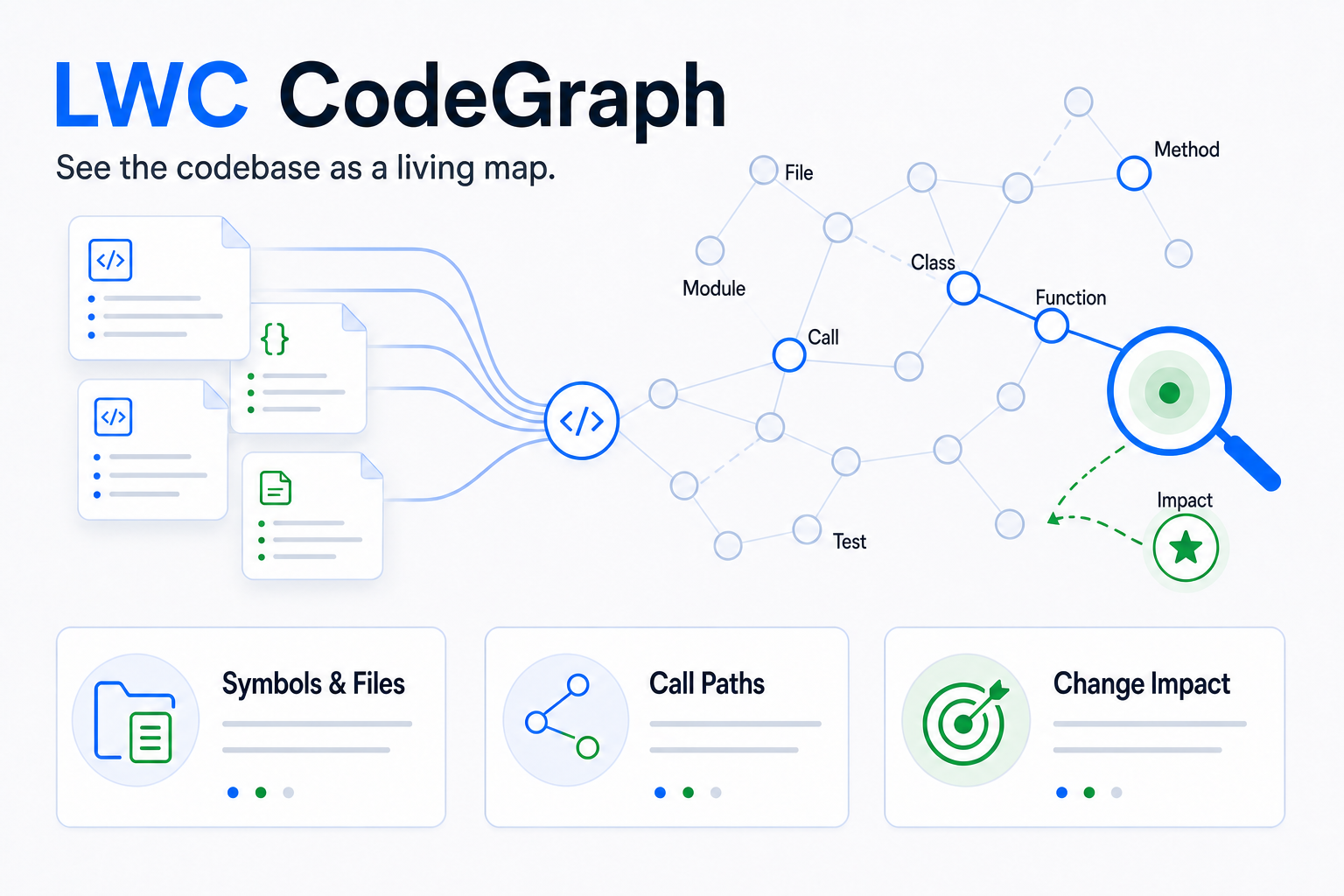
CodeGraph is project-only and explicitly initialized. It answers questions about symbols, callers, callees, dependencies, files, and impact while keeping telemetry disabled and graph writes atomic per owner file.
The pinned runtime recognizes TypeScript, TSX, JavaScript, JSX, ArkTS, Python, Go, Rust, Java, C, C++, C#, Razor, PHP, Ruby, Swift, Kotlin, Dart, Svelte, Vue, Astro, Liquid, Pascal, Scala, Lua, Luau, Objective-C, R, Solidity, Nix, YAML, Twig, XML, .properties, CFML, CFScript, CFQuery, COBOL, VB.NET, Erlang, and Terraform.
Viewer guide → · CodeGraph guide →
Lint, reindexing, Markdown materialization, compaction, checkpoints, and graph projection are explicit operations. Long-running work is durable, observable, resumable, and applied in bounded document units.
SQLite remains canonical throughout. Search indexes, Markdown, and graph stores can be rebuilt without rewriting source history or current Wiki knowledge.
The opt-in benchmark measures import time, search latency, Recall@5/10, MRR, and storage on a caller-supplied sanitized corpus. Fair comparisons fix the machine, corpus, query set, and run conditions, then compare repeated-run medians.
Todo stores deferred work; Plan stores the currently executing objective, ordered steps, progress, and revision. They are independent, opt-in capabilities and never convert into each other automatically.
Bounded lifecycle context lets an Agent recover the active plan and due reminders after session or compaction boundaries without exposing private details unnecessarily.
Current design constraints:
- single-machine, single-user knowledge base;
- UTF-8 text workflow;
- bounded input size of 64 MiB per schema, purpose, source, or page body;
- lexical search, not semantic vector retrieval.
Deliberate non-goals for this CLI:
- no built-in LLM calls;
- no vector database;
- no daemon or background service;
- no web UI or desktop UI;
- no direct database editing contract.
If the projected Markdown drifts, rebuild it. If the SQLite schema is wrong, fix it through the CLI and migrations, not by hand.
Issues and pull requests are welcome, especially around:
- agent workflow ergonomics;
- deterministic projection behavior;
- durable citation and page maintenance contracts;
- search quality for multilingual technical corpora.
Please read CONTRIBUTING.md before opening a pull request. Report security issues according to SECURITY.md.
Licensed under the Apache License 2.0.