



AMD MIVisionX is a computer vision toolkit built around a highly optimized, conformant open-source implementation of the Khronos OpenVX™ 1.3 specification. As of the 4.0.0 release, MIVisionX ships three components: the AMD OpenVX™ engine, the AMD RPP OpenVX extension, and the RunVX graph executor — across CPU, HIP, and OpenCL backends.
The OpenVX framework provides a mechanism for vendors to add new vision functionality. MIVisionX ships the following extension on top of the AMD OpenVX™ core engine:
- amd_rpp: Interface to ROCm Performance Primitives (RPP) for image/tensor augmentation via rocAL
Note
amd_rpp supports only the CPU and HIP backends (RPP has dropped OpenCL support). When the core is built with the OpenCL backend, amd_rpp is built in CPU-only mode.
- RunVX: Command-line utility to execute OpenVX graphs described in GDF text files
Sample applications built on AMD OpenVX™ and OpenCV (built separately against an installed MIVisionX):
- bubble_pop: Creates bubbles and donuts to pop using OpenVX & OpenCV
- optical_flow: Runs Optical Flow on a video/live stream using an OpenVX graph
- CPU: AMD64
- GPU: AMD Radeon™ Graphics / AMD Instinct™ Accelerators [optional]
- APU: AMD Radeon™ Mobile/Embedded [optional]
Important
MIVisionX can be built for CPU only. For GPU acceleration via the HIP or OpenCL backend, an AMD GPU or APU is required.
| Platform | Supported versions |
|---|---|
| Linux (Ubuntu) | 22.04 / 24.04 |
| Linux (RedHat) | 8 / 9 |
| Linux (SLES) | 15-SP7 |
| Windows | 10 / 11 |
| macOS | Ventura 13 / Sonoma 14 / Sequoia 15 |
The ROCm Core SDK (ROCm 7.13 or later) provides everything MIVisionX needs to build: the HIP and OpenCL runtimes, the amdclang++ compiler, OpenMP, the half (float16) library, and RPP (3.1.0 or later). Additional dependencies:
| Package | Minimum Version | Notes |
|---|---|---|
| CMake | 3.10 |
install from your distribution's package manager |
| OpenCV | 3.X / 4.X |
optional — only used by RunVX for image/video display |
| OpenSSL / libcrypto | any | optional, Linux only — enables MD5 checksums in RunVX compare commands; a built-in fallback is used when absent (Windows uses wincrypt.h automatically) |
Important
- Required compiler support:
C++17,OpenMP,Threads - On
Ubuntu 22.04:sudo apt install libstdc++-12-dev
Note
RPP is included with the ROCm Core SDK. On ROCm releases where it is packaged separately, install it from the ROCm repository (for example amdrpp7.13-* / rpp-dev). Refer to the ROCm install guide for exact package names.
Important
Choose your installation method based on your environment:
- ROCm
7.2.xor below — install the prebuilt packages (see package install). - ROCm
7.13or later — build from source on top of the ROCm Core SDK (see source install). - CPU-only — build from source with
-DGPU_SUPPORT=OFF; no ROCm or GPU required (see source install).
Follow the ROCm install guide for your GPU and operating system. Verify your hardware is on the compatibility matrix before proceeding.
Important
Use either package install or source install.
Available for ROCm 7.2.x and below. Installs runtime libraries, development headers, and a ctest verification module.
| Distro | Command |
|---|---|
| Ubuntu | sudo apt-get install mivisionx mivisionx-dev mivisionx-test |
| RedHat | sudo yum install mivisionx mivisionx-devel mivisionx-test |
| SLES | sudo zypper install mivisionx mivisionx-devel mivisionx-test |
Important
Package install supports the HIP backend only. For the OpenCL backend or ROCm 7.13+, use the source install.
sudo apt install cmake   # or equivalent for your distro

git clone https://github.com/ROCm/MIVisionX.git
cd MIVisionX
mkdir build-hip && cd build-hip
cmake ../                 # HIP backend (default); use -DBACKEND=OCL for OpenCL, -DGPU_SUPPORT=OFF for CPU
make -j$(nproc)
sudo make install
Note
CPU-only build — no ROCm or GPU required:
mkdir build-cpu && cd build-cpu
cmake ../ -DGPU_SUPPORT=OFF
make -j$(nproc)
sudo make install- Windows SDK + a C++17 toolchain (Visual Studio 2019 or later)
- CMake
3.10or later - Latest AMD drivers
- OpenCL SDK (for the OpenCL backend)
The default Windows backend is OpenCL. Build with CMake from the command line or open the generated solution in Visual Studio:
git clone https://github.com/ROCm/MIVisionX.git
cd MIVisionX

# OpenCL backend (default — requires the OpenCL SDK)
cmake -B build
cmake --build build --config Release

# CPU-only (no GPU or OpenCL SDK required)
cmake -B build -DGPU_SUPPORT=OFF
cmake --build build --config ReleaseImportant
macOS supports the CPU backend only.
See the macOS build instructions wiki page.
The installer copies files to /opt/rocm:
| Path | Contents |
|---|---|
/opt/rocm/bin |
Executables (runvx) |
/opt/rocm/lib |
Libraries (libopenvx.so, libvxu.so, libvx_rpp.so) |
/opt/rocm/include/mivisionx |
Header files |
/opt/rocm/share/mivisionx |
Samples |
/opt/rocm/share/doc/mivisionx |
Documentation |
Canny Edge Detection sample:
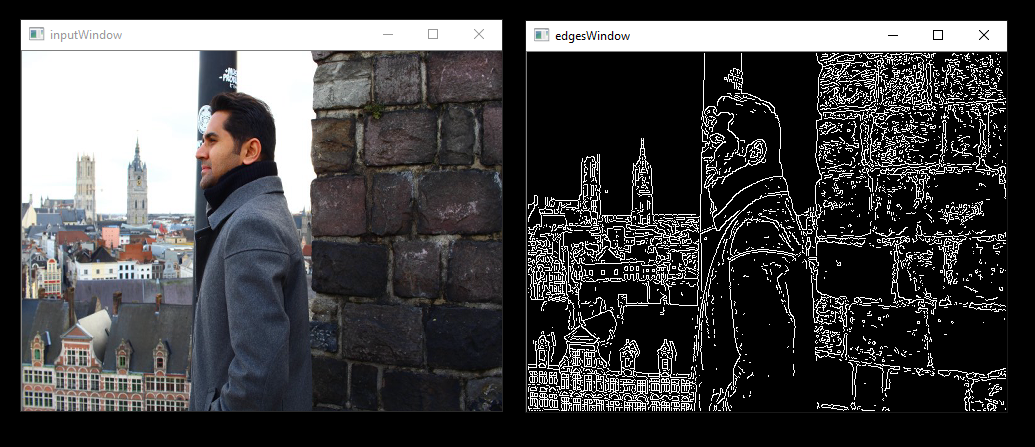
export PATH=$PATH:/opt/rocm/bin
export LD_LIBRARY_PATH=$LD_LIBRARY_PATH:/opt/rocm/lib
runvx /opt/rocm/share/mivisionx/samples/gdf/canny.gdf
Note
- More samples: samples/README.md
- macOS: use
export DYLD_LIBRARY_PATH=$DYLD_LIBRARY_PATH:/opt/rocm/lib
ctest verification (after installing the mivisionx-test package or building from source):
mkdir mivisionx-test && cd mivisionx-test
cmake /opt/rocm/share/mivisionx/test/
ctest -VVUse RunVX to verify the build output. From the repo root:
.\build\bin\Release\runvx.exe samples\gdf\skintonedetect.gdfBuild locally:
cd docs
pip3 install -r sphinx/requirements.txt
python3 -m sphinx -T -E -b html -d _build/doctrees -D language=en . _build/html
Doxygen API docs:
cd docs/doxygen && doxygen DoxyfileFile a bug on GitHub issues or email mivisionx.support@amd.com.
Review all notable changes with the latest release.
| Component | Version |
|---|---|
| ROCm | 7.13 or later (ROCm Core SDK) |
| RPP | 3.1.0 |
| OpenCV | 4.5.4 / 4.6 (optional, RunVX display only) |