Digital Ocean Kubernetes Challenge
AKA. Install Crossplane
For this challenge I'll be installing crossplane onto a DigitalOcean Kubernetes Cluster and using it to deploy kubernetes on DigitalOcean.
To start though, we need a kubernetes cluster to install crossplane into, a place for it to live so it can then manage our other kubernetes clusters. So let's use the easy interface Digital Ocean has given us and create one.
-
Head to https://cloud.digitalocean.com/kubernetes/clusters and click Create a Kubernetes Cluster.
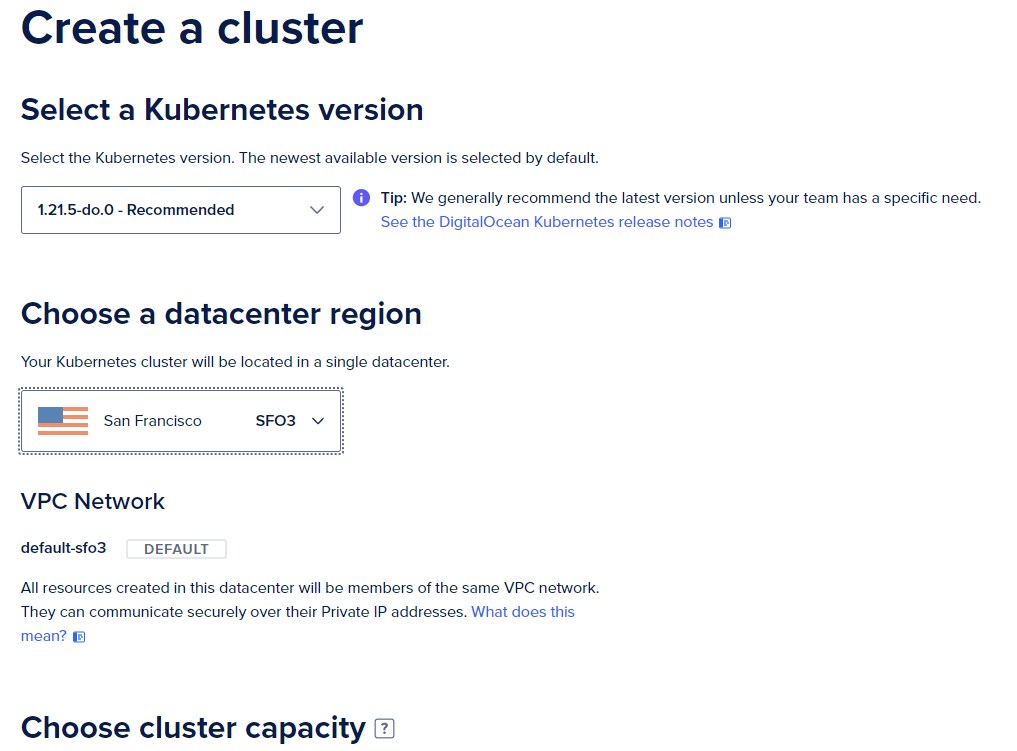
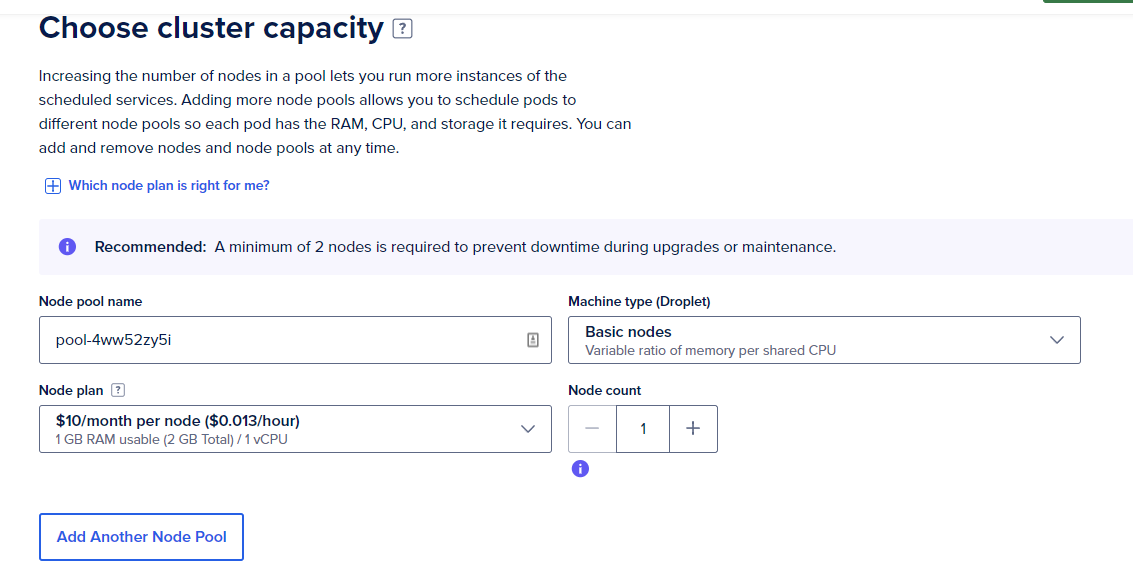
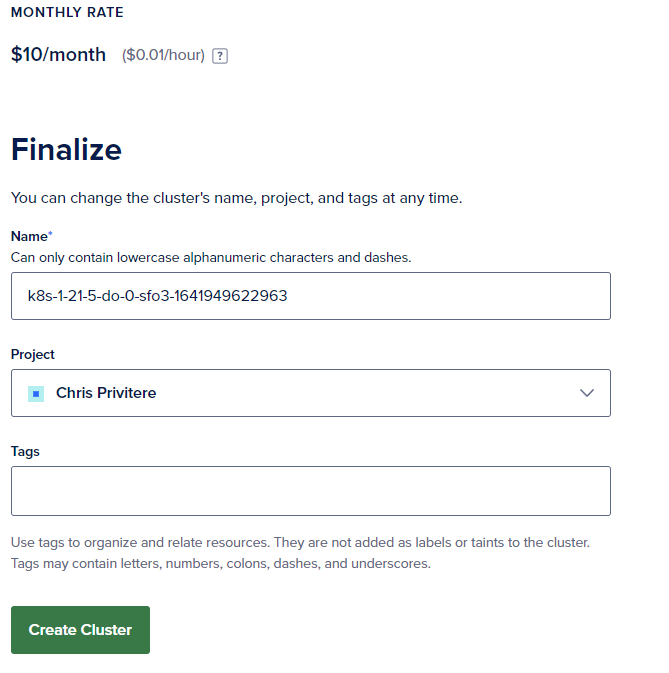
- You'll need to pick a region, K8S version, and a name, we're just going to go with the defaults here for everything, and two of the smallest nodes (to conserve credits), in production you'd likely want a full 3 node HA control plane and a backup/restore strategy for your crossplane cluster.
- Here's what I did:
-
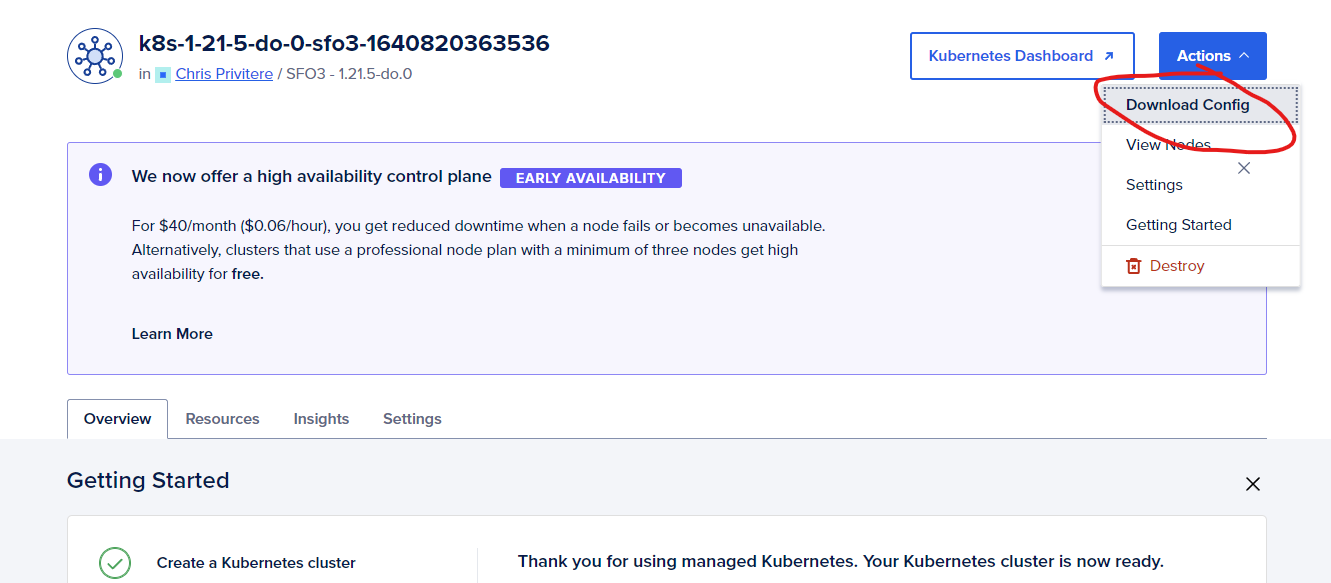
Next we download the kubeconfig (Download Config) from the cluster page in the digital ocean panel.
-
We use helm to install crossplane into our cluster.
kubectl create namespace crossplane-system helm repo add crossplane-stable https://charts.crossplane.io/stable helm repo update helm install crossplane --namespace crossplane-system crossplane-stable/crossplane- Helm should show it as installed.
❯ helm ls NAME NAMESPACE REVISION UPDATED STATUS CHART APP VERSION crossplane crossplane-system 1 2021-12-29 17:46:28.4349804 -0600 CST deployed crossplane-1.5.1 1.5.1 - We can also check if the pods are running
❯ kubectl get pods -n crossplane-system NAME READY STATUS RESTARTS AGE crossplane-7cfcfb84c9-cn59b 1/1 Running 0 14m crossplane-rbac-manager-cdcc7f487-rvfbg 1/1 Running 0 14m - Helm should show it as installed.
-
Install the crossplane binary for your system, directions are in the CLI section on this page: https://crossplane.io/docs/v1.5/getting-started/install-configure.html
-
We should install the digital ocean provider. But first some notes.
- The provider lives here: https://github.com/crossplane-contrib/provider-digitalocean
- The docs for the CRDs the provider gives you for crossplane are here: https://doc.crds.dev/github.com/crossplane-contrib/provider-digitalocean
-
As of this writing, the provider has not fully been released, so we'll need to do some things manually. First, let's install up the CRDs for the provider:
git clone https://github.com/crossplane-contrib/provider-digitalocean.git
cd provider-digitalocean/package/crds
kubectl apply -f .
- Next, let's install the provider the normal way (which isn't really doing anything today but it makes me feel better to see it there)
kubectl crossplane install provider crossplane-contrib/provider-digitalocean:latest
- Here's the next not normal thing we need to do, run the go program that IS the provider, locally on a linux machine.
- First make sure your terminal window has the kubernetes credentials for your cluster installed properly (ie commands like kubectl see and can do things with your k8s cluster)
- Clone and run the provider:
git clone https://github.com/crossplane-contrib/provider-digitalocean.git cd cmd\provider go run main.go --debug - Now we need a secret with our credentials for digital ocean.You can make a new token here: https://cloud.digitalocean.com/account/api/tokens. Then base64 encode it and put it into provider-do-secret.yaml:
apiVersion: v1
kind: Secret
metadata:
  namespace: crossplane-system
  name: provider-do-secret
type: Opaque
data:
  token: BASE64ENCODED_PROVIDER_CREDS
- Let's tell crossplane's digital ocean provider where to look for those credentails with a ProviderConfig object. We call it "example" here due to having to run a local instance of the digital ocean provider provider-do-config.yaml:
apiVersion: do.crossplane.io/v1alpha1
kind: ProviderConfig
metadata:
  name: example
spec:
  credentials:
    source: Secret
    secretRef:
      namespace: crossplane-system
      name: provider-do-secret
      key: tokens
- We can finally deploy something with crossplane! Let's make a second kubernetes cluster! provider-do-k8s-cluster.yaml:
apiVersion: kubernetes.do.crossplane.io/v1alpha1
kind: DOKubernetesCluster
metadata:
  name: second-cluster
spec:
  providerConfigRef:
    name: crossplane-provider-digitalocean
  forProvider:
    region: nyc3
    version: 1.21.5-do.0
    tags:
      - second-cluster
    nodePools:
      - size: s-1vcpu-2gb
        count: 2
        name: worker-pool
    maintenancePolicy:
      startTime: "00:00"
      day: wednesday
    autoUpgrade: true
    surgeUpgrade: true
    highlyAvailable: false
- After applying the above files you should see a new kubernetes cluster being created on the debug output from that other terminal window running the provider in it. And you should also see the cluster show up on the digital ocean panel, which we do!


- If we install the normal kubernetes provider, we can make changes to the current cluster...from within the current cluster (which you could just do with a tool like kubectl or applying yaml or a gitops ci/cd pipeline...but crossplane is today's hammer so let's use it). Here's the steps:
kubectl crossplane install provider crossplane/provider-kubernetes:main

SA=$(kubectl -n crossplane-system get sa -o name | grep provider-kubernetes | sed -e 's|serviceaccount\/|crossplane-system:|g')
kubectl create clusterrolebinding provider-kubernetes-admin-binding --clusterrole cluster-admin --serviceaccount="${SA}"
- Install the provider config for the kubernetes provider now from provider-kubernetes-config.yaml
apiVersion: kubernetes.crossplane.io/v1alpha1
kind: ProviderConfig
metadata:
  name: kubernetes-provider
spec:
  credentials:
    source: InjectedIdentity
- Now let's apply our object for the kubernetes to deploy. How about an nginx deployment in a new namespace, from this config: provider-kubernetes-nginx.yaml
apiVersion: kubernetes.crossplane.io/v1alpha1
kind: Object
metadata:
  name: nginx-namespace
spec:
  forProvider:
    manifest:
      apiVersion: v1
      kind: Namespace
      metadata:
        # name in manifest is optional and defaults to Object name
        # name: some-other-name
        labels:
          example: "true"
  providerConfigRef:
    name: kubernetes-provider
---
apiVersion: kubernetes.crossplane.io/v1alpha1
kind: Object
metadata:
  name: nginx-deployment
spec:
  forProvider:
    manifest:
      apiVersion: apps/v1
      kind: Deployment
      metadata:
        # name in manifest is optional and defaults to Object name
        # name: some-other-name
        namespace: nginx-namespace
        labels:
          app: nginx
      spec:
        selector:
          matchLabels:
            app: nginx
        replicas: 2 # tells deployment to run 2 pods matching the template
        template:
          metadata:
            labels:
              app: nginx
          spec:
            containers:
            - name: nginx
              image: nginx:latest
              ports:
              - containerPort: 80
  providerConfigRef:
    name: kubernetes-provider
- Check to see that the namespace was created:
kubectl get namespaces
NAME                STATUS   AGE
crossplane-system   Active   23h
default             Active   23h
kube-node-lease     Active   23h
kube-public         Active   23h
kube-system         Active   23h
nginx-namespace     Active   111s
- Check to see if nginx is up:
kubectl get pods -n nginx-namespace
NAME                               READY   STATUS    RESTARTS   AGE
nginx-deployment-585449566-6rt5z   1/1     Running   0          9s
nginx-deployment-585449566-c7czf   1/1     Running   0          9s