


A small Rust CLI tool that renames files and directories to clean, ASCII-safe slugs.
Warning
Breaking change since 0.4.0. The directory-scan mode and the
-a/--all and -r/--recursive options have been removed.
rename-simple now operates only on the paths you give it, like
rename(1). Use your shell's globbing to select entries:
rename-simple * instead of rename-simple -a, and
rename-simple **/*.pdf instead of -r.
- Transliterates accented and extended Latin characters to ASCII (
é → e,ç → c,œ → oe,ß → ss…) - Expands typographic ligatures and compatibility forms (
fi → fi, fullwidthFile → file, superscripts² → 2,™ → tm,№ → no) - Romanises Greek and Cyrillic letters (
Ελληνικά → ellinika,Москва → moskva) - Lowercases everything
- Replaces spaces and special characters with
-; collapses consecutive separators - Preserves
_; cleans up_-and-_sequences to_ - Strips leading and trailing
-/_before the extension - Preserves known compound extensions (
.tar.gz,.tar.bz2,.tar.xz,.tar.zst) - Keeps extensions separate only when they are ASCII alphanumeric and ≤10 characters
(e.g.
.tét→ absorbed as-tet;.abcdefghijkl(12 chars) → absorbed as-abcdefghijkl) - Skips hidden files (
.gitignore,.DS_Store…) and flags naming conflicts - Optional cleanup fixes: repairs mojibake (
-U), strips HTML tags and entities (-H), or both (-A)
Requires Rust 1.85+.
# From crates.io
cargo install rename-simple

# Or from source
cargo install --path .The repository is a flake, so no Rust toolchain is needed:
# Run without installing
nix run github:darkone-linux/rename-simple

# Or install into your profile
nix profile install github:darkone-linux/rename-simplerename-simple [OPTIONS] <files>...
Each argument is an entry renamed itself, like the traditional rename
command — globbing is left to the shell (rename-simple *.jpg, or
rename-simple dir/**/*.pdf with zsh / bash globstar). Files and directories
are both renamed by default; -f / -d act as a type filter. With no
arguments, rename-simple prints this help.
| Option | Description |
|---|---|
<files>... |
Entries to rename (files and/or directories) |
-f, --files-only |
Rename files only |
-d, --dirs-only |
Rename directories only |
-U, --fix-unicode |
Repair mojibake (UTF-8 misread as Latin-1/CP1252) before renaming |
-H, --fix-html |
Strip HTML tags and decode HTML entities before renaming |
-A, --fix-all |
Apply every cleanup fix (currently -U + -H) |
-n, --dry-run |
Preview renames without touching any file |
-q, --quiet |
Print nothing at all |
-v, --verbose |
Show details of each rename |
-h, --help |
Print help |
-V, --version |
Print version |
$ rename-simple --dry-run ~/Downloads/*[R] .: 01_ Introduction au Projet.PDF -> 01_introduction-au-projet.pdf
[R] .: Réunion d'équipe (2024).docx -> reunion-d-equipe-2024.docx
[R] .: backup.TAR.GZ -> backup.tar.gz
[R] .: Café Montréal.jpg -> cafe-montreal.jpg
[R] .: à faire .tét -> a-faire-tet
[R] .: notes.cuicuicuicui -> notes-cuicuicuicui
6 entries matched, 6 entries renamed, 0 error.
$ rename-simple -f ~/Downloads/*Directories among the arguments are left untouched; only files are renamed.
$ rename-simple -d ~/Projects/*Files among the arguments are left untouched; only directories are renamed.
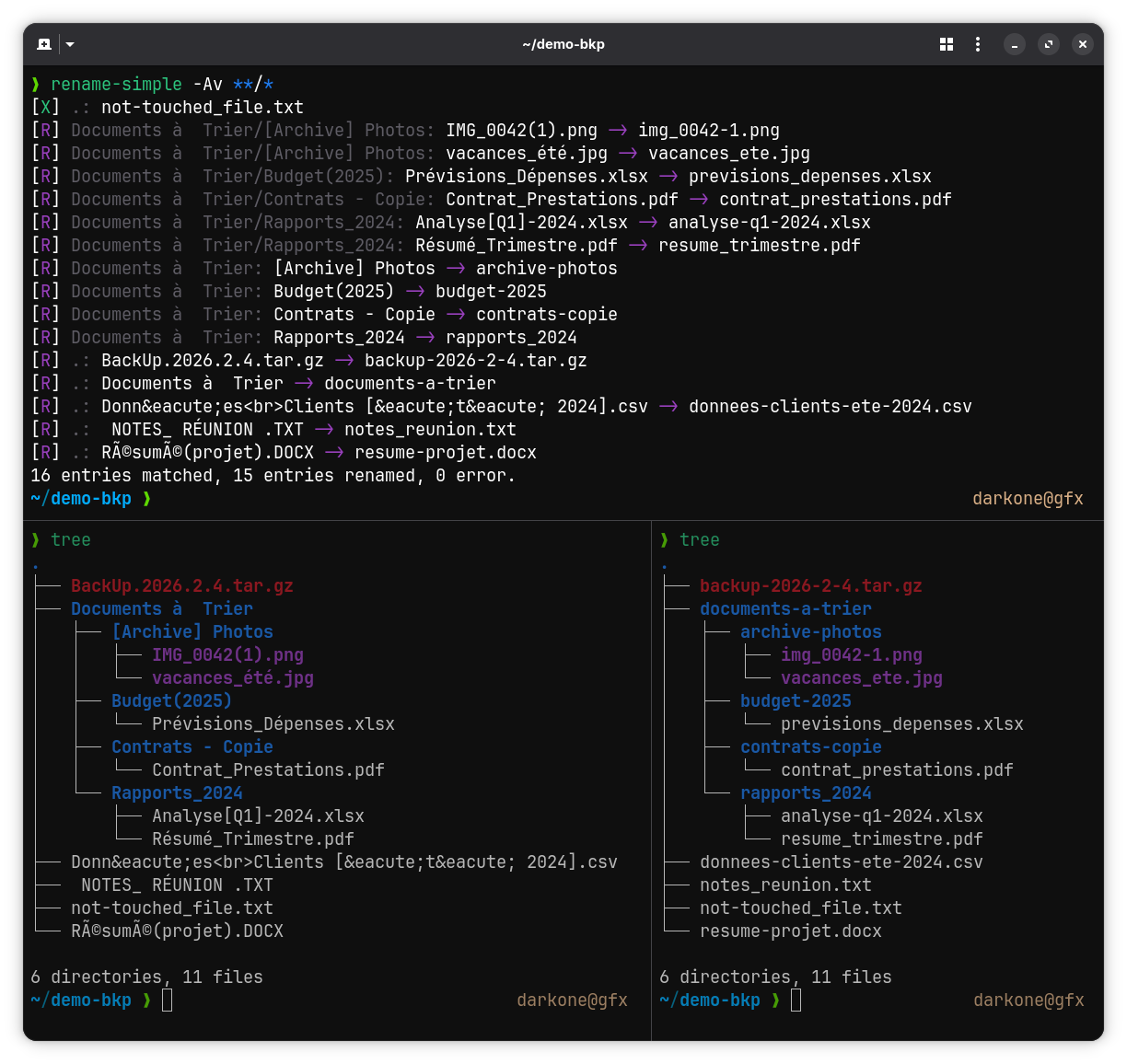
$ rename-simple ~/Downloads/*With a shell that supports recursive globs you can select entries at any depth:
$ rename-simple ~/Documents/**/*.pdfNames coming from broken downloads or web scrapers often carry mojibake (UTF-8 read as Latin-1/CP1252) or HTML markup. The cleanup fixes repair the name before the slug pipeline runs:
$ rename-simple -A ~/Downloads/*[R] .: Café Montréal.jpg -> cafe-montreal.jpg
[R] .: Tom & Jerry.mp4 -> tom-jerry.mp4
[R] .: <b>Été 2024.pdf -> ete-2024.pdf
3 entries matched, 3 entries renamed, 0 error.
-U/--fix-unicode is all-or-nothing per name: a file that is already
correctly named (café.jpg) is never re-decoded, so the fix is safe to apply
everywhere. Double mojibake (Café) is repaired too. -H/--fix-html
strips tags and decodes named (é), decimal (é) and hex
(é) entities. Block-level tags (<br>, <p>, <div>, <li>,
<h1>–<h6>, …) are replaced by a space so the surrounding words stay
separated (data<br>client → data-client), while inline tags (<b>, <i>,
<span>, …) vanish with no gap (client<b>s → clients). -A/--fix-all
applies every cleanup fix.
Verbose mode prints each rename and a summary:
$ rename-simple -v ~/Downloads/*[R] .: 01_ Introduction au Projet.PDF -> 01_introduction-au-projet.pdf
[R] .: Réunion d'équipe (2024).docx -> reunion-d-equipe-2024.docx
[R] .: backup.TAR.GZ -> backup.tar.gz
[R] .: Café Montréal.jpg -> cafe-montreal.jpg
[R] .: à faire .tét -> a-faire-tet
[R] .: notes.cuicuicuicui -> notes-cuicuicuicui
6 entries matched, 6 entries renamed, 0 error.
Since the directory-scan mode is gone, "rename everything in the current
directory" is now just rename-simple *. A shell alias makes it a habit:
alias rsa='rename-simple *'Add this line to your ~/.bashrc or ~/.zshrc, then:
rsa                      # rename everything in the current directory
rename-simple -n *       # dry-run preview
rename-simple **/*.pdf # rename every PDF in the tree (zsh / bash globstar)cargo testMIT