An interactive audio-visual installation where a physical hardware controller steers a generative system that produces atmospheric synth ambient sound and particle visuals in real time.
The system is autonomous — it runs on its own. The user doesn't compose or perform; they conduct. Through knobs and buttons, they shape the conditions: density, tone, tension, space, freeze, wobble. Both the soundscape and the visual particle world respond simultaneously.
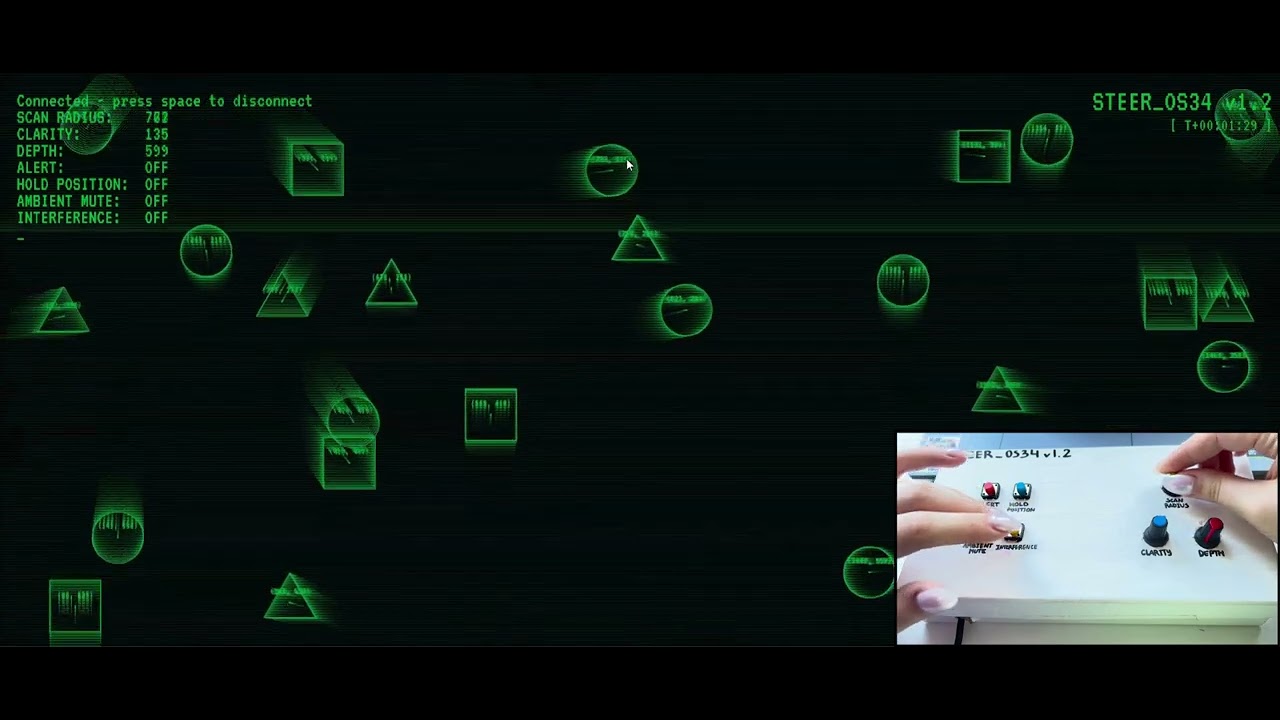

| Control | Label | Effect |
|---|---|---|
| Knob 1 | SCAN RADIUS | Shape size → collision frequency → note density |
| Knob 2 | CLARITY | Lowpass filter cutoff (dark ↔ bright) |
| Knob 3 | DEPTH | Reverb decay time (dry ↔ cathedral) |
| Button 1 (hold) | ALERT | Narrows filter + raises resonance — tension mode |
| Button 2 (hold) | HOLD POSITION | Slows particles to near-freeze, mutes note triggers |
| Button 3 (toggle) | AMBIENT MUTE | Fades drone to near-silence |
| Button 4 (hold) | INTERFERENCE | Detunes oscillators apart — eerie wobble |
Arduino side reads 3 potentiometers (A1, A2, A3) and 4 buttons (D7–D10, INPUT_PULLUP) and sends 7 comma-separated values over serial at 115200 baud.
p5.js side receives the values, updates a shared state, and drives two parallel systems:
- Audio engine — a drone layer (two detuned sawtooth oscillators → lowpass filter → reverb) plus a triggered note layer (3 oscillators, D Dorian scale, fired on particle collisions)
- Visual system — a particle world of drifting geometric shapes; size, trail length, and stroke weight all respond to knob values; CRT scanline effect + typewriter terminal UI overlay
Both halves read from the same state, so one physical control affects audio and visuals simultaneously.
- Arduino UNO (SparkFun Inventor's Kit)
- 3× 10kΩ potentiometer (WH148)
- 4× tactile push button
- Cardboard enclosure, hobby knife, acrylic paint
- Alligator clips + jumper wires
See docs/schematic.jpg for the hand-drawn circuit schematic.
- Arduino IDE
- p5.js web editor or local server
- p5.webserial library — add to
index.html - p5.sound — add to
index.html - VT323 font — add to project files
- Upload
arduino/steer_os34.inoto your Arduino UNO - Close Arduino IDE Serial Monitor
- Open
p5/sketch.jsin the p5 editor (or run locally) - Press spacebar to connect to Arduino via serial
- Click the canvas to start audio (browser requires user interaction)
- Press F to toggle fullscreen
- p5.js — creative coding library
- p5.sound — audio synthesis
- p5.webserial by gohai — serial communication
- Serial + fullscreen examples by Mangtronix / Aaron Sherwood
- VT323 font — Google Fonts
- Particle system adapted from personal shapes & connections sketch (Week 2 assignment)
NYU Abu Dhabi — Introduction to Interactive Media, Spring 2026