Developer Guide
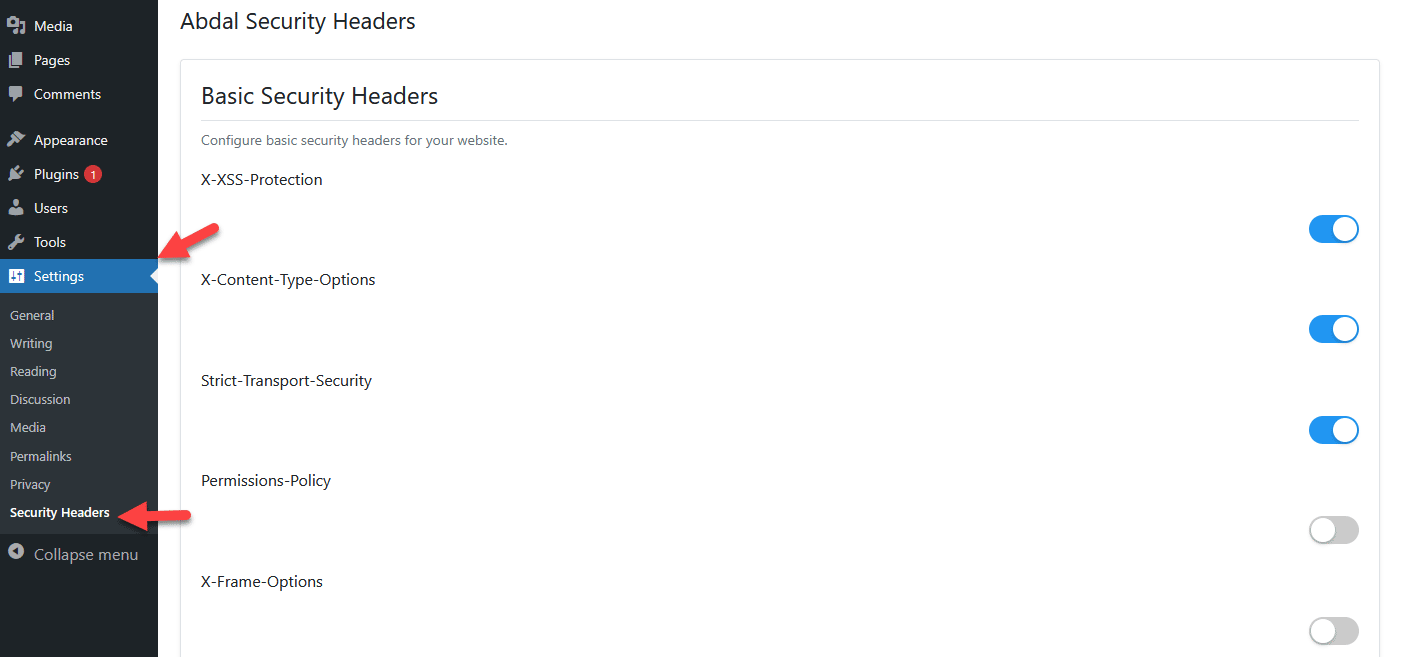
Abdal Security Headers is a WordPress plugin that enhances your website's security by implementing and managing HTTP security headers. This plugin provides a simple interface for configuring security headers and Content Security Policy (CSP) directives.
- 🔒 X-XSS-Protection header to prevent cross-site scripting attacks
- 🛡️ X-Frame-Options header to prevent clickjacking
- 🔐 X-Content-Type-Options header to prevent MIME-type sniffing
- 🌐 Strict-Transport-Security (HSTS) header to enforce HTTPS connections
- 🚫 Referrer-Policy header to control information leakage
- 🛑 Content Security Policy (CSP) with real-time preview and configuration
- 📝 Visual CSP directive editor
- 👁️ Real-time CSP header preview
- 🎨 CSP directive syntax highlighting
- ✅ CSP syntax validation
- 📊 CSP violation reporting configuration
- 🎭 Hide WordPress version information
- ⚡ Remove unnecessary headers
- 🔌 XML-RPC protection
- 🔑 REST API access control
- 📢 Hide server information
- 💫 Modern UI with iOS-style switches
- 🎛️ Accordion sections for better organization
- 🌐 Full RTL support for multilingual sites
- 💡 Helpful tooltips and documentation
- 🎯 User-friendly settings panel
- 📱 Mobile-responsive admin interface
- 🔄 Settings import/export capability
- 📝 Security event logging
- ⚙️ Fine-grained control over each security feature
- 🛠️ Developer-friendly hooks and filters
- Upload plugin files to
/wp-content/plugins/abdal-security-headers - Activate the plugin through WordPress plugins screen
- Use
Settings -> Security Headersto configure the plugin
- Go to
Settings -> Security Headersin WordPress admin panel - Enable/disable security headers using the switches
- Configure CSP directives if needed
- Save settings
- WordPress 5.0 or higher
- PHP 7.2 or higher
- Modern web browser for admin interface
If you encounter any issues or need configuration help, please contact us at Prof.Shafiei@Gmail.com. You can also report issues on GitLab or GitHub.
If you found this project helpful and would like to support further development, please consider making a donation:
Made with love by Ebrahim Shafiei (EbraSha)
- Email: Prof.Shafiei@Gmail.com
- Telegram: @ProfShafiei
This project is licensed under GPLv2 or later - see the LICENSE file for details.
- Introduction
- Installation & Setup
- Project Structure
- Key APIs and Functions
- Contribution Guide
- Troubleshooting
The Abdal Security Headers plugin is a security enhancement tool for WordPress that provides management of security headers and additional security features.
- Clone the repository:
git clone https://github.com/ebrasha/abdal-security-headers.git- Install dependencies:
composer install- Copy files to WordPress plugins folder
abdal-security-headers/
├── docs/                    # Documentation
├── includes/               # Core classes
│   ├── class-ash-admin.php  # Admin panel management
│   └── class-ash-headers.php # Headers implementation
├── languages/              # Translation files
├── assets/                # CSS and JS files
└── abdal-security-headers.php # Main plugin file
Responsible for managing security headers and security features:
// Set security headers
public function set_security_headers()

// Disable XML-RPC
public function ash_block_xmlrpc_access()

// Restrict REST API
public function ash_disable_rest_api()Manages admin panel interface:
// Create settings page
public function create_admin_page()

// Register settings
public function page_init()- Create a new branch for feature or bug fix
- Make your changes
- Run tests
- Create Pull Request
- Enable WP_DEBUG in wp-config.php
- Check error logs
- Use security headers checking tools like SecurityHeaders.com
For more information, visit the complete documentation.