


etool turns everyday office and developer chores into one-line shell commands (or Python calls): merge / split / encrypt PDFs, extract images from Word documents, convert Markdown to Word / HTML / Excel, batch-convert photos to WebP, generate and decode QR codes, merge Jupyter notebooks, test network / disk speed, chat with any OpenAI-compatible LLM, render cheat-sheet wallpapers, and more.
Add --json to any command and it prints exactly one machine-readable JSON envelope — which makes etool a drop-in tool layer for AI agents, scripts, and CI pipelines.
- 🧩 All-in-one — PDF, Word, Excel, image, QR code, Markdown, Jupyter, web, LLM, and network utilities behind a single
etoolcommand. Every feature is also importable as a plain Python API. - 🤖 AI-agent friendly — with
--json, every command emits one envelope:{"ok": true, "data": ...}or{"ok": false, "error": {code, message, details}}, with stable machine-readable error codes. Ideal for function calling and automated pipelines. - 🪶 Light by default — the default install is ~15 MB. Heavy binary dependencies (PyMuPDF, OpenCV) are opt-in extras:
etool[all]. - 🖥️ Cross-platform — one codebase for Windows, macOS, and Linux, CI-tested on all three. Python 3.10+.
pip install -U etool          # lightweight core (~15 MB) — covers almost everything
pip install -U "etool[all]" # + PDF → PNG rasterization and QR decoding| Extra | Enables | Adds |
|---|---|---|
etool[pdf-images] |
etool pdf to-images (PDF → PNG) |
PyMuPDF |
etool[qr-decode] |
etool qrcode decode (offline QR recognition) |
OpenCV (headless) |
etool[all] |
everything above | both |
Run it without installing anything (via uv), or install it as an isolated CLI app:
uvx etool qrcode generate --text "https://example.com" --out qr.png
pipx install etool
After install, the etool entry point is on your PATH; python -m etool ... also works.
# Merge two PDFs
etool pdf merge --out merged.pdf part1.pdf part2.pdf

# Turn a Markdown note into a Word document
etool md to-docx notes.md --out notes.docx

# Batch-convert a folder of photos to lossless WebP
etool image rename-webp ./photos

# Generate a QR code
etool qrcode generate --text "https://example.com" --out qr.png

# Fetch a web page as clean, readable text
etool web fetch-text https://example.com

# Chat with any OpenAI-compatible model (stdlib HTTP, no SDK needed)
etool llm chat "Why is the sky blue?" --system "Answer in one sentence."
Need structured output for a script or an agent? Add --json:
$ etool --json web mask-ip 8.8.4.4
{
  "ok": true,
  "data": {
    "masked": "8.8.x.4",
    "is_public": true
  }
}
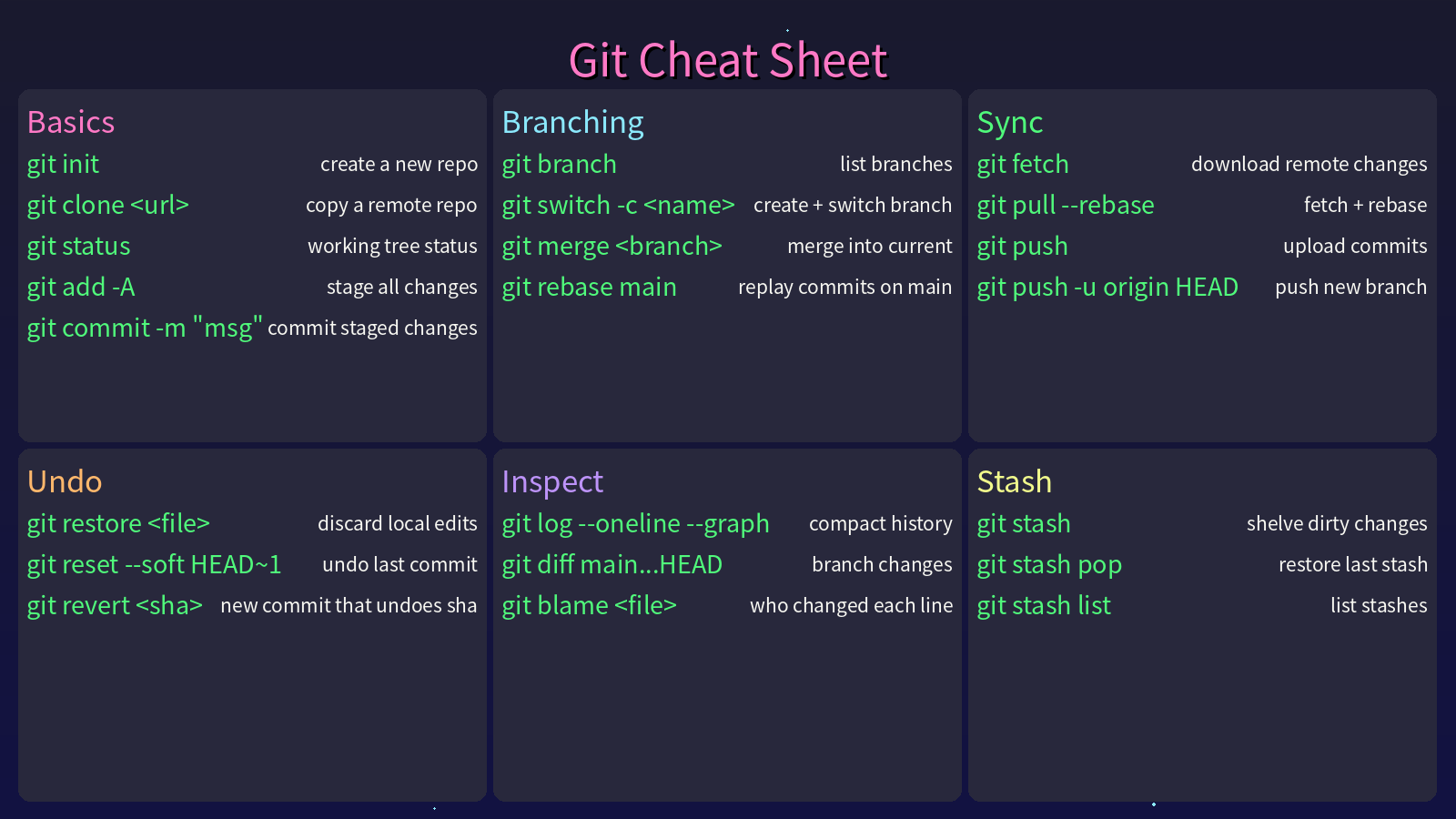
etool can even render a cheat-sheet wallpaper for any tool — this image was generated by etool cheatsheet generate:
| Domain | Command | What you get |
|---|---|---|
etool pdf |
merge, split, encrypt / decrypt, watermark, insert, PDF → PNG | |
| Word | etool docx |
replace text, swap page orientation, extract embedded images |
| Excel | etool excel |
copy workbook formatting to a new file |
| Images | etool image |
stitch left-right / top-bottom, pad to square, 3×3 grid crop, batch → WebP |
| QR codes | etool qrcode |
generate, decode offline |
| Markdown | etool md |
→ Word, → HTML, tables → Excel |
| Jupyter | etool ipynb |
merge notebooks, notebook → Markdown |
| Web | etool web |
page → readable text, RSS / Atom parsing, IP masking |
| LLM | etool llm |
chat, summarize, outline via any OpenAI-compatible API |
| Cheat sheets | etool cheatsheet |
render a command cheat-sheet wallpaper PNG |
| Speed | etool speed |
network / disk / memory speed tests |
| Passwords | etool password |
random passwords, arbitrary base conversion |
| Misc | etool stdlib / install-reqs / scheduler / email |
stdlib usage analysis, bulk pip install, schedule parsing, SMTP mail |
With --json, stdout is one JSON document per invocation (pretty-printed, 2-space indent):
- Success:
{"ok": true, "data": { ... }} - Failure:
{"ok": false, "error": {"code", "message", "details"}}
Without --json, output is human-readable (errors go to stderr). Below, Input is the command; Output shows typical --json stdout (values such as paths, passwords, and timings are illustrative).
Version — etool version
Input
etool --json versionOutput
{"ok": true, "data": {"version": "2.2.0"}}PDF — merge · split · encrypt · watermark · rasterize — etool pdf
Merge
etool --json pdf merge --out merged.pdf part1.pdf part2.pdf{"ok": true, "data": {"merged": "merged.pdf", "log": "merged: part1.pdf\nmerged: part2.pdf\nmerged file saved as: merged.pdf"}}Split by page chunk size
etool --json pdf split-pages --pages 3 document.pdf{"ok": true, "data": {"source": "document.pdf", "log": "generated: document_part_by_page1.pdf\n..."}}Split into N parts
etool --json pdf split-num --parts 2 document.pdf{"ok": true, "data": {"source": "document.pdf", "log": "..."}}Encrypt / decrypt
etool --json pdf encrypt --password secret doc.pdf --out doc_encrypted.pdf
etool --json pdf decrypt --password secret doc_encrypted.pdf --out doc_clear.pdf{"ok": true, "data": {"log": "encrypted file saved as: doc_encrypted.pdf"}}Insert another PDF after a page index
etool --json pdf insert --pdf1 a.pdf --pdf2 b.pdf --after-page 0 --out out.pdf{"ok": true, "data": {"output": "out.pdf", "log": "inserted file saved as: out.pdf"}}Watermark
etool --json pdf watermark --target folder_or_file.pdf --watermark wm.pdf --out-dir watermarked{"ok": true, "data": {"log": "..."}}PDF → PNG images (requires etool[pdf-images])
etool --json pdf to-images --input doc.pdf --out-dir png_out --dpi 2{"ok": true, "data": {"log": "found 1 PDF file(s)\n..."}}Word — replace text · swap orientation · extract images — etool docx
Replace text
etool --json docx replace --path report.docx --old foo --new bar{"ok": true, "data": {"path": "report.docx"}}Swap page dimensions (landscape ↔ portrait style)
etool --json docx swap-dimensions --input in.docx --output out.docx{"ok": true, "data": {"path": "out.docx"}}Extract embedded images
etool --json docx extract-images --input in.docx --out-dir ./img_out{"ok": true, "data": {"path": "./img_out"}}Excel — copy template formatting — etool excel
Copy formatting from a template workbook
etool --json excel copy-format --source template.xlsx --output out.xlsx{"ok": true, "data": {"path": "out.xlsx"}}Images — stitch · pad · grid crop · WebP — etool image
Merge left–right / top–bottom
etool --json image merge-lr left.png right.png --out lr.png
etool --json image merge-ud top.png bottom.png --out ud.png{"ok": true, "data": {"path": "lr.png"}}Pad to square / 3×3 grid crop / batch rename to WebP
etool --json image fill-square photo.jpg --out square.jpg
etool --json image cut-grid photo.jpg
etool --json image rename-webp ./shots --remove-original{"ok": true, "data": {"paths": ["photo_cut00.jpg", "..."]}}QR codes — generate · decode — etool qrcode
Generate
etool --json qrcode generate --text "https://example.com" --out qr.png{"ok": true, "data": {"path": "qr.png"}}Decode (local OpenCV; requires etool[qr-decode])
etool --json qrcode decode qr.png{"ok": true, "data": {"text": "https://example.com"}}Jupyter — merge notebooks · to Markdown — etool ipynb
Merge all .ipynb in a directory
etool --json ipynb merge-dir ./notebooks/{"ok": true, "data": {"path": "./notebooks.ipynb"}}Notebook → Markdown file
etool --json ipynb to-markdown analysis.ipynb --out-dir ./md_out{"ok": true, "data": {"path": "analysis.md"}}Markdown — to Word · to HTML · tables to Excel — etool md
etool --json md to-docx notes.md --out notes.docx
etool --json md to-html notes.md --out notes.html
etool --json md tables-to-xlsx tables.md --out tables.xlsx{"ok": true, "data": {"message": "Converted Markdown to Word document: notes.docx"}}LLM — chat · summarize · outline — etool llm
Works with any OpenAI-compatible endpoint, using stdlib HTTP only (no SDK dependency). Credentials come from --api-key / --base-url / --model, or the ETOOL_LLM_API_KEY / ETOOL_LLM_BASE_URL / ETOOL_LLM_MODEL environment variables (standard OPENAI_* variables also work). Reasoning-model <think>...</think> blocks are stripped automatically.
Chat
etool --json llm chat "Why is the sky blue?" --system "Answer in one sentence."{"ok": true, "data": {"text": "Because air molecules scatter blue light more strongly than red."}}Summarize (replies in the same language as the input; text inline or via --file)
etool --json llm summarize --file article.txt --min-words 50 --max-words 150{"ok": true, "data": {"summary": "..."}}Outline (structure text into main_title / sections / points JSON)
etool --json llm outline --file article.txt{"ok": true, "data": {"outline": {"main_title": "...", "sections": [{"title": "...", "points": ["...", "..."]}]}}}Web — page to text · RSS / Atom · IP masking — etool web
Fetch a page as readable text (drops script/style noise)
etool --json web fetch-text https://example.com{"ok": true, "data": {"text": "Example Domain\n..."}}Parse an RSS 2.0 / Atom feed (URL, local XML file, or raw XML string)
etool --json web rss https://example.com/feed.xml --limit 2{"ok": true, "data": {"entries": [{"title": "...", "link": "...", "published": "...", "summary": "..."}]}}Mask an IP for display
etool --json web mask-ip 8.8.4.4{"ok": true, "data": {"masked": "8.8.x.4", "is_public": true}}Cheat-sheet wallpaper — render a command cheat sheet PNG — etool cheatsheet
Render a command cheat-sheet PNG (up to 3×3 category cards; by default the left quarter is kept clear for desktop icons — tune with --left-margin-ratio, 0 disables). Data comes from a JSON file (--data) or is generated by an LLM (--keyword, needs the LLM configuration above).
etool --json cheatsheet generate --keyword git --out git.png --width 1920 --height 1080
etool --json cheatsheet generate --data uv.json --title "UV Cheat Sheet" --out uv.png
uv.json shape:
{"categories": [{"name": "Basics", "commands": [{"command": "uv sync", "description": "install deps"}]}]}{"ok": true, "data": {"path": "git.png"}}Speed — network · disk · memory — etool speed
Network (uses speedtest-cli; needs internet, can be slow)
etool --json speed network{"ok": true, "data": {"report": "\n network test result:\ndownload speed: ... Mbps\n..."}}Disk
etool --json speed disk --file-size-mb 10{"ok": true, "data": {"report": "\n disk test result:\nread speed: ... MB/s\nwrite speed: ... MB/s\n"}}Memory (stdlib buffer test)
etool --json speed memory --size-mb 32{"ok": true, "data": {"report": "\n memory test result:\nread speed: ... MB/s\nwrite speed: ... MB/s"}}Passwords — random · base conversion — etool password
Random password
etool --json password random --length 16{"ok": true, "data": {"password": "xYz9...16chars"}}Base conversion
etool --json password convert-base --from-base 16 --to-base 2 A1F{"ok": true, "data": {"result": "101000011111"}}Stdlib usage analysis — etool stdlib
One subcommand: stdlib analyze DIR. By default the envelope puts the nested counts under data.result (JSON object). With --json-string, the same analysis is returned as a single formatted JSON text under data.json (useful when you want one string field instead of nested JSON).
etool --json stdlib analyze ./src
etool --json stdlib analyze ./src --json-string{"ok": true, "data": {"result": {"os": {"path.join": 12, "listdir": 3}}}}{"ok": true, "data": {"json": "{\n \"os\": {\n \"path.join\": 12\n }\n}"}}Install requirements — etool install-reqs
Uses python -m pip install internally.
etool --json install-reqs --file requirements.txt --failed-file failed.txt --retry 2{"ok": true, "data": {"success": true}}On failure:
{"ok": false, "error": {"code": "RUNTIME_ERROR", "message": "some packages failed to install", "details": {}}}Scheduler — parse schedule expressions — etool scheduler
etool --json scheduler parse 120
etool --json scheduler parse '"08:00"'{"ok": true, "data": {"log": "Execute every 120 seconds"}}Email — send via SMTP — etool email
Do not paste real passwords into shell history; prefer environment-specific secrets in automation.
etool --json email send \
  --sender you@example.com \
  --password "$SMTP_PASSWORD" \
  --recipient other@example.com \
  --message "Hello" \
--subject "Test"{"ok": true, "data": {"result": "send success"}}Every CLI feature maps to a Manager* class with plain static methods:
from etool import ManagerPdf, ManagerImage, ManagerQrcode, ManagerMd

ManagerPdf.merge_pdfs(["part1.pdf", "part2.pdf"], "merged.pdf")
ManagerImage.fill_image("photo.jpg")                      # pad to square
ManagerQrcode.generate_qrcode("https://example.com", "qr.png")
ManagerMd.convert_md_to_docx("notes.md", "notes.docx")
For structured envelopes in your own code:
from etool import ok, err, EtoolError, ErrorCode

payload = ok({"path": "/tmp/out.pdf"})
failure = err(EtoolError(ErrorCode.VALIDATION_ERROR, "bad input", {"field": "x"}))
Missing optional dependencies never break the package: each manager is imported defensively, and etool.get_import_status() reports what is available.
etool --json <command> is designed to be called by agents and scripts:
- stdout always carries exactly one JSON document (valid JSON, 2-space indent);
okis the single success flag to branch on;- error codes are a stable contract:
| Code | Meaning |
|---|---|
VALIDATION_ERROR |
bad or missing input |
NOT_FOUND |
file or resource not found |
IO_ERROR |
read / write failure |
DEPENDENCY_ERROR |
optional dependency missing (details.install tells you what to install) |
RUNTIME_ERROR |
any other failure |
{"ok": false, "error": {"code": "DEPENDENCY_ERROR", "message": "QR decoding requires OpenCV", "details": {"install": "pip install \"etool[qr-decode]\""}}}The repository ships ready-made Agent Skills under .cursor/skills/ — one SKILL.md per domain that teaches a coding agent (Cursor, Claude Code, etc.) when and how to call the etool CLI:
| Skill | Covers |
|---|---|
etool-pdf |
merge / split / encrypt / decrypt / insert / watermark / to-images |
etool-office |
docx, excel, md, ipynb commands |
etool-image |
image, qrcode, cheatsheet commands |
etool-web |
fetch-text, rss, mask-ip |
etool-llm |
chat, summarize, outline |
etool-utils |
password, speed, stdlib analyze |
In this repo they work out of the box with Cursor. To use them elsewhere, copy the skill folders into your project's .cursor/skills/ (Cursor) or .claude/skills/ (Claude Code) — the format is identical — and make sure etool is installed (pip install etool).
With uv (uv.lock is committed; the dev group includes the heavy optional deps so the full test suite runs):
uv sync
uv run pytest tests/test_etool.py -v
With pip:
pip install -e ".[all,dev]"
pytest tests/test_etool.py -v
See CHANGELOG.md for release history (including the platform-specific features deliberately removed in 2.0 to keep etool fully cross-platform).
Issues and pull requests are welcome: github.com/jiangyangcreate/etool. If etool saves you time, a ⭐ helps more people discover it.