Modern OPC-UA client and server nodes for Node-RED.
Use Node-RED to read, write, browse, and subscribe to industrial OPC-UA servers, or expose Node-RED values as an OPC-UA server that PLCs, SCADA systems, historians, and test clients can read and write.
This package is built for Node-RED 5.x and current node-opcua. It is intended as a clean,
maintained alternative to older OPC-UA Node-RED packages that have become difficult to rely
on in modern IIOT deployments.
| Node | Use it for |
|---|---|
opcua-endpoint |
Shared OPC-UA client endpoint configuration: URL, security, authentication, timeout, PKI trust behavior |
opcua-read |
Read one or many OPC-UA node values |
opcua-write |
Write one or many OPC-UA node values with explicit data types |
opcua-browse |
Browse an address space from a starting NodeId |
opcua-subscribe |
Subscribe to value changes with sampling, publishing, queue, trigger, and deadband settings |
opcua-server |
Serve Node-RED values as OPC-UA variables and emit messages when OPC-UA clients write |
Core behavior:
- One shared, ref-counted OPC-UA connection per endpoint config node.
- Automatic reconnect and subscription re-arm after outages.
- Fail-fast read/write/browse operation timeout so flows do not hang forever.
- Secure-by-default certificate validation for encrypted client connections.
- Username/password authentication for client and server use cases.
- Server-side
None,Sign, andSignAndEncryptendpoint options. - Three bundled example flows that are ready to import from the Node-RED Examples menu.
- Node.js
>=22.9.0 - Node-RED 5.x recommended
- Node-RED 4.x is supported by package metadata, but Node-RED 5.x is the primary target
In Node-RED:
- Open Menu -> Manage palette.
- Go to Install.
- Search for
@jsgorana/node-red-opcua. - Click Install.
From your Node-RED user directory:
npm install @jsgorana/node-red-opcuaThen restart Node-RED if your runtime does not automatically reload installed nodes.
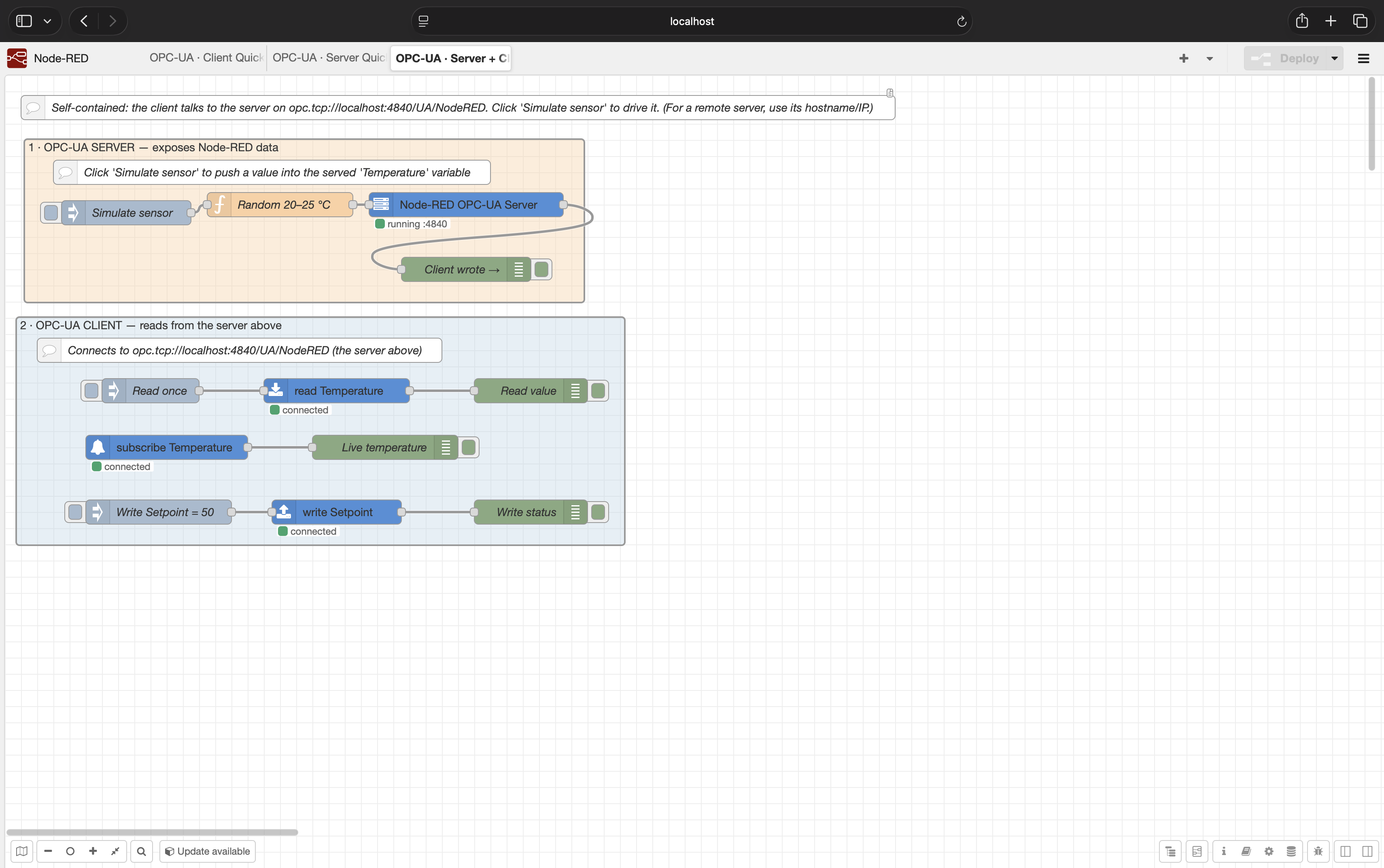
The quickest way to prove the package is working is the bundled Server + Client Demo. It runs an OPC-UA server and OPC-UA client in the same Node-RED instance, so no PLC, simulator, or external server is required.
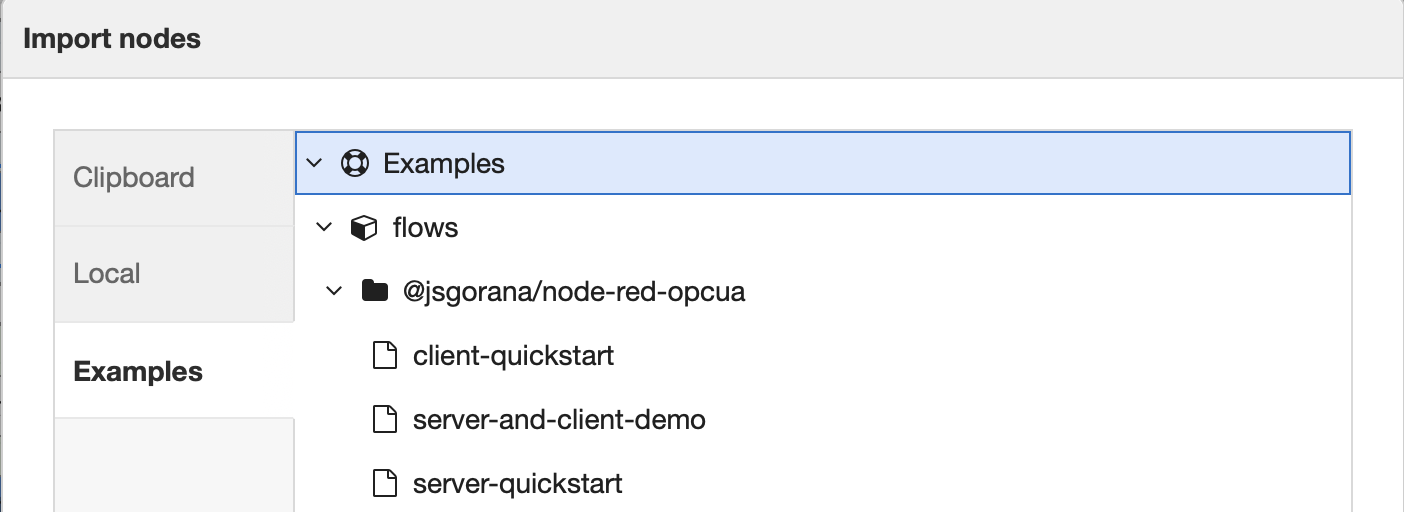
- In Node-RED, open Menu -> Import.
- Select the Examples tab.
- Open
@jsgorana/node-red-opcua. - Import Server + Client Demo.
- Click Deploy.
- Click Simulate sensor.
- Watch the read/subscription/debug nodes update.
The demo exposes:
ns=1;s=Temperaturens=1;s=Setpoint
The client nodes connect to:
opc.tcp://localhost:4840/UA/NodeRED
Use localhost only when the client and server are in the same runtime/container/host.
For remote systems, use the OPC-UA server host name or IP address that is reachable from
Node-RED.
Import examples from Menu -> Import -> Examples -> @jsgorana/node-red-opcua.
Self-contained flow for first validation. The orange group serves values; the blue group reads, writes, and subscribes to the server above it.
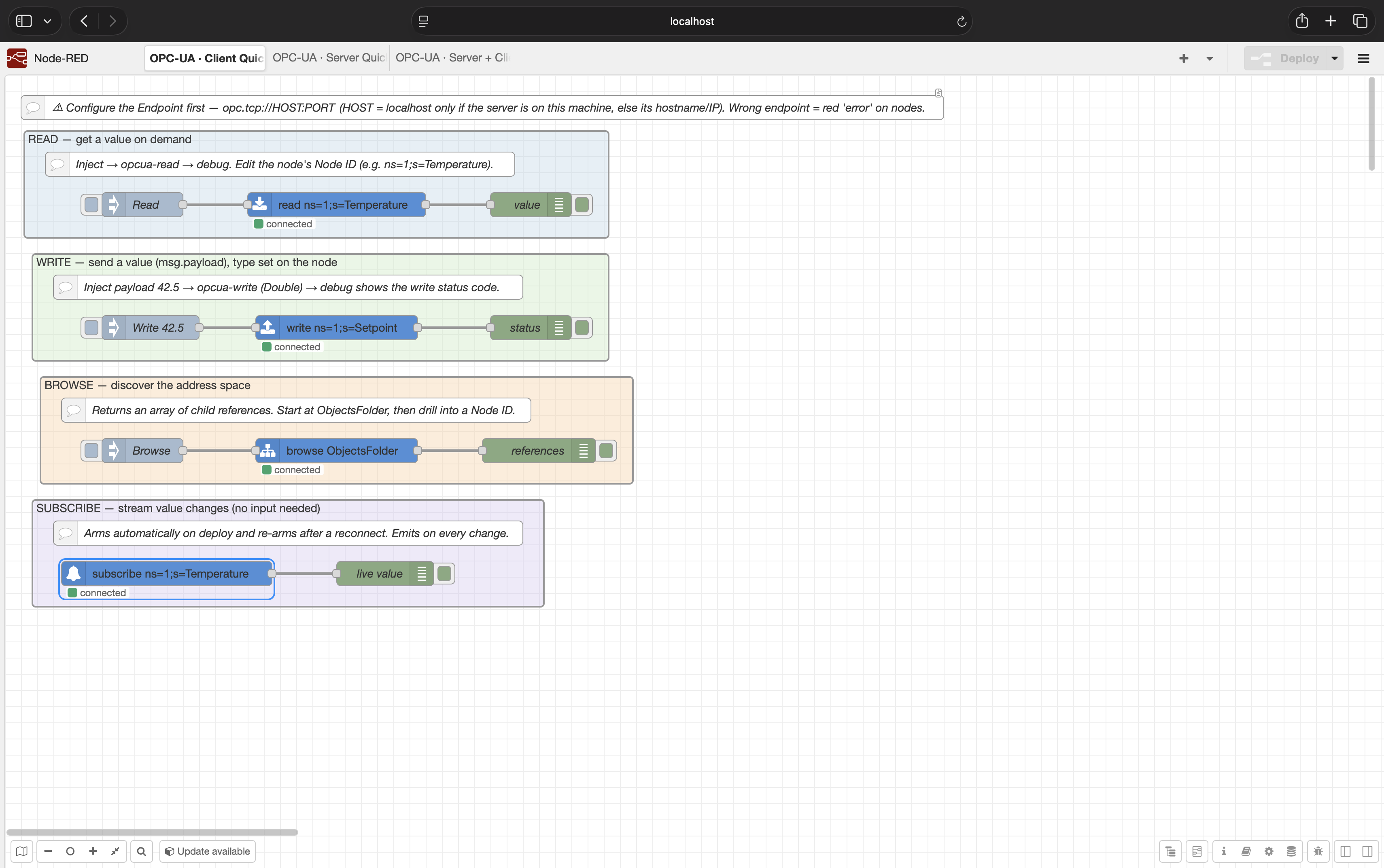
Client-only patterns for connecting to your own OPC-UA server:
- Read a value on demand.
- Write a value.
- Browse the address space.
- Subscribe to live value changes.
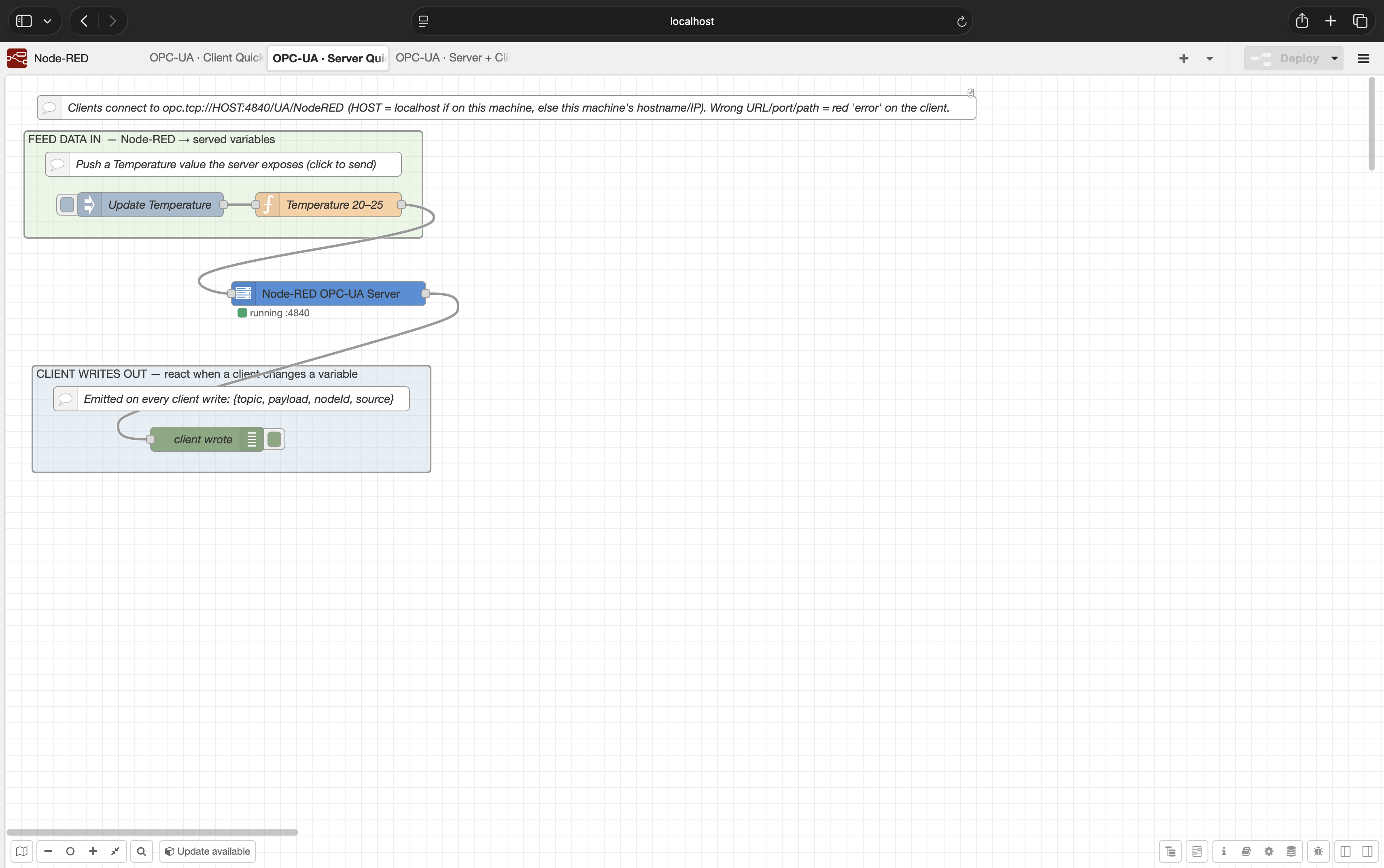
Server-only pattern for exposing Node-RED data outward:
- Feed Node-RED values into served OPC-UA variables.
- Receive messages when an OPC-UA client writes a variable.
All client operation nodes use an opcua-endpoint config node. Multiple read/write/browse/
subscribe nodes that point at the same endpoint share one connection and session.
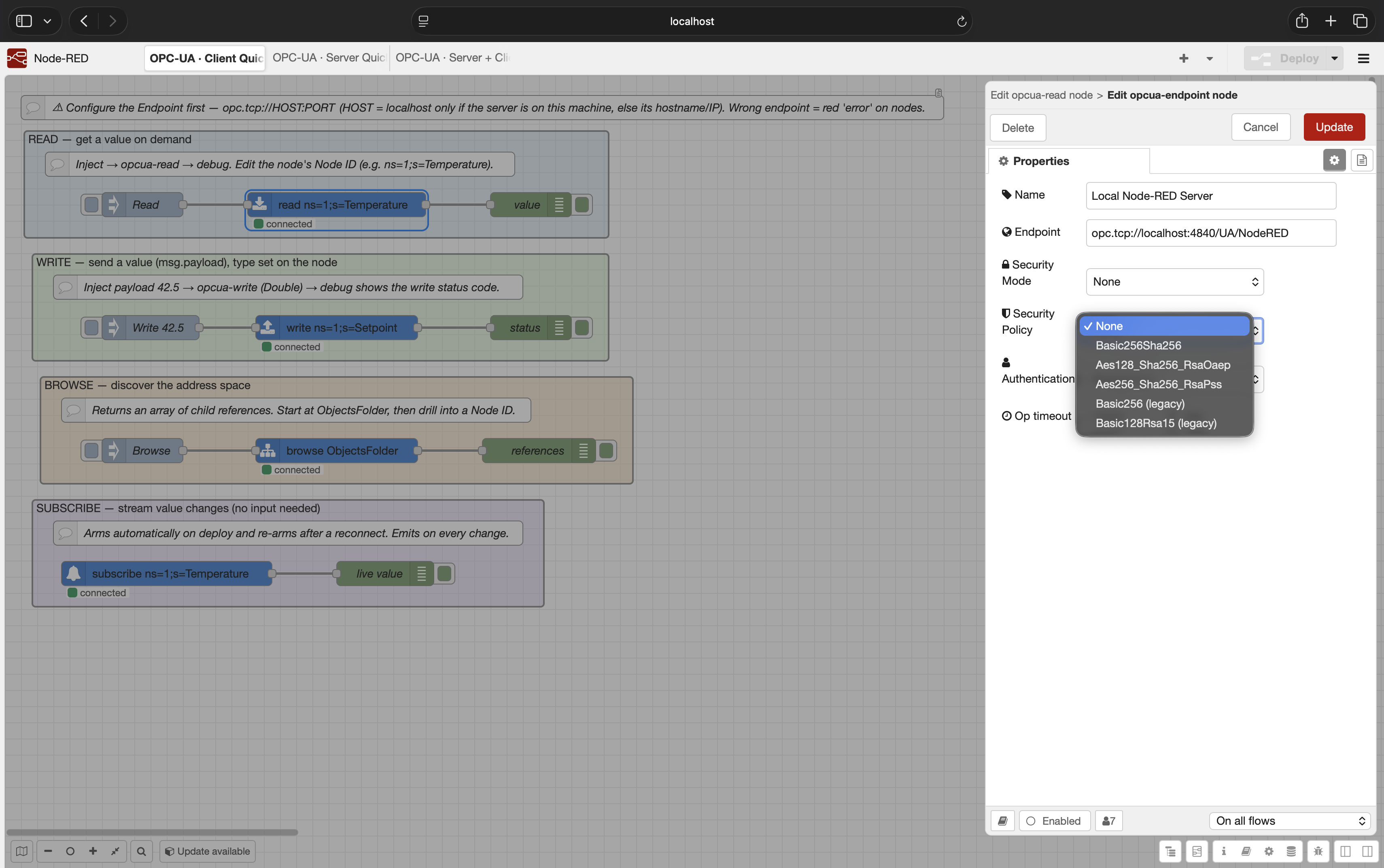
Important fields:
| Field | Meaning |
|---|---|
| Endpoint | OPC-UA endpoint URL, for example opc.tcp://192.168.1.20:4840/UA/MyServer |
| Security Mode | None, Sign, or SignAndEncrypt |
| Security Policy | None, Basic256Sha256, Aes128_Sha256_RsaOaep, Aes256_Sha256_RsaPss, or legacy policies |
| Authentication | Anonymous or username/password |
| Op timeout | Maximum time a read/write/browse operation waits before failing |
For production systems, prefer:
Security Mode:SignAndEncryptSecurity Policy:Basic256Sha256or stronger- Authentication: username/password if your server supports it
- Server certificate trusted in the Node-RED PKI store
Configure Node ID on the node, or pass it with msg.nodeId.
Input:
{
  "nodeId": "ns=1;s=Temperature"
}
Output:
{
  "payload": 23.7,
  "nodeId": "ns=1;s=Temperature",
  "statusCode": "Good (0x00000000)"
}Send an array as msg.nodeIds or msg.payload.
Input:
{
  "nodeIds": [
    "ns=1;s=Temperature",
    "ns=1;s=Setpoint"
  ]
}
Output:
{
  "payload": [
    {
      "nodeId": "ns=1;s=Temperature",
      "payload": 23.7,
      "statusCode": "Good (0x00000000)"
    },
    {
      "nodeId": "ns=1;s=Setpoint",
      "payload": 50,
      "statusCode": "Good (0x00000000)"
    }
  ],
  "nodeIds": [
    "ns=1;s=Temperature",
    "ns=1;s=Setpoint"
  ],
  "statusCodes": [
    "Good (0x00000000)",
    "Good (0x00000000)"
  ]
}Configure Node ID and Data Type on the node, or override with msg.nodeId and
msg.dataType.
Input:
{
  "nodeId": "ns=1;s=Setpoint",
  "dataType": "Double",
  "payload": 50
}
Output:
{
  "nodeId": "ns=1;s=Setpoint",
  "statusCode": "Good (0x00000000)"
}Use an array of write descriptors:
{
  "payload": [
    {
      "nodeId": "ns=1;s=Setpoint",
      "dataType": "Double",
      "value": 50
    },
    {
      "nodeId": "ns=1;s=Label",
      "dataType": "String",
      "value": "line running"
    }
  ]
}
Output:
{
  "nodeIds": [
    "ns=1;s=Setpoint",
    "ns=1;s=Label"
  ],
  "statusCodes": [
    "Good (0x00000000)",
    "Good (0x00000000)"
  ]
}
Supported data type names are the node-opcua DataType enum names, including:
Boolean, SByte, Byte, Int16, UInt16, Int32, UInt32, Float, Double,
String, and DateTime.
opcua-browse browses from a configured Node ID, or from msg.nodeId.
Common starting points:
RootFolder
ObjectsFolder
ns=1;s=SomeObject
Output payload is an array of references:
[
  {
    "nodeId": "ns=1;s=Temperature",
    "browseName": "1:Temperature",
    "displayName": "Temperature",
    "nodeClass": 2,
    "typeDefinition": "i=63"
  }
]opcua-subscribe automatically connects and arms its monitored item when the flow starts.
It has no input. It emits a message each time the server reports a value change.
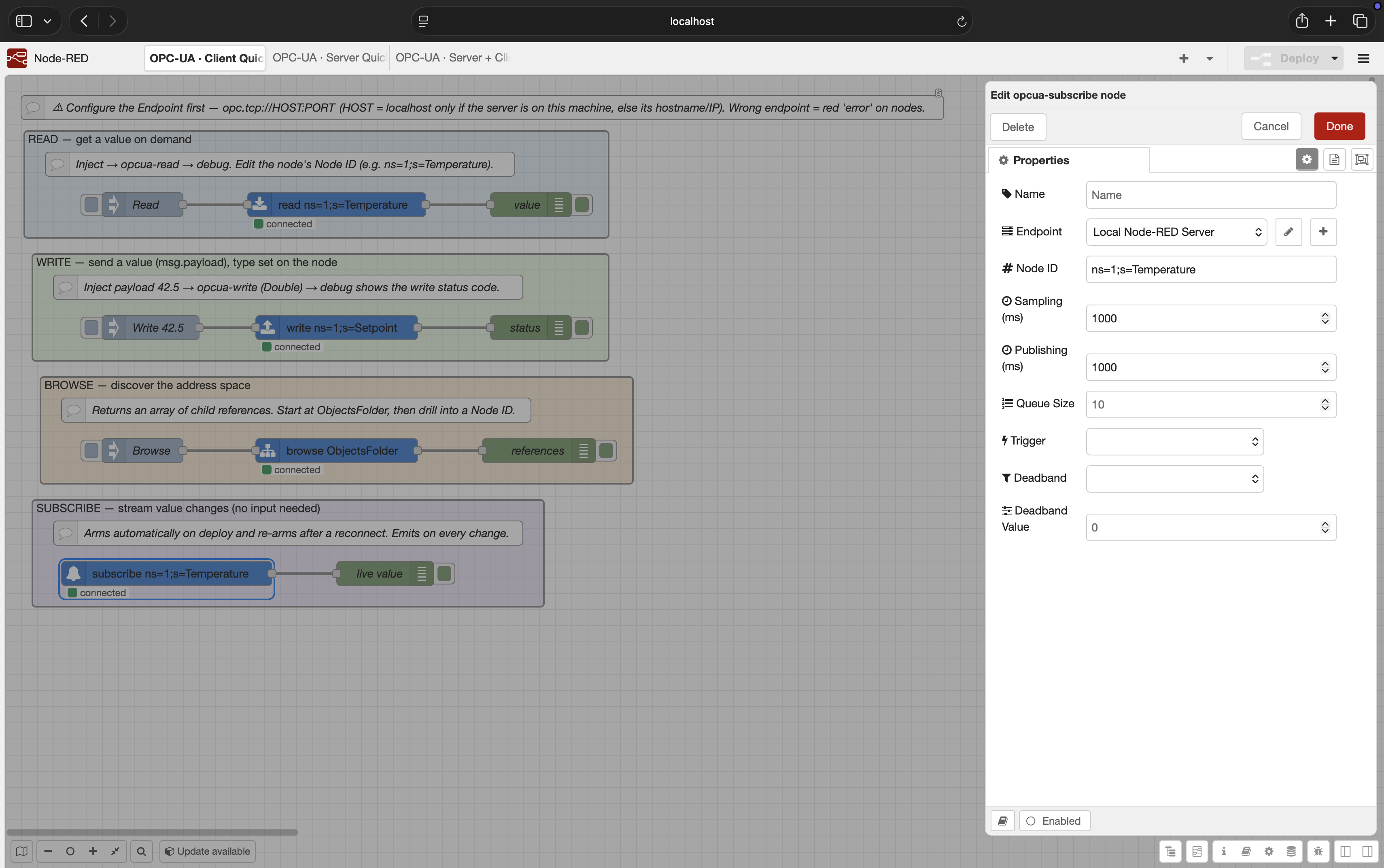
Output:
{
  "payload": 23.9,
  "nodeId": "ns=1;s=Temperature",
  "statusCode": "Good (0x00000000)",
  "sourceTimestamp": "2026-06-28T12:00:00.000Z"
}
Subscription settings:
| Field | Meaning |
|---|---|
| Sampling (ms) | How often the server samples the value |
| Publishing (ms) | How often the subscription publishes notifications |
| Queue Size | Number of changes to queue if the client cannot process them immediately |
| Trigger | Status only, status + value, or status + value + timestamp |
| Deadband | None, Absolute, or Percent |
| Deadband Value | Threshold for absolute or percent deadband |
All subscribe nodes that share the same endpoint use one OPC-UA subscription with separate monitored items. This is friendlier to servers that limit subscription counts.
Use opcua-server when you want other OPC-UA clients to read or write data owned by
Node-RED.
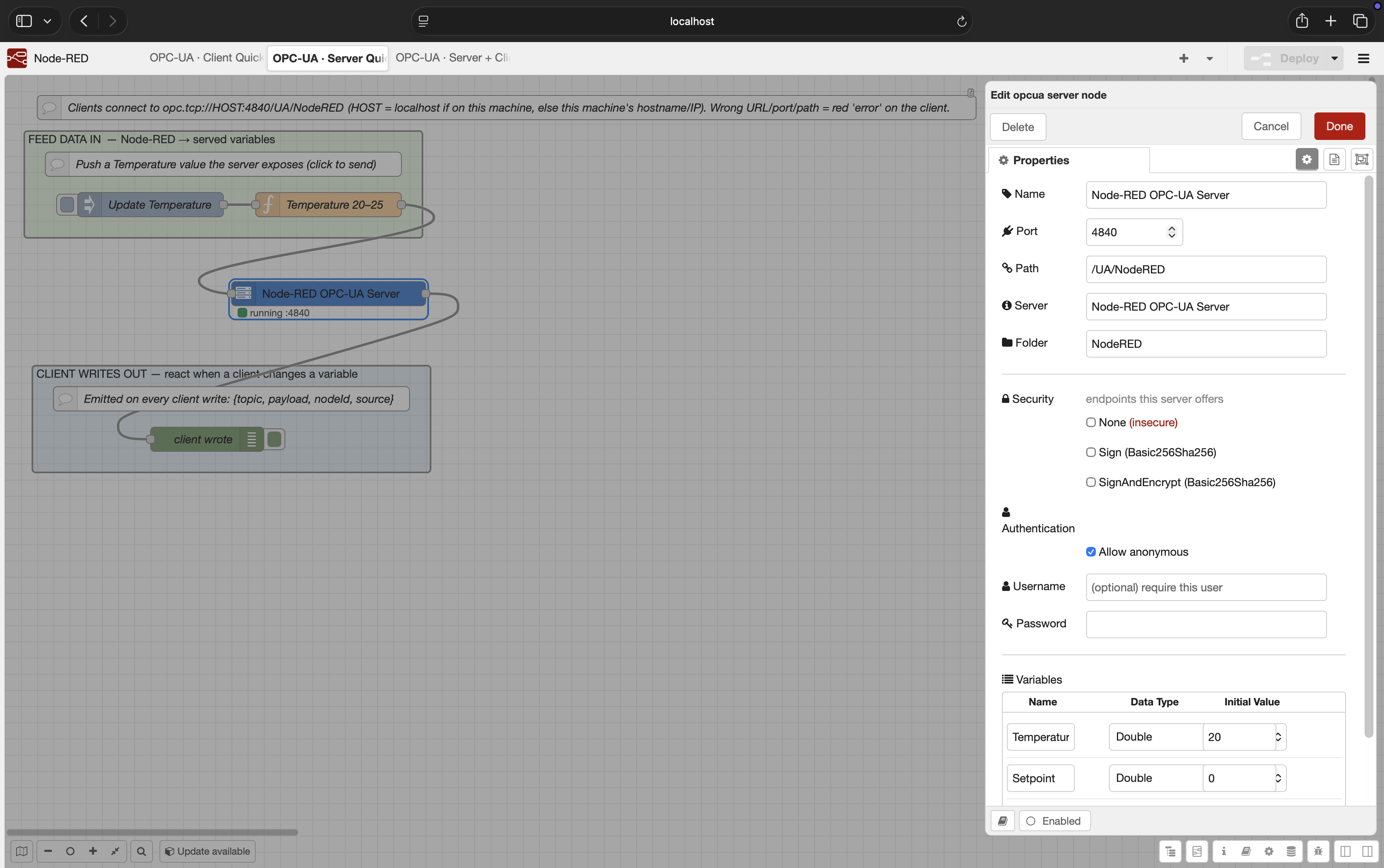
Input message:
{
  "topic": "Temperature",
  "payload": 24.2,
  "dataType": "Double"
}
The server exposes that as:
ns=1;s=Temperature
If an OPC-UA client writes to a served variable, the node emits:
{
  "topic": "Setpoint",
  "payload": 50,
  "nodeId": "ns=1;s=Setpoint",
  "source": "client"
}
Server security options:
- Offer
None,Sign, and/orSignAndEncryptendpoints. - Require username/password, allow anonymous, or support both.
- Validate client certificates in the server PKI trust store.
- Use
SignAndEncryptplus credentials for production-facing servers.
For secure client connections (Sign or SignAndEncrypt), server certificate validation is
enabled by default.
The client PKI store is created under:
<Node-RED userDir>/opcua-pki
Important folders:
| Folder | Purpose |
|---|---|
own/certs |
Node-RED client's own application certificate |
trusted/certs |
Server certificates explicitly trusted by this Node-RED instance |
rejected |
Unknown certificates rejected during connection attempts |
If a secure connection fails with BadCertificateUntrusted, copy the server certificate
from rejected into trusted/certs, then reconnect.
The Accept untrusted server cert option is for development only. It disables the trust decision and should not be used in production.
Credentials are stored using Node-RED credentials storage. For production systems, combine
username/password with SignAndEncrypt.
The opcua-server node stores server-side PKI material under:
<Node-RED userDir>/opcua-pki/server
When client certificate validation is enabled, unknown client certificates are rejected until trusted.
localhost means "inside this runtime".
Common cases:
- Node-RED and OPC-UA server on the same host:
opc.tcp://localhost:4840/... - Node-RED in Docker, server on host machine: use the host name/IP reachable from the
container, not
localhost. - Node-RED in Docker Compose: use the service name if both containers share a network.
- Remote PLC/server: use the PLC/server IP or DNS name and ensure the OPC-UA port is open.
- Confirm the endpoint URL, port, and resource path.
- Confirm Node-RED can reach the server from its runtime environment.
- Increase
Op timeoutif the network is slow. - Check whether the server requires security or credentials.
- Look in
<userDir>/opcua-pki/rejected. - Move the server certificate to
<userDir>/opcua-pki/trusted/certs. - Restart/reconnect the flow.
- Avoid Accept untrusted server cert outside development.
- Check whether the server requires
SignAndEncrypt. - Confirm the username and password in the endpoint credentials.
- Confirm the server supports username/password user tokens for the selected endpoint.
- Confirm the exact NodeId.
- Confirm the node exposes the
Valueattribute. - For writes, confirm the server allows writing and the selected data type matches.
- Confirm the node value actually changes.
- Check sampling/publishing intervals.
- Remove deadband while testing.
- Confirm the server permits subscriptions.
- Confirm Node.js is
>=22.9.0. - Confirm the package is installed in the Node-RED user directory or through Palette Manager.
- Restart Node-RED after installing if needed.
npm install
npm run lint
npm test
Run a local test server:
node test/helpers/standalone-server.js 4841It exposes:
ns=1;s=Temperature
ns=1;s=Label
ns=1;s=Setpoint
0.1.0 is the first public release. The core client/server workflows are implemented and
tested. Deferred items include OPC-UA method calls, X.509 user authentication, and richer
server-side address-space modeling.
MIT © jsgorana