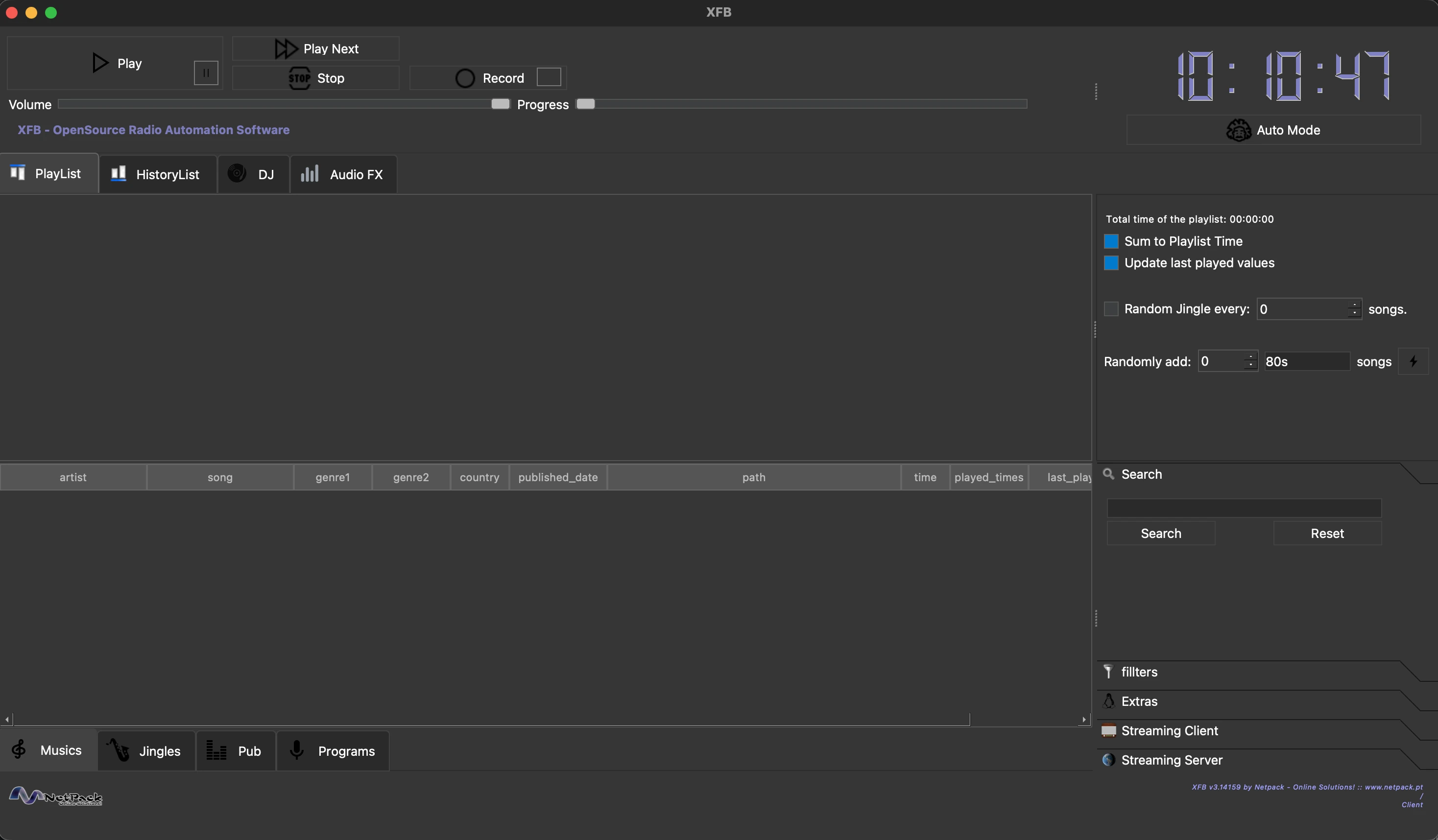




XFB is an open-source radio automation software developed by Frédéric Bogaerts at Netpack Online Solutions.
- Database Management — Catalog and organize music, jingles, advertisements, and programs
- Automated Scheduling — Create schedules for music playback, ad slots, and program airing
- Drag & Drop Playlist — Drag tracks from the music library directly into the playlist
- Multi-Player — Main player plus two auxiliary LP players for DJ mixing
- Audio FX — Per-player 10-band equalizer (with presets) and broadcast-style compressor, applied live (XFB → Audio FX, requires ffmpeg)
- 432 Hz Playback — Retune everything from A=440 to A=432 in real time without touching your files, or batch-convert one track, a selection, or the whole library (Database menu / music table right-click)
- Live Recording — Record programs directly within the application
- Streaming Client — Listen to any Icecast/Shoutcast stream or .m3u/.pls playlist from within XFB (with automatic reconnect), e.g. to monitor your station's output
- Torrent Search — Search and download music via Tor-routed onion sites
- Accessibility — ORCA screen reader support, keyboard navigation, audio feedback
- Cross-Platform — Runs on macOS, Linux (Debian/Arch), and Windows
Option A — Homebrew (recommended):
brew install --cask netpack/xfb/xfbThis installs XFB.app into /Applications together with ffmpeg (required by the
audio FX engine). Upgrade later with brew upgrade --cask xfb — or simply use
the in-app update notification.
Option B — Manual:
- Download
XFB-3.14159-macOS.dmgfrom GitHub Releases - Open the DMG file
- Drag
XFB.appinto your Applications folder - Launch XFB from Applications (first launch: right-click → Open to bypass Gatekeeper)
Requirements: macOS 11.0 (Big Sur) or later, Apple Silicon
# Download and install the .deb package
sudo apt install ./xfb_3.14159-1_amd64.deb

# Or if dependencies are missing:
sudo dpkg -i xfb_3.14159-1_amd64.deb
sudo apt install -f
Requirements: Ubuntu 20.04+ or Debian 11+, Qt6 runtime libraries
# Using yay
yay -S xfb

# Or using paru
paru -S xfb

# Or manually
git clone https://aur.archlinux.org/xfb.git
cd xfb
makepkg -si- Download the installer from GitHub Releases:
- Intel/AMD 64-bit:
XFB-3.14159-Setup.exe - ARM64 (Windows on ARM, e.g. Snapdragon):
XFB-3.14159-arm64-Setup.exe
- Intel/AMD 64-bit:
- Run the installer and follow the prompts
- Launch XFB from the Start Menu or Desktop shortcut
Requirements: Windows 10 or later (64-bit Intel/AMD or ARM64)
Option A — Manual:
- Drag
XFB.appfrom Applications to the Trash - Optionally remove config:
rm -rf ~/Library/Application\ Support/Netpack\ -\ Online\ Solutions/XFB
Option B — Script:
./uninstall-macos.shThis removes the app, configuration, cache, and Tor data. Your music library is preserved.
# Remove the application (keeps configuration)
sudo apt remove xfb

# Remove everything including configuration
sudo apt purge xfb# Remove the package
sudo pacman -R xfb
# Remove with unused dependencies
sudo pacman -Rns xfbUser configuration in ~/.config/XFB/ is preserved. Remove manually if desired.
- Installer version: Use "Add or Remove Programs" in Windows Settings, or run
Uninstall.exefrom the install directory - Portable version: Run
uninstall-windows.batthen delete the XFB folder
User data in %APPDATA%\Netpack - Online Solutions\XFB is preserved.
- Add music to the database via File → Add a single song or File → Add all songs in a folder
- Browse your music library in the Musics tab at the bottom
- Drag and drop a track from the music table onto the Playlist tab
- Alternatively, right-click a track and select "Add to Playlist"
- Click Play to start playback from the playlist
- Use the Auto Mode button to enable automatic advancement through the playlist
- The progress slider shows current position; the volume slider controls output level
| Action | Shortcut |
|---|---|
| Play/Pause | Space |
| Stop | Ctrl+S |
| Next Track | Ctrl+Right |
| Full Screen | F11 |
| Add Music | Ctrl+M |
| Save Playlist | Ctrl+Shift+S |
- C++17 compiler (GCC 9+, Clang 10+, MSVC 2019+)
- CMake 3.16+
- Qt6 (Core, Gui, Widgets, Multimedia, Sql, Network, WebEngineCore, WebEngineQuick, QuickWidgets)
brew install qt@6 cmake
git clone https://github.com/netpack/XFB.git
cd XFB
./build-macos.shsudo apt install build-essential cmake qt6-base-dev qt6-multimedia-dev qt6-webengine-dev libsqlite3-dev
git clone https://github.com/netpack/XFB.git
cd XFB
./build-deb-no-tests.shREM Requires: Qt6 (MSVC), CMake, Visual Studio 2022 Build Tools
REM x64 (default)
set QT_DIR=C:\Qt\6.8.3\msvc2022_64
build-windows.bat
REM ARM64 (Windows on ARM). Best built natively on an ARM64 machine.
set QT_DIR=C:\Qt\6.8.3\msvc2022_arm64
build-windows.bat --arch arm64To cross-compile ARM64 on an x64 machine, install the ARM64 MSVC build tools
plus both an x64 and an ARM64 Qt, then point QT_HOST_DIR at the x64 Qt so
windeployqt can run while deploying the ARM64 libraries:
set QT_DIR=C:\Qt\6.8.3\msvc2022_arm64
set QT_HOST_DIR=C:\Qt\6.8.3\msvc2022_64
build-windows.bat --arch arm64For full functionality, consider installing:
| Tool | Purpose |
|---|---|
tor |
Anonymous torrent search via onion sites |
aria2c |
Torrent downloading |
orca |
Screen reader support (Linux) |
exiftool |
Automatic track duration detection |
yt-dlp |
Download media from online sources |
ffmpeg |
Audio format conversion |
- Open an issue on GitHub
- Email: info@netpack.pt
- Website: netpack.pt
XFB is licensed under the GNU General Public License v3.0. See the LICENSE file for details.
Made with ❤️ by Frédéric Bogaerts @ Netpack - Online Solutions