All URIs are relative to https://cloud.seatable.io, except if the operation defines another base path.
| Method | HTTP request | Description |
|---|---|---|
| addSelectOption() | POST /api-gateway/api/v2/dtables/{base_uuid}/column-options/ | Add Single/Multiple Select Options |
| appendColumns() | POST /api-gateway/api/v2/dtables/{base_uuid}/batch-append-columns/ | Append Columns |
| deleteColumn() | DELETE /api-gateway/api/v2/dtables/{base_uuid}/columns/ | Delete Column |
| deleteSelectOption() | DELETE /api-gateway/api/v2/dtables/{base_uuid}/column-options/ | Delete Single/Multiple Select Options |
| insertColumn() | POST /api-gateway/api/v2/dtables/{base_uuid}/columns/ | Insert Column |
| listColumns() | GET /api-gateway/api/v2/dtables/{base_uuid}/columns/ | List Columns |
| updateColumn() | PUT /api-gateway/api/v2/dtables/{base_uuid}/columns/ | Update Column |
| updateColumnCascade() | POST /api-gateway/api/v2/dtables/{base_uuid}/column-cascade-settings/ | Update Column Cascade Settings |
| updateSelectOption() | PUT /api-gateway/api/v2/dtables/{base_uuid}/column-options/ | Update Single/Multiple Select Options |
addSelectOption($base_uuid, $add_single_multiple_select_options): objectAdd Single/Multiple Select Options
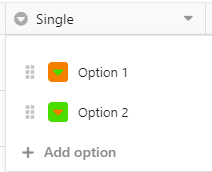
Once you have created a single/multiple select column, use this request to add options for it. In the request body: table_name is the name of the table; column is the name or the key of the single/multiple select column; options is an array containing the label (name), option color (color) and the color of the arrow (textColor):
<?php
require_once(__DIR__ . '/vendor/autoload.php');

// Configure Bearer authorization: BaseTokenAuth (use the right token for your request)
$config = SeaTable\Client\Configuration::getDefaultConfiguration()->setAccessToken('YOUR_TOKEN');
$apiInstance = new SeaTable\Client\Base\ColumnsApi(
    new GuzzleHttp\Client(),
    $config
);
$base_uuid = 5c264e76-0e5a-448a-9f34-580b551364ca; // string | The unique identifier of a base. Sometimes also called dtable_uuid.
$add_single_multiple_select_options = new \SeaTable\Client\Base\AddSingleMultipleSelectOptions(); // \SeaTable\Client\Base\AddSingleMultipleSelectOptions

try {
    $result = $apiInstance->addSelectOption($base_uuid, $add_single_multiple_select_options);
    print_r($result);
} catch (Exception $e) {
    echo 'Exception when calling ColumnsApi->addSelectOption: ', $e->getMessage(), PHP_EOL;
}| Name | Type | Description | Notes |
|---|---|---|---|
| base_uuid | string | The unique identifier of a base. Sometimes also called dtable_uuid. | |
| add_single_multiple_select_options | \SeaTable\Client\Base\AddSingleMultipleSelectOptions | [optional] |
object
BaseTokenAuth
appendColumns($base_uuid, $append_columns_request): objectAppend Columns
Use this request to append multiple columns to your table at once. As for the request body, refer to the previous call, Insert Column, for a detailed list of column formats. These requested and optional params can be used in the request body: table_name is the name of your table, required. columns is a list of columns you'd like to append, in each object of which: * column_name is the name of your new column, required; * column_type is the type of your new column, required; * column_data is the format setting of a special column, required in case. For details, refer to the call Insert Column. Please note that you can't append formula, link or link-formula columns using this endpoint. Use the Insert Column endpoint instead.
<?php
require_once(__DIR__ . '/vendor/autoload.php');

// Configure Bearer authorization: BaseTokenAuth (use the right token for your request)
$config = SeaTable\Client\Configuration::getDefaultConfiguration()->setAccessToken('YOUR_TOKEN');
$apiInstance = new SeaTable\Client\Base\ColumnsApi(
    new GuzzleHttp\Client(),
    $config
);
$base_uuid = 5c264e76-0e5a-448a-9f34-580b551364ca; // string | The unique identifier of a base. Sometimes also called dtable_uuid.
$append_columns_request = new \SeaTable\Client\Base\AppendColumnsRequest(); // \SeaTable\Client\Base\AppendColumnsRequest

try {
    $result = $apiInstance->appendColumns($base_uuid, $append_columns_request);
    print_r($result);
} catch (Exception $e) {
    echo 'Exception when calling ColumnsApi->appendColumns: ', $e->getMessage(), PHP_EOL;
}| Name | Type | Description | Notes |
|---|---|---|---|
| base_uuid | string | The unique identifier of a base. Sometimes also called dtable_uuid. | |
| append_columns_request | \SeaTable\Client\Base\AppendColumnsRequest | [optional] |
object
BaseTokenAuth
deleteColumn($base_uuid, $delete_column): objectDelete Column
Delete a column with its name or key. See the request body for detailed params.
<?php
require_once(__DIR__ . '/vendor/autoload.php');

// Configure Bearer authorization: BaseTokenAuth (use the right token for your request)
$config = SeaTable\Client\Configuration::getDefaultConfiguration()->setAccessToken('YOUR_TOKEN');
$apiInstance = new SeaTable\Client\Base\ColumnsApi(
    new GuzzleHttp\Client(),
    $config
);
$base_uuid = 5c264e76-0e5a-448a-9f34-580b551364ca; // string | The unique identifier of a base. Sometimes also called dtable_uuid.
$delete_column = new \SeaTable\Client\Base\DeleteColumn(); // \SeaTable\Client\Base\DeleteColumn

try {
    $result = $apiInstance->deleteColumn($base_uuid, $delete_column);
    print_r($result);
} catch (Exception $e) {
    echo 'Exception when calling ColumnsApi->deleteColumn: ', $e->getMessage(), PHP_EOL;
}| Name | Type | Description | Notes |
|---|---|---|---|
| base_uuid | string | The unique identifier of a base. Sometimes also called dtable_uuid. | |
| delete_column | \SeaTable\Client\Base\DeleteColumn | [optional] |
object
BaseTokenAuth
deleteSelectOption($base_uuid, $delete_select_options): objectDelete Single/Multiple Select Options
Use this request to remove single select or multiple select options that you don't need any more. These deleted options will be removed from the entries containing them. In the request body: table_name is the name of the table; column is the name or the key of the single/multiple select column; option_names is a list of options you'd like to delete.
<?php
require_once(__DIR__ . '/vendor/autoload.php');

// Configure Bearer authorization: BaseTokenAuth (use the right token for your request)
$config = SeaTable\Client\Configuration::getDefaultConfiguration()->setAccessToken('YOUR_TOKEN');
$apiInstance = new SeaTable\Client\Base\ColumnsApi(
    new GuzzleHttp\Client(),
    $config
);
$base_uuid = 5c264e76-0e5a-448a-9f34-580b551364ca; // string | The unique identifier of a base. Sometimes also called dtable_uuid.
$delete_select_options = new \SeaTable\Client\Base\DeleteSelectOptions(); // \SeaTable\Client\Base\DeleteSelectOptions

try {
    $result = $apiInstance->deleteSelectOption($base_uuid, $delete_select_options);
    print_r($result);
} catch (Exception $e) {
    echo 'Exception when calling ColumnsApi->deleteSelectOption: ', $e->getMessage(), PHP_EOL;
}| Name | Type | Description | Notes |
|---|---|---|---|
| base_uuid | string | The unique identifier of a base. Sometimes also called dtable_uuid. | |
| delete_select_options | \SeaTable\Client\Base\DeleteSelectOptions | [optional] |
object
BaseTokenAuth
insertColumn($base_uuid, $insert_column_request): \SeaTable\Client\Base\UpdateColumn200ResponseInsert Column
Create a new column. You can only add one new column at the end of a table.
<?php
require_once(__DIR__ . '/vendor/autoload.php');

// Configure Bearer authorization: BaseTokenAuth (use the right token for your request)
$config = SeaTable\Client\Configuration::getDefaultConfiguration()->setAccessToken('YOUR_TOKEN');
$apiInstance = new SeaTable\Client\Base\ColumnsApi(
    new GuzzleHttp\Client(),
    $config
);
$base_uuid = 5c264e76-0e5a-448a-9f34-580b551364ca; // string | The unique identifier of a base. Sometimes also called dtable_uuid.
$insert_column_request = new \SeaTable\Client\Base\InsertColumnRequest(); // \SeaTable\Client\Base\InsertColumnRequest | Choose which column type you want to add. If you want to add multiple columns, use the request [Append Columns](/reference/appendcolumns-1).

try {
    $result = $apiInstance->insertColumn($base_uuid, $insert_column_request);
    print_r($result);
} catch (Exception $e) {
    echo 'Exception when calling ColumnsApi->insertColumn: ', $e->getMessage(), PHP_EOL;
}| Name | Type | Description | Notes |
|---|---|---|---|
| base_uuid | string | The unique identifier of a base. Sometimes also called dtable_uuid. | |
| insert_column_request | \SeaTable\Client\Base\InsertColumnRequest | Choose which column type you want to add. If you want to add multiple columns, use the request Append Columns. | [optional] |
\SeaTable\Client\Base\UpdateColumn200Response
BaseTokenAuth
listColumns($table_name, $base_uuid, $view_name): objectList Columns
List all the visible columns in a certain view in a table.
<?php
require_once(__DIR__ . '/vendor/autoload.php');

// Configure Bearer authorization: BaseTokenAuth (use the right token for your request)
$config = SeaTable\Client\Configuration::getDefaultConfiguration()->setAccessToken('YOUR_TOKEN');
$apiInstance = new SeaTable\Client\Base\ColumnsApi(
    new GuzzleHttp\Client(),
    $config
);
$table_name = Table1; // string | The name of the table to perform the operation on. Alternatively, you can use the `table_id` instead of `table_name`. If using `table_id`, ensure that the key in the request body is replaced accordingly. **Example:** Instead of `table_name: Table1` you can use `table_id: 0000`.
$base_uuid = 5c264e76-0e5a-448a-9f34-580b551364ca; // string | The unique identifier of a base. Sometimes also called dtable_uuid.
$view_name = Default View; // string | The name of the view to perform the operation on. Alternatively, you can use the `view_id` instead of `view_name`. If using `view_id`, ensure that the key in the request body is replaced accordingly. **Example:** Instead of `view_name: Default View` you can use `view_id: 0000`.

try {
    $result = $apiInstance->listColumns($table_name, $base_uuid, $view_name);
    print_r($result);
} catch (Exception $e) {
    echo 'Exception when calling ColumnsApi->listColumns: ', $e->getMessage(), PHP_EOL;
}| Name | Type | Description | Notes |
|---|---|---|---|
| table_name | string | The name of the table to perform the operation on. Alternatively, you can use the `table_id` instead of `table_name`. If using `table_id`, ensure that the key in the request body is replaced accordingly. Example: Instead of `table_name: Table1` you can use `table_id: 0000`. | |
| base_uuid | string | The unique identifier of a base. Sometimes also called dtable_uuid. | |
| view_name | string | The name of the view to perform the operation on. Alternatively, you can use the `view_id` instead of `view_name`. If using `view_id`, ensure that the key in the request body is replaced accordingly. Example: Instead of `view_name: Default View` you can use `view_id: 0000`. | [optional] |
object
BaseTokenAuth
updateColumn($base_uuid, $update_column): \SeaTable\Client\Base\UpdateColumn200ResponseUpdate Column
Allows various changes of the column: name, column_type, freeze/unfreeze, resize, etc... op_type is required. The following options are available: - rename_column - modify_column_type - resize_column - move_column - freeze_column column is the name or key of the target column. new_column_type is the new type of the target column. For a list of column type params refer to the SeaTable API Parameter. For further information on column types, check the page Models.
<?php
require_once(__DIR__ . '/vendor/autoload.php');

// Configure Bearer authorization: BaseTokenAuth (use the right token for your request)
$config = SeaTable\Client\Configuration::getDefaultConfiguration()->setAccessToken('YOUR_TOKEN');
$apiInstance = new SeaTable\Client\Base\ColumnsApi(
    new GuzzleHttp\Client(),
    $config
);
$base_uuid = 5c264e76-0e5a-448a-9f34-580b551364ca; // string | The unique identifier of a base. Sometimes also called dtable_uuid.
$update_column = new \SeaTable\Client\Base\UpdateColumn(); // \SeaTable\Client\Base\UpdateColumn

try {
    $result = $apiInstance->updateColumn($base_uuid, $update_column);
    print_r($result);
} catch (Exception $e) {
    echo 'Exception when calling ColumnsApi->updateColumn: ', $e->getMessage(), PHP_EOL;
}| Name | Type | Description | Notes |
|---|---|---|---|
| base_uuid | string | The unique identifier of a base. Sometimes also called dtable_uuid. | |
| update_column | \SeaTable\Client\Base\UpdateColumn | [optional] |
\SeaTable\Client\Base\UpdateColumn200Response
BaseTokenAuth
updateColumnCascade($base_uuid, $body): objectUpdate Column Cascade Settings
After you have added at least two single select columns and have added relevant options, you can start to set the cascade relationships between these single select columns. ## What are cascade settings? With cascade settings for the single select column, you can set up a "parent" single select column and a "child" single select column, so that when you select one option in the parent, the child column will only show you the options belonging to that parent. For example, if the parent column is "continent" and you've selected "Europe", then the child column will only show you the countries in Europe. Of course, this doesn't happen automatically - you have to set up the cascade relationship with this API request first. 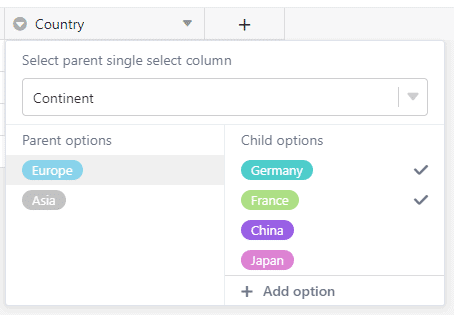
success: - table_name: The name of the table. - parent_column: The 1st level of single select column's name or key. - child_column: The 2nd level of single select column's name or key. - cascade_settings: In this object, list all the child options for each parent option, like demonstrated in the example request.
<?php
require_once(__DIR__ . '/vendor/autoload.php');

// Configure Bearer authorization: BaseTokenAuth (use the right token for your request)
$config = SeaTable\Client\Configuration::getDefaultConfiguration()->setAccessToken('YOUR_TOKEN');
$apiInstance = new SeaTable\Client\Base\ColumnsApi(
    new GuzzleHttp\Client(),
    $config
);
$base_uuid = 5c264e76-0e5a-448a-9f34-580b551364ca; // string | The unique identifier of a base. Sometimes also called dtable_uuid.
$body = array('key' => new \stdClass); // object

try {
    $result = $apiInstance->updateColumnCascade($base_uuid, $body);
    print_r($result);
} catch (Exception $e) {
    echo 'Exception when calling ColumnsApi->updateColumnCascade: ', $e->getMessage(), PHP_EOL;
}| Name | Type | Description | Notes |
|---|---|---|---|
| base_uuid | string | The unique identifier of a base. Sometimes also called dtable_uuid. | |
| body | object | [optional] |
object
BaseTokenAuth
updateSelectOption($base_uuid, $update_single_multiple_select_options): objectUpdate Single/Multiple Select Options
Use this request to update existing single/multiple select options by changing their name and/or color. In the request body: table_name is the name of your table, required; column is the name of the column, required; options is a list of option objects that you would like to update, in which: * id is the ID of that option, which you can retrive with the call "List Columns in A View in A Table", required; * color is the label's new color, optional; * name is the label's new name, optional. return_options gives you the possibility to get an overview of all the options you just updated, optional, false by default.
<?php
require_once(__DIR__ . '/vendor/autoload.php');

// Configure Bearer authorization: BaseTokenAuth (use the right token for your request)
$config = SeaTable\Client\Configuration::getDefaultConfiguration()->setAccessToken('YOUR_TOKEN');
$apiInstance = new SeaTable\Client\Base\ColumnsApi(
    new GuzzleHttp\Client(),
    $config
);
$base_uuid = 5c264e76-0e5a-448a-9f34-580b551364ca; // string | The unique identifier of a base. Sometimes also called dtable_uuid.
$update_single_multiple_select_options = new \SeaTable\Client\Base\UpdateSingleMultipleSelectOptions(); // \SeaTable\Client\Base\UpdateSingleMultipleSelectOptions

try {
    $result = $apiInstance->updateSelectOption($base_uuid, $update_single_multiple_select_options);
    print_r($result);
} catch (Exception $e) {
    echo 'Exception when calling ColumnsApi->updateSelectOption: ', $e->getMessage(), PHP_EOL;
}| Name | Type | Description | Notes |
|---|---|---|---|
| base_uuid | string | The unique identifier of a base. Sometimes also called dtable_uuid. | |
| update_single_multiple_select_options | \SeaTable\Client\Base\UpdateSingleMultipleSelectOptions | [optional] |
object
BaseTokenAuth