Identify stale content in your ArcGIS Online organisation and send polite, automated reminders to item owners to consider cleaning up.

A healthy ArcGIS Online organisation creates a lot of content. Over time, older items accumulate that are no longer actively used but continue to consume storage credits. This notebook helps admins manage that problem without being heavy-handed — it identifies stale items and nudges owners to take action, rather than deleting anything automatically.
As an ArcGIS administrator, I don't want to stifle content creation amongst my Web GIS users, but I do want to gently remind them to clear out items that are no longer being used.
This notebook will detect and notify users about items that are:
- Not getting recent views
- Larger filesizes
- Are old
Results are written to a Hosted Table in your org for reporting and dashboarding. A public-facing dashboard showing the stale items list is a surprisingly effective way to encourage users to self-manage — no-one wants to appear on the list.

⚠️ Test first. Run this notebook against a free ArcGIS Developer Plan or a staging subscription before using it in production.
The notebook writes results to a Hosted Table. Create one in your org and do NOT make it public. You can remove email if you do not want this information recorded. This is to support other workflows where you might want to send emails or work with notification in MS Teams via a bot.
The table requires the following fields:
| Field | Type | Purpose |
|---|---|---|
id |
String | ArcGIS item ID |
title |
String | Item title |
owner |
String | Username |
FirstName |
String | Owner's first name (used in notification comment) |
email |
String | Owner's email address |
disabled |
String | Whether the owner account is disabled ("0" / "1") |
access |
String | Item sharing level |
size_mb |
Double | Item size in MB |
numViews60d |
Integer | Views in last 60 days |
ReminderSent |
Date | Timestamp of notification — NULL means not yet notified |
- Log in to your ArcGIS Online account
- Go to Content → New Item
- Drag and drop
declutter.ipynbinto the upload dialog - Add metadata to the item
Alternatively you can run this notebook from importing it into ArcGIS Pro or VS Code, but then you can't later schedule it to run.
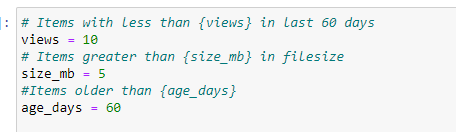
Open the notebook and update Cell 2 — this is the only cell you need to edit before running:
# STALE ITEM THRESHOLDS
views    = 10   # fewer than this many views in the last 60 days
size_mb  = 5    # larger than this many MB
age_days = 40   # older than this many days

# HOSTED TABLE
table_item = 'YOUR_TABLE_ITEM_ID_HERE'  # replace with your item ID

# NOTIFICATION SETTINGS
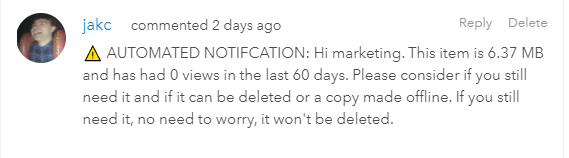
NOTIFICATION_PREFIX     = '⚠️ AUTOMATED NOTIFICATION'  # do not change after first run
SLEEP_BETWEEN_COMMENTS  = 15  # seconds between comments — do not set below 12
⚠️ Do not changeNOTIFICATION_PREFIXafter your first run. The notebook uses this string to detect previously notified items. Changing it will cause all items to be treated as new and owners will receive duplicate notifications.
The notebook is structured as a linear flow. Run each cell in order:
| Cell | What it does |
|---|---|
| 1 | Connect to GIS |
| 2 | Set configuration |
| 3 | Search for all Hosted Feature Services |
| 4 | Scan items and apply stale filters |
| 5 | Preview results as a DataFrame |
| 6 | Write results to the Hosted Table |
| 7 | Return the table item |
| 8 | Query items pending notification |
| 9 | Define check_comments() helper |
| 10 | Preview notifications — review who will be contacted before proceeding |
| 11 | Send notifications — only run once satisfied with the preview |

You can scheule the notebook to run as a task.
Having this run as a fortnightly or monthly task is usually sufficient for most reporting purposes.
