MycotoolsDB
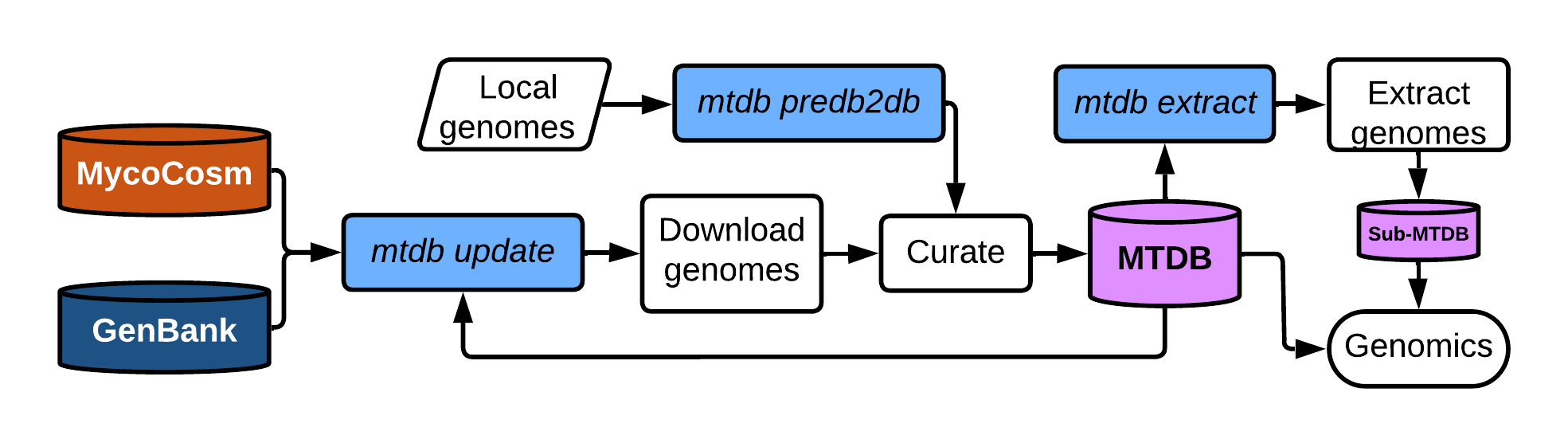
MycotoolsDBs (MTDBs) are locally assimilated, uniformly curated databases of
local, JGI MycoCosm, and NCBI genomic data. An MTDB is represented as a
tab-delimited .mtdb reference file, which serves as the scalable input to
Mycotools commands.
Herein are the objectives, standards, and expectations of MTDB and its associated files.
Enable broadscale comparative genomics via a systematically curated, automatically assembled and updated, scalable genomes database. MTDB primarily seeks to resolve several outstanding problems in comparative genomics:
- Uniformly curate genome data within and across multiple databases, e.g. the
inconsistency of gene coordinate
gfffiles - Promote ease-of-use for large-scale analyses, e.g. transitioning between datasets in a phylogenetic analysis
- Keep up with the accelerating deposition of public genome data via automatic updates
- Implement a modular comparative genomics toolkit that enables automated pipelining and makes routine analyses accessible
Because MTDBs are essentially tab-delimited spreadsheets, the database can be
scaled by extracting rows of interest with bash or
mtdb extract
and feeding the scaled MTDB into Mycotools
commands. Master MTDB files are
labeled YYYYmmdd.mtdb after the date the update began; the most recent .mtdb
in the primary MTDB folder is used as the primary database.
Example row:
#ome    genus   species strain  taxonomy        version source  biosample   assembly_acc    acquisition_date        published       fna     faa     gff3
aaoarx1 Aaosphaeria     arxii   CBS17579        {"clade": "dothideomyceta", "kingdom": "Fungi", "phylum": "Ascomycota", "subphylum": "Pezizomycotina", "class": "Dothideomycetes", "subclass": "Pleosporomycetidae", "order": "Pleosporales", "family": "", "subfamily": "", "genus": "Aaosphaeria", "species": "Aaosphaeria arxii"}    v1.0    jgi             Aaoar1  20210414 Haridas S et al.,2020
One row per genome, with ordered columns:
-
ome: MTDB accession "ome" — first three letters of genus, first three letters of species (or "sp."), unique database number, and an optional MTDB version tag.\d+, e.g.psicub1/cryneo24.1;[a-zA-Z0-9\.] -
genus: genus name;[a-zA-Z] -
species: species name;[a-zA-Z] -
strain: strain name;[a-zA-Z0-9\-\.] -
taxonomy: NCBI taxonomyJSONobject derived from genus -
version: MycoCosm version/NCBI modification date -
source: genome source, e.g. 'ncbi'/'jgi'/'lab';[a-z0-9\.] -
biosample: optional NCBI BioSample accession -
assembly_acc: NCBI GenBank/RefSeq assembly accession or MycoCosm portal -
acquisition_date: date of input into the primary database;YYYYmmdd -
published: publication metadata or binary publication response; 0/None/'' are use-restricted — all others are presumed open access by Mycotools commands (see below) -
fna: assembly.fna, required when not$MYCOFNA/fna/<ome>.fna; PATH -
faa: proteome.faa, required when not$MYCOFAA/faa/<ome>.faa; PATH -
gff3: gene coordinate.gff3, required when not$MYCOGFF3/gff3/<ome>.gff3; PATH
Header lines must begin with #; generally, lines beginning with # are
ignored.
MTDB requires an assembly and gene coordinate gff3 for ALL GENOMES. Proteomes
are generated by referencing the assembly and gff3.
All MTDB aliases are formatted as <ome>_<acc>, where ome is the ome in the
MTDB and acc is the retrieved accession, for both assemblies and proteomes.
Alias accessions are therefore connected to the MTDB by slicing to the
underscore. Accessions are pulled from the gene coordinates file: the
protein_id field for JGI, and the product_id field for NCBI.
Entries without a detected protein ID are assigned an alias with the prefix
mtdb. Pseudogene, tRNA, and rRNA aliases are formatted as
<ome>_<type><type_count>.
MTDB curates, assimilates, and modernizes MycoCosm and NCBI legacy data. All
entries contain an MTDB alias in the attributes field, and all attribute fields
contain ID=[^;]+ and Alias=[^;]+. Non-gene entries carry a Parent=[^;]+
field relating the entry to its parent RNA, and each RNA to its parent gene. For
non-gene terminal entries — where the highest entry in a hierarchy is not a
gene/pseudogene — the assigned Alias corresponds to the type field.
On the occasion a GFF entry is not given an Alias, assume that it is ignored by
Mycotools. Curation is fairly robust for JGI and NCBI GFFs, but other GFFs may
have cryptic formatting discrepancies. CDSs without an alias are not translated
into the proteome faa fasta.
-
gene,pseudogene: contains the terminal ID of descendant entries and an alias (Alias=.*;) of all MTDB aliases derived from the gene, separated by|.ID=gene_<ACC> -
mRNA,tRNA,rRNA,RNA:RNAis synonymous withtranscriptand represents ambiguous RNA, which may be interpreted as mRNA in downstream software or ignored.ID=<RNA>_<ACC> -
exon: parent is an RNA ID; introns are curated to exons.ID=exon_<ACC>_<EXON#> -
CDS: parent is an RNA ID; typically contains aprotein_id/product_idfield.ID=CDS_<ACC>_<CDS#> -
three_prime_UTR,five_prime_UTR
MTDB recognizes several attribute fields, separated by a semi-colon and optionally contained within single/double quotes. Non-recognized fields are permitted.
-
Alias=<ome>_<acc>: MTDB accession; REQUIRED -
ID=[^;]+: entryID; REQUIRED -
Parent=[^;]+: theIDthis row descends from, i.e. gene → mRNA → CDS/exon -
[protein_id[^;]+|proteinId=[^;]+]: protein ID field -
product=[^;]+: functional annotation -
[transcriptId=[^;]+|transcript_id=[^;]+]: transcript ID field
Alternately spliced genes are accounted for in curation. Genes with alternately
spliced descendants have multiple aliases, separated by |; mRNAs and their
children all have unique aliases. Groups of CDS coordinates tied to the same mRNA
that are exactly the same as another group are removed, because this is commonly
an annotation error and/or the resulting protein sequence will not differ.
Proteomes are generated on the fly when updating the database by referencing an
MTDB-curated gff3 and assembly. Proteins are generated from CDS coordinates
that can be tied to an mRNA with a gene parent.
mtdb update prioritizes MycoCosm (JGI) genomes over NCBI by referencing the
submitter field in NCBI assembly metadata. NCBI genomes that lack a strain are
excluded if a JGI genome of the same species exists. For JGI downloading, each
unique Portal (genome accession) is retrieved from the MycoCosm primary table.
Use-restriction metadata is applied from the associated field in the MycoCosm
primary table. By default, use-restricted JGI data is excluded and must be
specifically requested via --nonpublished in mtdb update.
IT IS USER RESPONSIBILITY TO VERIFY THE VALIDITY OF AUTOMATICALLY APPLIED USE-RESTRICTION LABELS. Please review JGI policy on use-restricted data.
NCBI genomes are retrieved from the primary eukaryotes.txt/prokaryotes.txt
tables; each unique assembly accession not submitted by JGI is retrieved. Version
checking operates on the Modify Date field.
All NCBI entries are assumed to be "published" for non-restricted use. "However, some submitters may claim patent, copyright, or other intellectual property rights in all or a portion of the data they have submitted." — NCBI. It is user responsibility to determine which, if any, genome data have use-restriction policies.
There may be edge-case examples of use-restricted NCBI data; however, NCBI cannot provide oversight for their particular restrictions, and thus MTDB cannot determine what is use-restricted. A git issue can be raised for isolated examples, which can then be incorporated into a manually curated exceptions file; for local handling, simply empty the publication field of the associated row. MTDBs are user-assimilated databases, and Mycotools makes no guarantee that it comprehensively addresses use-restriction. It is ultimately user responsibility to ensure that any sensitive data are available for use.
Locally annotated genomes are added to the database by filling out and submitting
a .predb file via mtdb predb, which curates the inputted data and outputs to
the current directory. Once complete, the generated .mtdb is added to the
primary database:
mtdb update --add <PREDB_RESULT>All taxonomy metadata is acquired by querying the NCBI taxonomy with the genus name; taxonomy is therefore subject to errors in NCBI taxonomy.
The primary MTDB should be generated by one user, with privileges distributed
using chmod, e.g. chmod -R 755. Note that the primary user/group are the only
ones privileged to update the primary database and merge manually curated predb
files into it.
Users should refrain from editing database files, as unexpected errors may result in downstream commands.