Usage

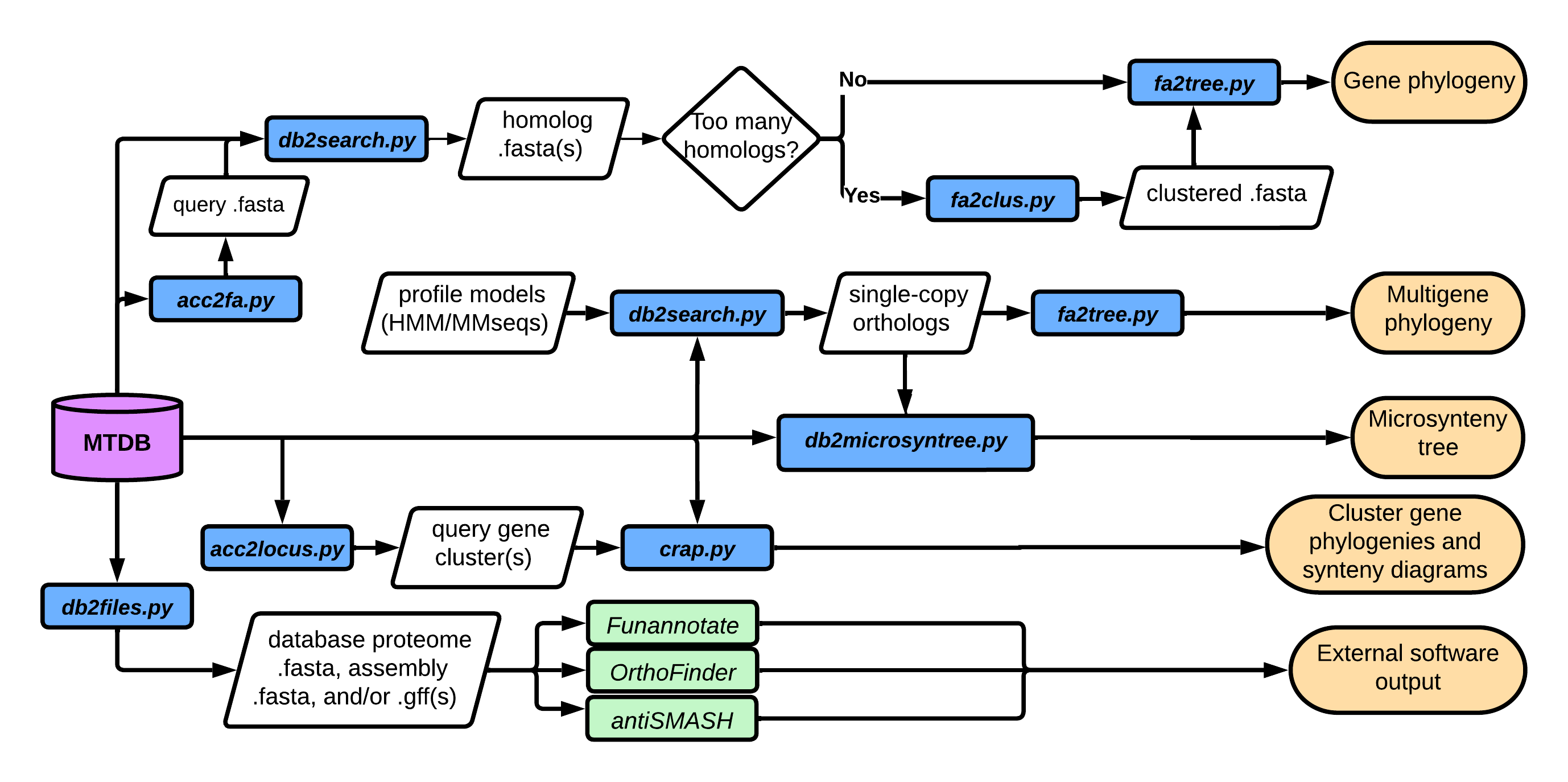
Mycotools is a comparative genomics software suite built around a curated database — the MycotoolsDB (MTDB) — of standardized genomic data. This guide covers the Mycotools commands that enable high-throughput pipelining and routine genomic analysis.
Mycotools is heavily dependent on the MycotoolsDB: its standardized file formats are what make automated, reproducible analysis possible, so there is no guarantee that these commands will work with arbitrary external files. For the rationale behind this design, see the MycotoolsDB guide.
Contents
Mycotools exposes two top-level commands:
| Command | Purpose |
|---|---|
mtdb |
Build, manage, and query the MycotoolsDB |
mycotools |
Downstream comparative-genomics analysis |
Each takes a subcommand — and, where relevant, a nested method or format — such
as mycotools phylo tree or mtdb accession gbk. Append -h at any level to
list its options:
mycotools -h
mycotools phylo -h
mycotools phylo tree -h
Migrating from an earlier release? The former standalone commands (
db2search,fa2tree,acc2gbk, …) remain available for one transition release. They now print a deprecation notice and forward to the nested invocation shown throughout this guide — please update your scripts accordingly.
After installation, decide which role applies to you:
- Users who want to work with an existing MycotoolsDB should interface with a preexisting central database.
- Administrators building a new MycotoolsDB should proceed to initialization.
The following commands interface with and manipulate MycotoolsDB (MTDB) .mtdb
files. To learn more about the MycotoolsDB and the .mtdb format standard, refer
to this guide.
mtdb update initializes and builds the primary MTDB. To instead interface with
an established MTDB, see
interfacing.
Fungi. To initialize a curated database of all NCBI and MycoCosm (JGI) fungal genomes:
mtdb update -i <INIT_DIR>JGI downloading is throttled to one file per minute, so initialization takes multiple days. It can be resumed with
-r YYYYmmdd.
Bacteria, plants, animals, archaea. To initialize a curated database of NCBI genomes from other kingdoms/superkingdoms:
mtdb update -i <INIT_DIR> --kingdom <KINGDOM>There are hundreds of thousands of bacterial genomes — and plant and animal genomes are orders of magnitude larger — so this may take several days to weeks.
Specific lineages. To restrict initialization to specific lineages of Fungi,
append --lineage and --rank. Include the appropriate --kingdom argument if
the target is not Fungi:
mtdb update -i <INIT_DIR> \
    --lineage "Pezizomycotina,Agaricomycotina" \
    --rank "subphylum,subphylum"
HPC usage. If you use a job submission protocol such as SLURM, you can encrypt your NCBI and JGI login information and pass the encryption password when submitting a job, as described under managing.
A MycotoolsDB can be initialized against an external .mtdb file — for example,
to reproduce an analysis using another dataset. Note that this only assimilates
NCBI and JGI genomes from the reference .mtdb.
If you are currently linked to an existing MycotoolsDB, unlink first:
mtdb -uThen initialize from the reference, appending any necessary arguments:
mtdb update -i <INIT_DIR> -r <REF.mtdb>On success, a new MycotoolsDB is initialized in <INIT_DIR>. To link back to a
previously established MycotoolsDB, see
interfacing.
A MycotoolsDB can be initialized from a predb.tsv file describing your local
genomes. Mycotools requires both an assembly and an annotation for every genome
in the database.
Generate a blank spreadsheet:
mtdb predb > predb.tsvOnce it is filled in, initialize your primary MTDB against the metadata spreadsheet:
mtdb update -i <INIT_DIR> --predb predb.tsvUpdate the MycotoolsDB:
mtdb update -uUpdate the taxonomy of the primary MTDB:
mtdb update -tmtdb is the central MycotoolsDB utility. Run without arguments, it prints the
path of the primary database (MycotoolsDBs are labeled YYYYmmdd.mtdb):
$ mtdb
/home/xonq/mtdb/mtdb/20210125.mtdb
To link to a primary MTDB:
mtdb -i <DATABASE_BASE_DIR>To encrypt a local copy of your NCBI and JGI passwords for fast access:
mtdb manage -pThis is required to submit jobs for commands that need passwords. Such commands
(for example mtdb update) receive the password from stdin:
read -s PASSWORD
# <type password>
printf '{"username":"myname","password":"%s"}' "$PASSWORD" | mtdb update -umtdb can query ome codes. To obtain the entire row for an ome code:
mtdb <OME>To obtain a specific file path for an ome, append .fna (assembly), .faa
(proteome), or .gff3 (gene coordinates):
mtdb <OME>.<EXTENSION>Because mtdb returns paths, you can use standard shell utilities to work with
the output — for example, to open the database in an editor or grep it:
vim $(mtdb)
grep 'Psilocybe' $(mtdb)
Note:
grepmay return non-specific taxonomy results. For example,grep Athelia $(mtdb)yields not only the genus Athelia but also all members of the family Atheliaceae. Usemtdb extractto subset by taxonomy precisely.
mtdb extract subsets lineages of interest from the primary MTDB. By default it
ignores use-restricted data; add -n to include use-restricted data only if you
understand and will respect its limitations. Run mtdb extract -h for all
options.
Extract a database for a taxonomic order:
mtdb extract -l Atheliales > atheliales.mtdbExtract all NCBI Aspergillus accessions:
mtdb extract -s ncbi -l aspergillus > aspergillus.mtdb_ncbiExtract a list of orders from a file:
mtdb extract -ll <TAX_FILE> > taxa.mtdbmtdb files takes a .mtdb file (the primary database by default) and either
symlinks the selected file types, hard-copies them, or prints their paths. A
symlink is a lightweight placeholder that points at the database file, so it does
not consume additional storage the way a hard copy does. Because editing a
symlink edits the original file, only hard-copy (--hard) when you need to edit
the files.
Suppose you want protein data for one family. First extract a database of the organisms of interest:
mtdb extract -l Atheliaceae > atheliaceae.mtdbThen copy the protein fastas into the current directory (run mtdb files -h for
all options):
mtdb files -d atheliaceae.mtdb -pOr, if you only need the paths (links) to these files:
mtdb files -d atheliaceae.mtdb -p --printTo add in-house genomes and annotations (both required), mtdb predb
ingests your genome and metadata, curates them, and prepares a database file for
integration. Your database administrator then adds the result to the primary
MTDB.
First, generate a predb spreadsheet:
mtdb predb > predb.tsvThe resulting predb.tsv can be edited in spreadsheet software and exported as a
tab-delimited .tsv, or edited directly in a plain-text editor (tab-separated).
Note the following conventions for the genomeSource column:
- De novo annotations produced by Funannotate/Orthofiller must be entered as
new. - Annotations derived directly from NCBI/JGI data must specify their source.
- Updates to existing entries may not be detected automatically from metadata, so
enter the current MTDB ome code you are updating in the
previous_omecolumn.
Next, generate a MycotoolsDB file from your completed predb and notify your database administrator that it is ready for integration:
mtdb predb <PREDB.TSV>Administrators finalize integration into the primary MTDB with:
mtdb update -a <PREDB2DB.mtdb>mycotools rename substitutes MycotoolsDB ome codes (e.g. fusgra1) with
taxonomic names (e.g. Fusarium_graminearum_var._XYZ) throughout an input file.
mycotools rename <INPUT_FILE> [MYCOTOOLSDB] [FORBIDDEN_CHARS]-
INPUT_FILE— file in which ome codes are regex-substituted for names -
MYCOTOOLSDB— optional.mtdbfile (defaults to the primary database) -
FORBIDDEN_CHARS— optional string of flag characters controlling which name components are omitted:
| Flag | Omits |
|---|---|
o |
ome code |
g |
genus |
s |
species |
v |
strain |
a |
source accession |
For example, to substitute ome codes for genus, species, and strain (omitting the ome code and source accession):
mycotools rename <INPUT_FILE> oaCompute assembly or annotation statistics for a single file:
mycotools stats assembly <ASSEMBLY.fa>
mycotools stats annotation <ANNOTATION.gff3>
To obtain a table of statistics across many organisms, create a MycotoolsDB of the organisms of interest and pass it instead:
mycotools stats assembly <MTDB.mtdb>
mycotools stats annotation <MTDB.mtdb>
To write the output to a file, redirect with > <OUTPUT_FILE> or supply an
output file as the second argument.
These commands take a MycotoolsDB (or a manually constructed input, shown at the
end of this section). On completion, they emit predb.tsv files usable as a
standard local-genome metadata spreadsheet for
adding local genomes.
Suppose you want transcript data for the genus Aspergillus. First extract the relevant subset of the database:
mtdb extract -l aspergillus > aspergillus.mtdbDelete the line(s) of any organisms you do not want. Run
mycotools download jgi -h or mycotools download ncbi -h to find the flags for
the files you need. Each downloader filters the input database to its own source,
so the same extracted .mtdb can be passed to both. To download transcript data
(and EST data for JGI) into the current directory:
mycotools download jgi -i aspergillus.mtdb -t -e
mycotools download ncbi -i aspergillus.mtdb -t
To unzip the results, run gunzip <FILETYPE>/*.gz.
To submit as a job (not recommended), create an encrypted MycotoolsDB passkey via
mtdb manage and pass
the password to these commands via stdin.
Alternatively, -i accepts a newline-delimited file of genome codes (JGI) or
assembly/BioSample accessions (NCBI):
jgiGenomeCodes.txt
Abobi1
Absrep1
Acain1
ncbiBioSamples.txt
SAMN15352002
SAMN06205226
SAMN02744098
mycotools download jgi -i jgiGenomeCodes.txt -t -e
mycotools download ncbi -i ncbiBioSamples.txt -tAfter installing NCBI's SRA tools and confirming fastq-dump is on your PATH:
mycotools download ncbi --sra -i <REFERENCE>The reference may contain SRA IDs, a BioProject, or any query that uniquely
resolves to the SRRs of interest. For paired-end reads, add -pe.
All Mycotools accessions — assembly or protein — take the form <OME>_<ACC>,
where OME is the MTDB genome codename and ACC is the accession. Suppose you
want Panaeolus cyanescens (ome pancya1) PsiD, whose NCBI accession is
PPQ80975.1.
Accession retrieval is available through the mtdb accession subcommand (alias
mtdb a), with a format subcommand for each output: fa, gff, gbk, and
locus. Run mtdb accession -h for the format list, or
mtdb accession <FORMAT> -h (e.g. mtdb accession gff -h) for a format's
options.
Prepend the ome codename and _ to the accession, then retrieve it from the MTDB:
mtdb accession gff -a pancya1_PPQ80975.1
mtdb accession fa  -a pancya1_PPQ80975.1
mtdb accession gbk -a pancya1_PPQ80975.1
To write to a file, append > <FILENAME>.
For a list of accessions, create an input file with one accession per line:
mtdb accession gff -i <INPUT_FILE>
mtdb accession fa  -i <INPUT_FILE>
mtdb accession gbk -i <INPUT_FILE>
Or supply accessions from stdin (note the - argument):
echo "pancya1_PPQ80975.1" | mtdb accession gbk -a -Full genome GenBanks (GBKs) are not produced by default, to save space. To
retrieve one, append --full to mtdb accession gbk and change -a from an
accession to an ome code:
mtdb accession gbk -f -a athter2.2 > athter2.2.full.gbkRetrieve loci as above, bounded by a number of genes or nucleotides (-n) plus or
minus a focal accession.
List genes within +/- 5 kb of an accession (note -n for nucleotides):
$ mtdb accession locus -a fibpsy1_906341 -p 5000 -n
fibpsy1_809145
fibpsy1_923701
fibpsy1_771516
fibpsy1_906341
fibpsy1_719531
fibpsy1_846242
fibpsy1_138
List genes within +/- 5 genes of an accession (note the absence of -n):
$ mtdb accession locus -a fibpsy1_906341 -p 5
fibpsy1_880711
fibpsy1_846234
fibpsy1_809145
fibpsy1_923701
fibpsy1_771516
fibpsy1_906341
fibpsy1_719531
fibpsy1_846242
fibpsy1_138
fibpsy1_942299
fibpsy1_906343
Retrieve genes between two accessions (note -b for between):
$ mtdb accession locus -a "psicub1_30114 psicub1_87205" -b
psicub1_30114
psicub1_72370
psicub1_30121
psicub1_30049
psicub1_72373
psicub1_87205
Generate a GenBank from a locus (useful for clinker):
mtdb accession locus -a <OME>_<ACC> -p 5 | mtdb accession gbk -a -Output GFFs and protein fastas for a locus:
mtdb accession locus -a <OME>_<ACC> -p 5 --omemycotools seq coords extracts subsequences from a nucleotide fasta by
coordinate.
mycotools seq coords <FASTA> <SEQ_ID> <START> <END> <STRAND>Extract a full sequence from the sense strand (0 -1 spans the entire contig):
mycotools seq coords assembly.fna scaffold_20 0 -1Extract a coordinate range from the antisense strand:
mycotools seq coords assembly.fna scaffold_20 69 420 -For bulk extraction, supply a tab-delimited table with one region per row:
#fasta_path sequence_id start_coordinate end_coordinate strand_sense [concat_id]
mycotools seq coords coords.tsvmycotools seq gff extracts the nucleotide or amino-acid sequences associated
with a gene-coordinates gff file. It accepts optional flanking nucleotides
(plus/minus) and extracts flanks independently for each sequence ID (column 1)
within the gff. Coding or noncoding regions may be specified. With
--intergenic, only the first and last gene of each fasta sequence are
considered.
For example, extract nucleotide sequences with 1 kb flanks, including noncoding
regions, for the genes in a gff:
mycotools seq gff -g <.GFF3> -a <.FNA> -nc -pm 1000 -nmycotools gff add adds new and corrected gene models to a full-genome gff.
Overlapping coordinates can be removed, and an update file for the primary MTDB is
optionally generated.
To add corrected genes from an exonerate-derived gff to a MycotoolsDB gff and
prepare a database update:
mycotools gff add -i <EXONERATE_GFF> -a $(mtdb <OME>.gff3) -uDatabase administrators must finalize the update to propagate the data to the primary database:
mtdb update -a <ADD2GFF.mtdb>
mycotools gff svg takes a .gff3 — or a newline-delimited list of .gff3
paths — and, for each contig, outputs an SVG of the locus annotated by function
from the product= field.
Render an SVG from a single GFF3:
mycotools gff svg -g <MY.gff3>Render SVGs for every GFF3 in a newline-delimited list, with width set to 20:
mycotools gff svg -i <LIST_OF_GFF3.nsv> -o <OUTPUT_DIR> -w 20mycotools homology db runs hmmer, blast, diamond, or mmseqs, queries an
input fasta, and outputs a results fasta for each accession in the query.
mycotools cluster db circumscribes homology groups using mmseqs cluster to
group protein sequences by amino-acid similarity. It outputs a crude pangenome
circumscription, homology groups present in single-copy across the dataset, and —
optionally — near single-copy homology groups meeting criteria for median
genes/HG per genome (-e) and standard deviation (-s). This is useful for
large-scale homology group circumscription and as a crude single-copy ortholog
inference module.
mycotools phylo tree takes a fasta file or a directory of fasta files, trims,
and builds trees. See the complete
phylogenetic pipeline
below.
Swiftly construct a FastTree from a fasta:
mycotools phylo tree -i <FASTA>.fa --fastPrepare a robust IQ-TREE for SLURM job submission:
mycotools phylo tree -i <FASTA> -s -A PAS1046Construct a multigene phylogeny with independent evolutionary models per gene:
mycotools phylo tree -i <FASTA_DIR> -pThe final IQ-TREE file is *.contree; the FastTree output is a .treefile. View
trees with FigTree.
A microsynteny tree recapitulates the divergence in gene order between species. Mycotools implements a maximum-likelihood microsynteny tree reconstruction from a binary trait alignment of the presence/absence of combinations of gene families in focal neighborhoods.
mycotools phylo synteny attempts to determine these focal neighborhoods around
gene families that exist in single-copy across the dataset, though it is ideal to
manually supply a set of focal genes via -f. The neighborhoods used in the
presence/absence alignment are derived from pairs of gene families that include a
focal gene family within an 11-gene sliding window (adjustable with -w). The
tree is then built from this binary alignment via IQ-TREE2 using a general
time-reversible model with ascertainment-bias correction.
mycotools phylo synteny -d <MTDB> -f <FILE_OF_SCOs> -t <PHYLOGENOMIC_NEWICK_CONSTRAINT>Some gene families (e.g. P450s) have many highly identical homologs, which
complicates phylogenetic analysis and the handling of large datasets.
mycotools cluster fasta invokes sequence-clustering algorithms to systematically
truncate a dataset without constructing a phylogeny. It optionally implements an
automated, iterative approach to obtaining a cluster of a minimum-to-maximum size
that contains the gene of interest.
For hierarchical agglomerative clustering, mycotools cluster fasta either takes
a fasta and generates a distance matrix (via usearch calc_distmx by default, or
the percent identity of diamond alignments), then clusters sequences and outputs
a .clus file of cluster assignments and a .newick dendrogram.
Note: sequence-similarity clustering uses a heuristic — sequence similarity — as a proxy for relatedness. It may therefore remove closely related sequences when the number of input genes greatly exceeds the maximum cluster constraint, or when there are no highly similar sequences around the gene of interest.
Run mmseqs cluster on a fasta with a minimum 20% query coverage and 30% amino-
acid identity:
mycotools cluster fasta -f <FASTA>.fa -m 0.2 -x 0.3Iteratively cluster until a cluster of 50–200 genes is achieved:
mycotools cluster fasta -f <FASTA> -m 0.2 -x 0.3 \
    --iterative <FOCAL_GENE> --minseq 50 --maxseq 200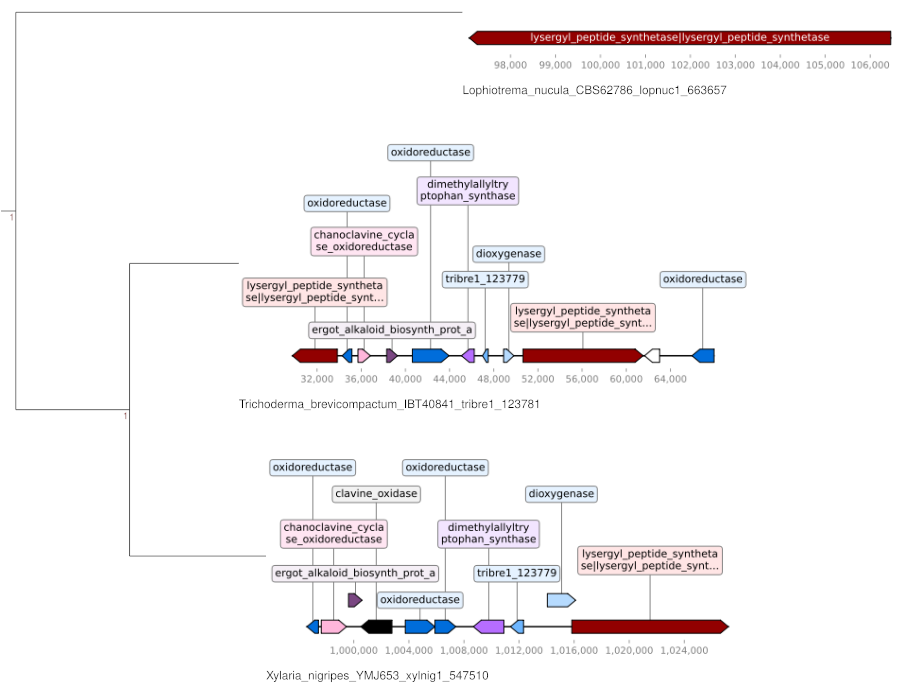
CRAP — adapted and expanded from the
Slot & Rokas implementation —
reconstructs and visualizes gene cluster phylogenies to study gene cluster
evolution on a gene-by-gene basis. mycotools phylo crap will:
- Take a cluster query and use a search algorithm (BLAST/mmseqs/Diamond) or an orthogroup-based approach to find homologs in the MycotoolsDB.
- Apply sequence-similarity clustering to truncate the sequence set and detect outgroups.
- Construct phylogenies of each query sequence.
- Map locus synteny diagrams onto the tips of the phylogenies.
mycotools phylo crap operates on a query of MycotoolsDB accessions or a
standalone multifasta of external accessions. Following homolog acquisition, it
submits each set of hits for tree building, or for sequence-similarity clustering
if the number of sequences exceeds the specified maximum (-m).
Sequence-similarity clustering can occasionally remove close homologs when too many sequences are analyzed relative to the maximum.
By default, mycotools phylo crap constructs trees with FastTree. Alternatively,
specify -i/--iqtree to construct a robust IQ-TREE with 1000-bootstrap-
iteration support values.
To search an extracted sub-MycotoolsDB with blastp and build phylogenies with
FastTree:
mtdb extract --lineage Basidiomycota > basi.mtdb
mycotools phylo crap -q <QUERY_GENES> -d basi.mtdb -s blastp --bitscore 40 --cpu 12
Mycotools is designed to enable pipelining in both Linux shells and Python.
For commands such as mtdb accession fa/gbk/gff/locus, the input is an accession
or set of accessions and can be piped in via standard input. Every command that
accepts stdin requires - as the input argument. This lets you chain commands
and quickly generate the input for downstream analysis.
Suppose you want to see whether an accession of interest belongs to a gene cluster. Run CRAP on the accessions within +/- 20 kb of your gene of interest:
mtdb accession locus -a athter2_3 -n -p 20000 | mycotools phylo crap -q - <ARGS>Create a file of query genes from the CRAP output, extract locus accessions for each gene, and output a GenBank for each locus:
for acc in $(cat <INPUT_FILE>); do
    mtdb accession locus -a "$acc" -p 20000 -n | mtdb accession gbk -a - > "$acc.locus.gbk"
doneDespite the benefits of increased sampling, large samples create two problems for phylogenetic analysis: large alignments lose resolution because they must consider many sequences, and analysis time increases with sample size.
For a small set of genes such as ITS, one can usually assume the gene family is conserved, so the dataset can be cut down to closely related organisms. For most other genes this assumption is invalid, because horizontal transfer can lead to unexpected distributions.
It is therefore sometimes necessary to balance alignment resolution against computational tractability by systematically truncating the dataset into subsets of gene homologs. Mycotools accomplishes this by iteratively constructing phylogenies, identifying and extracting clades of homologs, and repeating until a manageable tree is obtained. On its own this requires elaborate integration of multiple independent tools, but Mycotools handles most of it.
For example, to acquire a set of homologs for a gene family by searching a representative query protein sequence:
-
Extract a database of published sequences (or use other arguments to extract organisms of interest):
mtdb extract > pub.mtdb -
Obtain gene homologs with an e-value threshold of 10-2:
mycotools homology db -d pub.mtdb -e 2 -q <QUERY>
-
If there are more than 1000 homologs, truncate them around a focal gene to between 50 and 500 genes:
mycotools cluster fasta -f <FASTA>.fa --min_seq 50 --max_seq 500 -i <FOCAL_GENE>
-
If there are fewer than 1000 homologs, construct a FastTree (
-f, for many samples) or omit that parameter for a robust IQ-TREE:mycotools phylo tree -i <FASTA>.fa
-
If the phylogeny can be improved, extract a highly supported node from step 4 and reconstruct, or systematically truncate the dataset with step 3 and reconstruct.
Identify single-copy (or near single-copy) gene families from a MycotoolsDB (omit
-d to use the full database):
mycotools cluster db -d <MTDB>Build a multi-gene partition phylogenomic tree from the inferred single-copy orthologs:
mycotools phylo tree -p -i cluster_db_<YYYYmmdd>/single_copy_genes/ -c <CPUS>Sometimes single-copy gene families do not exist because of copy-number variation
or absence in some genomes — particularly relevant for broad taxonomic samples.
Identify near single-copy gene families by specifying criteria for the maximum
median genes per homology group, the standard deviation, and the minimum percent
of genomes in which the homology group must be present. See mycotools cluster db -h for the full parameter list.
mycotools cluster db -d <MTDB> <NEAR_SINGLE_COPY_PARAMETERS> --hmmUse the HMMs of the near single-copy genes to identify the best hits in your genomes:
mycotools homology db -a hmmsearch -q cluster_db_<YYYYmmdd>/hmm/*hmm -d <MTDB> -m 1Build a phylogenomic tree from the best-hits output:
mycotools phylo tree -i homology_db_<YYYYmmdd>/fastas -p -c <CPUS>Download the HMM of 14 near single-copy protein models found in Fungi and search for the best hit of each in your dataset:
wget https://raw.githubusercontent.com/xonq/mycotools/master/test/scos.hmm
mycotools homology db -d <MTDB> -a hmmsearch -q scos.hmm -m 1
mycotools phylo tree -i homology_db_<YYYYmmdd>/fastas -p -c <CPUS>